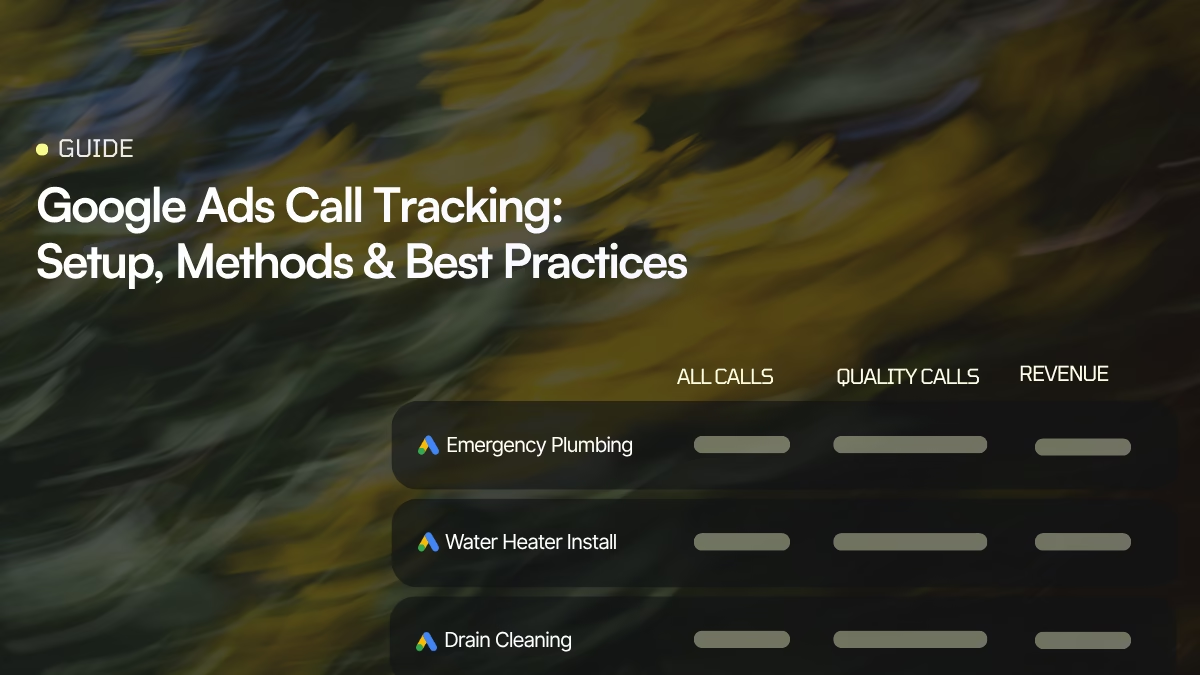
If your Google Ads campaigns generate phone calls, measuring clicks and form submissions alone leaves a major part of your conversion data out of the picture.
Google Ads call tracking connects your ads to the phone calls they generate, so you can see which campaigns, ads, keywords, and other interactions are responsible for phone leads.
But there’s an important distinction between counting calls and measuring which calls actually matter.
Google Ads provides native tools for tracking calls, while a dedicated call tracking platform such as Nimbata can capture more detailed call data, identify qualified leads, and send conversion and value data back to Google Ads.
This guide explains how Google Ads call tracking works in 2026, the different ways you can track calls, and how to set up a Google Ads + Nimbata workflow.
What you’ll learn
- What Google Ads call tracking is
- How Google forwarding numbers work
- The different types of phone call conversions in Google Ads
- How to set up call tracking directly in Google Ads
- How to track calls from your website
- How to track click-to-call interactions
- How to import call conversions from Nimbata
- How to send qualified calls and conversion values back to Google Ads
- When native Google Ads tracking is enough and when you need a call tracking platform
What is Google Ads Call Tracking?
Google Ads call tracking is the process of measuring phone calls generated by your Google Ads campaigns.
Google Ads can track calls associated with your ads or website and use that information to report on phone call conversions. Depending on the setup, Google can also record information such as call duration, start time, whether the call was connected, and caller information where available.
The basic journey looks like this:
Google ad → click → phone number/call → business → conversion
The goal is to connect that phone call back to the advertising interaction that generated it.
For example, imagine you run Google Ads for a plumbing company. A potential customer searches for “emergency plumber near me,” clicks your ad, and calls your business.
Without call tracking, Google Ads may only show you that someone clicked your ad. With call tracking, you can connect the phone interaction to your advertising data and determine that the campaign generated a call.
With a more advanced setup, you can go one step further:
Google Ads → phone call → qualified lead → booked job → revenue
How does Google Ads call tracking work?
Google Ads uses different mechanisms depending on where the call happens.
For calls generated directly from ads, Google can use a Google forwarding number to route the call to your business while recording call-related information.
For calls made after someone visits your website, Google can dynamically replace your business number with a forwarding number using website call conversion tracking.
The general process is:
- Someone interacts with your Google ad.
- Google identifies the interaction.
- The user calls your business.
- Google records the call information.
- Google matches the call to the relevant advertising interaction where possible.
- The call can be counted as a conversion based on the rules you configure.
- The conversion can then be used for reporting and, when configured appropriately, Smart Bidding.
Google forwarding numbers act as intermediaries between the customer and your actual business number. Google assigns them for call reporting, and they can change or be reassigned, so they should not be treated as permanent business numbers.
The 4 ways to track phone calls with Google Ads
Google Ads currently gives advertisers several ways to measure phone conversions:
| Method | What it tracks | Best for |
|---|---|---|
| Calls from ads | Calls initiated directly from ads/call assets | Measuring direct ad-driven calls |
| Calls from your website | Calls made to a number displayed on your website after an ad interaction | Businesses where users visit the website before calling |
| Click-to-call conversions | Clicks on phone numbers or call buttons | Measuring phone-link interactions |
| Imported call conversions | Calls tracked outside Google Ads and sent back as conversions | Businesses that need CRM/revenue-based attribution |
The last option is particularly important for businesses that need to distinguish between a call and a valuable lead. Google explicitly supports importing conversion data from other systems so that offline outcomes can be connected back to advertising activity.
Let’s look at each option.
1. Calls from Google Ads
Google Ads can track calls that start directly from your ads through call assets and other eligible ad experiences.

When call reporting is enabled, Google can use a Google forwarding number instead of your business number. When someone clicks the number and calls, Google routes the call to your business while collecting call reporting data.
What can you measure?
Depending on eligibility and reporting availability, Google Ads can provide information such as:
- Call duration
- Call start time
- Whether the call was connected
- Caller information where available
- Campaign and ad-related attribution
- Phone call conversions
You can also define a minimum call duration so that short calls aren’t automatically treated as conversions.
The important thing to understand is that a phone call isn’t necessarily a conversion.
A 30-second call could be:
- A genuine sales inquiry
- A wrong number
- A spam call
- Someone asking for an unrelated service
- An existing customer calling for support
Google’s native call tracking can help you measure call activity, but it doesn’t automatically know which conversations produced revenue for your business.
That’s why call duration alone can be a weak signal.
Limitations of the Google Ads Call Method
Native Google Ads call tracking is useful for measuring calls generated directly from your ads, but it has some limitations:
- It primarily focuses on the Google Ads interaction, rather than the complete customer journey.
- Call duration doesn’t tell you whether a caller was actually a qualified lead.
- It doesn’t give you the same level of call-level intelligence as a dedicated call tracking platform.
- Calls from other marketing channels aren’t attributed through this setup.
- The data available depends on Google’s call reporting and forwarding-number eligibility.
Verdict:
For businesses that receive a high volume of calls, this can make it difficult to understand which calls actually created business value.
2. Calls to a phone number on your website
This setup is designed for users who:
click your Google ad → visit your website → call the phone number on your website
Google dynamically replaces your website phone number with a Google forwarding number for eligible visitors. The call can then be attributed back to the Google Ads interaction.
This is useful because someone may not call directly from the ad.
For example:
Search → Google Ad → Service Page → “Call Now” → Phone Call
Without website call tracking, you could see the ad click but miss the connection between that click and the eventual phone call.
How to set it up
Google’s current workflow is essentially:
- Go to Goals in Google Ads.
- Create a conversion action.
- Select the option for calls from a website.
- Enter the phone number you want to track.
- Configure your conversion settings.
- Install the Google tag.
- Add Google’s phone snippet to the relevant website pages.
- Test that the number is replaced correctly.
Google supports installing the tracking through your website code or Google Tag Manager. The equivalent step in Nimbata is installing the DNI script, which also works through GTM.
Important: The number used in the setup needs to match the number displayed on your website, and the implementation needs to be present on the pages where the number appears.
Limitations
Website call tracking is useful when Google Ads visitors call after reaching your website, but there are a few limitations.
- Requires deep technical knowledge to set up.
- The tracking only applies to visitors who meet Google’s attribution and tracking requirements.
- It can become more difficult to manage when a business has multiple phone numbers, locations, or complex call flows.
- This method uses NON-UNIQUE Google Forwarding Numbers. This means that Google may have shown the number to an ad for another business.
- A lot of users are complaining of receiving calls asking for businesses not related to them but Google charges for each of these calls.
- You also must have met the threshold of clicks in a 4-week period for Google to show and report your call conversions (for Desktop).
- Calls are tracked in total with no visibility on individual lead insights.
- It primarily tells you that a Google Ads interaction resulted in a call, it doesn’t automatically tell you whether that call became a qualified lead or customer.
- Calls that happen outside the configured attribution path may not be connected to the original Google Ads interaction.
- Only available in the following countries.
Verdict:
For businesses that rely heavily on phone leads, this can leave a gap between attributed calls and actual lead quality.
3. Click-to-call conversions
There’s another important distinction:
A click on a phone number isn’t the same thing as an actual phone call.
If your website contains a phone link such as:
tel:+123456789
you can track the click as a conversion using Google Ads conversion tracking. If you are still setting those links up, here is how to add a click-to-call button with HTML.
This tells you:
“Someone clicked the phone number.”
It does not necessarily tell you:
“The call connected, lasted 3 minutes, and became a qualified lead.”
That’s why click-to-call tracking can be useful alongside actual call tracking, but shouldn’t automatically be treated as a substitute for measuring calls.
Limitations
The biggest limitation is straightforward: a click isn’t a conversation.
A user can click a phone number and:
- Cancel the call before connecting
- Accidentally tap the number
- Decide not to call
- Call from a different device
- Reach the business but never become a lead
As a result, click-to-call conversions can overstate the number of actual phone leads.
They also provide little information about what happened during the call or whether the interaction generated revenue.
Verdict:
If phone calls are an important conversion channel, actual call tracking is generally a stronger signal than measuring phone-link clicks alone.
4. Imported call conversions
For businesses where phone calls are an important source of revenue, this is often the most powerful setup.
Instead of telling Google:
“Every call longer than 60 seconds is a conversion.”
you can tell Google:
“This specific call became a qualified lead.”
Or:
“This caller booked an appointment.”
Or:
“This call generated €2,500 in revenue.”
Google Ads supports importing conversion data from external systems, allowing offline outcomes to be connected back to advertising interactions.
This is where a call tracking platform such as Nimbata becomes useful.
Limitations
Imported call conversions are more powerful, but they also require a more sophisticated setup.
- You need a reliable way to capture and pass the original Google Ads attribution data.
- Your external system needs to send conversion data back to Google Ads correctly.
- Conversion uploads aren’t necessarily instantaneous, so there can be a delay before data appears in Google Ads.
- Poorly defined qualification rules can still produce inaccurate conversion signals.
- More advanced setups require additional configuration between Google Ads, your call tracking platform, CRM, or other systems.
Verdict:
The benefit is greater control, but that control comes with more setup and maintenance than native call conversion tracking.
How do I set up call tracking in Google Ads natively?
If you want to track phone calls without using a third-party call tracking platform, Google Ads has built-in call conversion tracking.
The setup depends on where the call happens, but you start in the same place.
Step 1: Create a phone call conversion action
In Google Ads:
Goals → Summary → + Create conversion action → Conversions from phone calls
Then click Save and continue.
Google will ask you what type of phone conversion you want to track. Choose the option that matches your setup:
- Calls from ads: someone calls directly from your Google ad.
- Calls from your website: someone clicks your ad, visits your website, and calls the number shown there.
- Phone number clicks: you want to count clicks on a phone number as conversions.
- Calls from another system: you track calls elsewhere and import the conversions into Google Ads.
Once you’ve selected your method, Google will give you the relevant instructions.
Step 2: Configure your conversion
Give the conversion a clear name, such as:
Phone Call
or, even better:
Qualified Phone Call
Then configure the settings Google asks for, including:
- Conversion value
- Count (whether to count every conversion or one conversion per interaction)
- Conversion window
- Minimum call length, where applicable
- Primary or secondary action
The minimum call length is particularly important. If you set it to 60 seconds, for example, a 30-second call won’t be counted as a conversion.
But remember: a longer call isn’t automatically a better lead.
Step 3: Follow the setup for your chosen method
For calls from ads
Enable Call Reporting in your Google Ads account and add a Call asset to your campaign.
Google uses a forwarding number to measure calls generated through eligible call assets.
Important for 2026
Google has moved away from creating new standalone call ads. Google says new call ads are no longer available to create and recommends using Call assets with Responsive Search Ads instead. Existing call ads are scheduled to stop receiving impressions in February 2027.
For calls from your website
You’ll need to install the Google tag and Google’s phone snippet on your website.
The phone snippet dynamically replaces your website number with a Google forwarding number for eligible visitors who arrived through your ads.
For phone-number clicks
Set up the relevant website conversion tracking so Google records when someone clicks a phone number or call link.
Keep in mind that this tracks the click, not necessarily a completed phone call.
For calls tracked elsewhere
Use Google’s imported/offline call conversion workflow to send conversion information from your external system into Google Ads.
Step 4: Make sure Google is actually receiving conversions
After you’ve implemented the tracking, make a test call or click and check your conversion action.
Don’t panic if a new conversion action doesn’t immediately show activity. Conversion data can take time to appear, particularly when you’re importing conversions from another system.
How do I set up call tracking in Google Ads with a third-party tool?
A third-party call tracking tool works a little differently from Google’s native call tracking.
Instead of asking Google Ads to decide whether a call is a conversion based mainly on things like call duration, you can let your call tracking platform capture, analyze, qualify, and send the right conversion back to Google Ads.
With Nimbata, the basic flow is:
Google Ads → Call → Nimbata → Analyze & qualify → Google Ads conversion
This gives you much more control over what Google Ads learns from your phone leads.
Step 1: Connect your Google Ads account to Nimbata
In Nimbata, go to the Google Ads integration and connect your Google Ads account.
You can create and manage your Google Ads call conversions directly from the Nimbata interface, so you don’t have to jump back and forth between platforms just to create a conversion action.
Step 2: Track the call in Nimbata
Nimbata can track calls coming from your Google Ads campaigns using either:
- A Nimbata tracking number for calls directly from Google Ads call assets
- Dynamic Number Insertion (DNI) for calls made from your website after a Google Ads click
Nimbata captures the advertising information associated with the caller, allowing you to connect the phone conversation back to the marketing source.
Step 3: Decide which calls should become conversions
This is where Nimbata gives you more control than basic call tracking.
You can use automation rules or AI Questions to decide whether a call should trigger a Google Ads conversion.
Option 1: Use automation rules
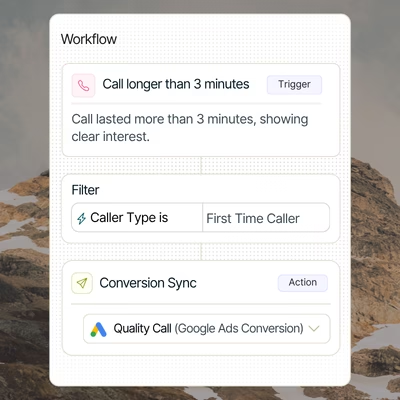
You can create rules based on call data, such as:
- Call duration
- Call tags
- Call status
- Caller information
- Campaign or source
- Other call properties
For example:
If call duration > 60 seconds → fire “Qualified Call” conversion
Or:
If call has the “Booked Appointment” tag → fire “Appointment” conversion
This works well when you already know exactly what conditions define a valuable call.
Option 2: Use AI Questions
If call quality depends on what was actually said during the conversation, you can use Nimbata’s AI Questions.
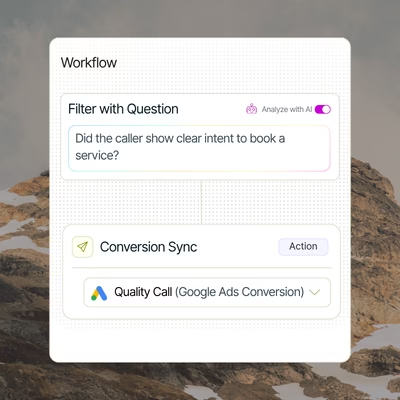
For example, you can ask:
“Was this call a good lead?”
Nimbata analyzes the conversation and if the answer of question is “Yes”, fires the “Quality Call” conversion in Google Ads
You can create questions around things such as:
- Was this a qualified lead?
- Did the caller request one of our services?
- Did they book an appointment?
- Was this an existing customer?
- Did the caller mention a specific budget?
- What was the estimated value of the opportunity?
This means you can use simple rules when the answer is already in your call data, and AI when you need to understand the conversation itself.
The two approaches can also work together. For example:
Call duration > 60 seconds → ask AI “Was this a qualified lead?” → Yes → fire Google Ads conversion
Step 4: Use conversation intelligence to determine the value of the call
You can go beyond deciding whether a call was good or bad.
Nimbata can use AI to extract or calculate the actual dollar value mentioned in the conversation.
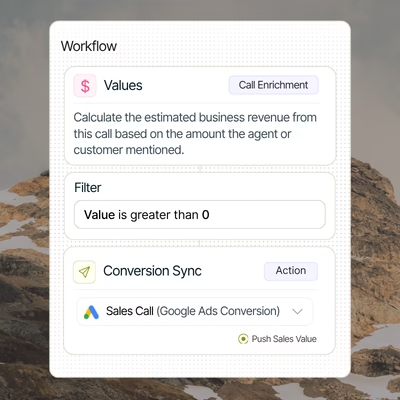
For example, a caller might say:
“I’m looking for a $2,500 roof replacement.”
Nimbata can use AI to capture that value and pass it into your conversion workflow.
You can also use a promptable field to calculate a value based on the information in the conversation.
For example:
Complete the Al Value field by estimating the revenue based on the lead’s budget mentioned during the call. Apply the following rules:
- For budgets under $15,000, calculate 20% of the budget.
- For budgets over $15,000, calculate 18%.
This allows you to move from:
100 calls → 100 conversions
to something much more useful:
100 calls → 37 qualified leads → $18,500 in potential value
That gives you a much clearer way to understand ROI from Google Ads phone leads.
Step 5: Send the conversion to Google Ads
Once Nimbata has determined that a call meets your criteria, it can send the conversion directly to Google Ads.
You can create different conversions for different outcomes, for example:
| Call outcome | Conversion |
|---|---|
| Good lead | Qualified Lead |
| Appointment booked | Appointment |
| Sale | Sale |
| High-value opportunity | High-Value Lead |
You can then decide which conversion actions should be used for optimization in Google Ads.
The important part is that Nimbata does the filtering before the conversion reaches Google Ads.
Step 6: Recover attribution that other tracking can miss
Another advantage of using a server-side approach is that Nimbata can use server-side tracking to recover attribution that may otherwise be lost because of ad blockers, browser restrictions, or other client-side tracking limitations.
Instead of relying entirely on tracking that happens in the visitor’s browser, server-side tracking gives you another way to capture and pass the relevant attribution data.
This can help you preserve more of the connection between:
Ad → Caller → Lead → Conversion
Step 7: Use Enhanced Conversions
Nimbata also supports Enhanced Conversions for Google Ads.
This provides another layer for matching conversion data back to Google Ads and can be particularly useful when you’re trying to improve the quality and completeness of your conversion attribution.
The result
With native Google Ads tracking, your workflow can look like:
Call → Google decides whether it counts → Conversion
With Nimbata, you can make the workflow:
Call → Nimbata tracks it → AI analyzes it → Nimbata decides whether it’s valuable → Conversion + value → Google Ads
That’s a much more useful setup when phone calls are a major source of revenue.
Instead of optimizing Google Ads for more calls, you can give it signals based on better calls, qualified leads, appointments, sales, or actual call value.
Google Ads call tracking vs. Nimbata
Native Google Ads call tracking is useful if your primary objective is simply to understand whether your ads generate phone calls.
But marketers often need more than a call count.
They want to know:
- Which campaign generated the call?
- Which keyword generated it?
- Was the call answered?
- Was it a qualified lead?
- What did the caller want?
- Was an appointment booked?
- Did the lead become a customer?
- How much revenue did the call generate?
This is where the two approaches differ.
Google Ads
Google Ads is primarily focused on advertising measurement and optimization.
It can tell you which advertising interactions generated phone call conversions and use those conversion signals for campaign optimization.
Nimbata
Nimbata adds the call-level data and qualification layer.
Nimbata can attribute calls to their marketing source, analyze conversations, classify leads, and use workflow conditions to determine which calls should be sent back to Google Ads as conversions.
For example, you could create separate conversion actions for:
- Answered calls
- Qualified leads
- Booked appointments
- Sales
- High-value calls
You can then use different Nimbata triggers to decide when each conversion should be sent to Google Ads. Nimbata supports multiple conversion actions within the same Google Ads integration.
Google Ads call tracking: what should you actually optimize for?
This is the question that matters most.
If you’re running a business where phone calls are valuable, don’t optimize blindly for call volume.
A better hierarchy is:
Clicks
↓
Calls
↓
Answered calls
↓
Qualified calls
↓
Appointments
↓
Sales
↓
Revenue
The further down this funnel you can reliably measure, the better your advertising data becomes.
For example, if Campaign A generates 100 calls and Campaign B generates 50 calls, Campaign A looks better.
But if:
- Campaign A → 100 calls → 10 qualified leads
- Campaign B → 50 calls → 25 qualified leads
then Campaign B is clearly generating better traffic.
And if Campaign B’s leads also produce more revenue, the difference becomes even more significant.
The goal isn’t to teach Google Ads how to generate more calls. It’s to teach it which calls are worth generating.
Google Ads call tracking and Smart Bidding
Conversion data doesn’t just improve reporting. It can also become an input into Google Ads bidding and optimization.
That’s why the quality of the conversion signal matters.
If you send every 20-second call to Google Ads as a conversion, you are effectively telling the system:
“Find me more people who behave like these callers.”
If many of those callers are irrelevant, you’re giving the algorithm a poor signal.
If you instead send qualified calls, booked appointments, or sales, you’re giving Google a much stronger indication of what a valuable lead looks like.
Google specifically warns that correctly configuring conversions as primary or secondary is important because Smart Bidding uses primary conversion goals for optimization.
Should you use Google Ads call tracking or a call tracking platform?
It depends on how important phone calls are to your business.
Use native Google Ads call tracking if:
- You mainly need basic call reporting
- You want to know which ads generate calls
- You don’t need detailed call-level analysis
- You don’t need CRM or revenue attribution
- Call volume is relatively low
Consider a call tracking platform if:
- Phone calls are a major source of leads
- You need campaign → keyword → call attribution
- You need individual call records
- You want to identify qualified calls
- You need call recordings or transcriptions
- You want AI-based call classification
- You need CRM integration
- You want to send qualified calls back to Google Ads
- You want to pass conversion values
- You manage multiple clients or locations
The difference isn’t simply free vs. paid.
It’s basic advertising measurement vs. a complete phone-lead attribution system.
Google Ads call tracking vs. Nimbata: the practical difference
| Google Ads | Google Ads + Nimbata | |
|---|---|---|
| Track calls from ads | ✓ | ✓ |
| Track website calls | ✓ | ✓ |
| Campaign attribution | ✓ | ✓ |
| Call-level data | Limited | ✓ |
| Call recordings | Limited/availability-dependent | ✓ |
| Transcriptions | Limited | ✓ |
| Lead qualification | Basic rules | Advanced rules + AI |
| CRM integration | Limited | ✓ |
| Multiple call outcomes | Limited | ✓ |
| Revenue/value attribution | Limited | ✓ |
| Send qualified calls back to Google Ads | Via imports | ✓ |
| AI call classification | Limited | ✓ |
Nimbata’s role is not to replace Google Ads. It is to feed Google Ads better conversion data while giving marketers a more complete view of what happens during and after the call
FAQ on Google Ads call tracking
Yes. Google Ads can track calls associated with ads and website interactions when the appropriate call reporting and conversion tracking are configured. It does not automatically track every phone call your business receives from every source.
Google uses Google forwarding numbers for eligible call reporting and website call conversion setups. These numbers route calls to your actual business number while allowing Google to collect call-related information.
Start by creating a phone call conversion action under Goals → Summary. Depending on your setup, choose calls from ads, calls from your website, click-to-call tracking, or imported call conversions. Then implement the required Google tag, phone snippet, or external integration.
Yes. Google Ads can dynamically replace your website phone number with a Google forwarding number for eligible visitors who arrived through your advertising. This allows Google to connect calls to the relevant ad interaction.
No. Native Google Ads call tracking only measures calls that fit the tracking setup you’ve configured. Calls from other channels, direct searches, organic traffic, existing customers, or other sources may not be attributed to Google Ads.
Google’s native tools can use criteria such as call duration, and Google also supports call conversion workflows based on recordings in certain setups. But if you need your own qualification logic, CRM outcomes, AI classification, or revenue-based attribution, a dedicated call tracking platform can provide a more complete solution.
Yes. You can use imported/offline call conversions to send conversion data from an external system back to Google Ads. Nimbata can send call conversions directly to Google Ads based on workflow conditions.
Yes. You can create separate conversion actions for different outcomes, such as qualified leads, appointments, and sales, and use different triggers to send each one. Nimbata supports multiple Google Ads conversions within the same integration.
Yes, where your setup has reliable conversion-value data. Nimbata supports value fields that can be sent with Google Ads call conversions, allowing advertisers to move beyond counting calls and toward value-based optimization.
Google’s native call reporting and Google forwarding numbers are provided as part of Google Ads rather than as a separate call tracking subscription. You still pay for your Google Ads advertising activity. A third-party platform such as Nimbata has its own subscription and usage costs.
GA4 can track interactions such as clicks on phone links, but it doesn’t automatically know that an actual phone conversation took place. A call tracking platform can send call events and outcomes into GA4 so phone activity can be analyzed alongside other website interactions.
The bottom line
Google Ads call tracking is the starting point for measuring phone leads from PPC.
It can tell you which advertising activity generated calls. But for businesses that depend on phone leads, the more important question is which of those calls generated business.
A strong 2026 setup therefore looks like:
Google Ads → Nimbata → Call attribution → Call qualification → CRM/revenue → Google Ads
Google provides the advertising data and bidding infrastructure.
Nimbata adds the call-level intelligence that helps you distinguish a call from a conversion, and a conversion from a valuable customer.
The result is better reporting, cleaner conversion signals, and a clearer connection between your Google Ads spend and actual business outcomes.
Track Google Ads call conversions with Nimbata