Over the past few months, I’ve spent a lot of time in Nimbata’s help center writing documentation, demoing features, and helping agencies and marketers solve smaller and bigger problems with their accounts. I can say for sure that call tracking customers are some of the most knowledgeable and inquisitive ones out there.
In my time as their call tracking agent, what surprised me most wasn’t the complexity of the setups they had in mind, but rather how often small misunderstandings escalated into big, urgent issues with workflows, call flows, and reporting. So I decided to put together a set of call tracking best practices and tips to address the most common call tracking customer support inquiries.
Here are the 6 unique insights I gained on Nimbata’s call tracking customers over the past 6 months:
6 Call tracking best practices I noticed as a call tracking agent
1. The DNI script is a solid foundation, not a magic fix-all
One of the most common call tracking customer support questions I received was some variation of:
- “Do I really need more than [x number of] tracking numbers?”
- “Why does every visitor on my website see the same number?”
- “Why is Google Ads telling me I don’t have enough numbers?”
At its core, DNI solves one thing: showing the right number to the right visitor at the right time. What it does not automatically solve:
- click ID capture
- Google Ads attribution
- lead qualification
- conversion validation
A single tracking number can work just fine for Google Ads, as the GCLID doesn’t care how many numbers you own. What changes with pool size is session isolation. If two people are on the site at the same time and you only have one number, they’ll share it.
Rather than being an indication of broken tracking, this is simply an issue of limited separation.
The teams that struggled most were the ones treating DNI as a central part of call attribution. The teams that succeeded treated it as the base of call attribution. Once we worked together to clarify the place of DNI in call tracking and what else the agencies needed to pay attention to, the rest of their setup would usually fall into place quickly thereafter.
2. Most attribution issues appear before the call takes place
To my surprise, I came across a significant number of call tracking customer support issues that had nothing to do with calls. They were caused by:
- tracking templates that rewrote URLs
- redirect chains that stripped parameters
- final URL mismatches in Google Ads
- landing page scripts that cleaned query strings
- assumptions that all should work well since auto-tagging is on
In every such scenario, by the time the call(s) too place the damage had already been done. You see, Nimbata can only capture a GCLID if it reaches the landing page. If the click ID disappears before the page loads, no call tracking platform can recover it later.
This is the part that created issues and bottlenecks for most agencies. Their focus was on debugging workflows, tracking numbers, and integrations. The underlying issue I helped redirect their attention to was to validate one simple thing: Does the landing page URL still contain the click ID after all the redirects?
By working together with the agency teams to test out the full click journey instead of individual components, they were able to diagnose and resolve their attribution issues quicker and without messing with what didn’t need fixing in the first place.
3. Workflows fail when they’re designed around specific events instead of process outcomes
Another pattern I saw repeatedly:
“Why did this webhook fire 90 minutes later?”
“Why didn’t this conversion send immediately?”
“Why did Zapier not run?”
The answer was almost always the same; workflows don’t trigger at the end of the call but, rather, when the system understands the call. If call transcription and AI analysis are part of the workflow, the automation can only run after that processing finishes. Things like longer calls, noisy audio, or high queue load all add time.
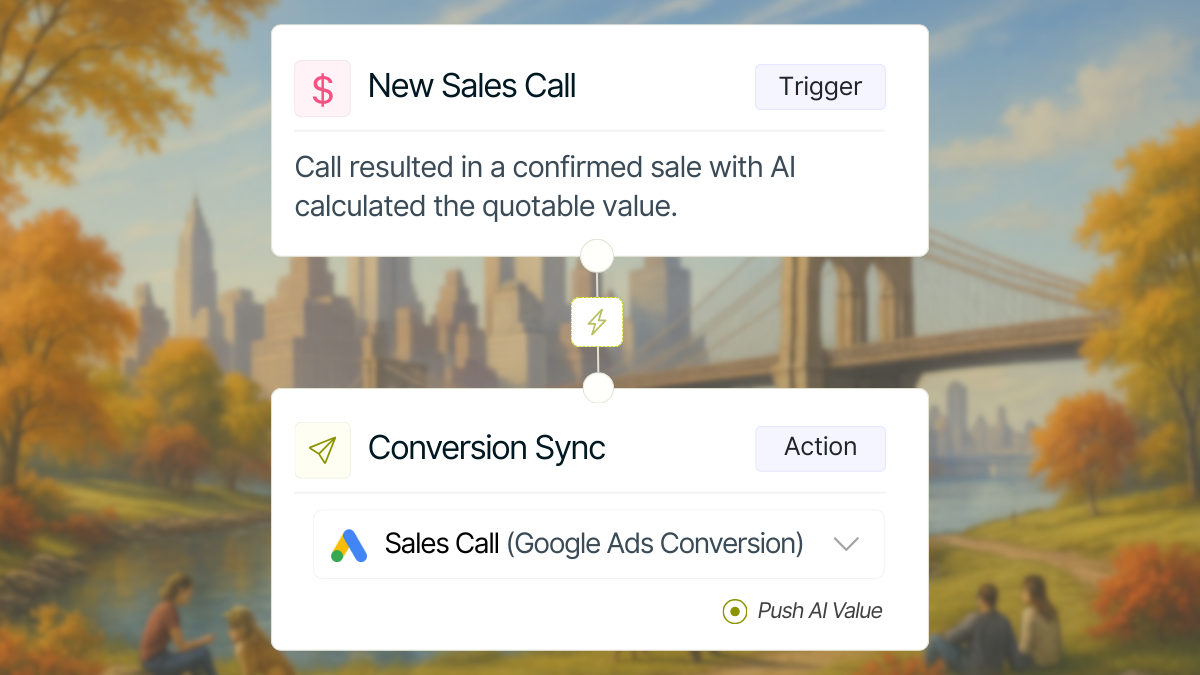
The most successful setups accepted this as a natural part of the call analysis process and embraced it. By leaving the mindset of sending conversions automatically based on call duration behind, the teams I worked with started triggering workflows based on:
- Tags like ‘Appointment Booked‘
- Manual verification
- AI-detected call outcomes
In other words, they automated process outcomes, not events.
4. AI was most useful when it reduced decision fatigue
Many agencies initially asked whether AI could tell them if a call was a sale, if a caller was qualified, and/or if a call should count as a conversion. These are valid and important questions every call tracking customer should ask. However, I was able to offer agencies the most value out of our call tracking solution when I helped them focus on something subtler:
The role of the Nimbata AI Call Analysis software is to help you scale good decisions even further – it is not a tool that can make those decisions for you.
Rather than listening to every single call teams skimmed summaries, filtered by AI ratings, and focused only on high-value conversations. And, instead of arguing about fake calls or anonymous callers, the Nimbata AI made spam patterns obvious, it helped qualified leads surface faster, and it resulted in calmer and more consistent reporting.
AI is not here to make decisions for teams. It exists to make great decisions scalable.
5. Most confusion can be traced back to mixing data sources
Another recurring theme was attribution overlap with Google Ads call extensions, Google Business Profile tap-to-call, and website DNI calls. Many teams wanted campaign, keyword, and GCLID data for all of them. To help adjust their scope and expectations, I communicated the following simple and constrained reality:
If a call doesn’t involve a website visit, there is no click ID to capture.
That applies to Google Business Profile calls and call extensions. No tool can infer what doesn’t exist. Successful teams accepted this early on and designed their setup accordingly by including:
- dedicated numbers for GBP
- DNI for website traffic
- native Google tracking where Google controls the call
Clarity beats completeness every time.
6. The best accounts optimized in phases
After seeing hundreds of cases, an interesting pattern emerged; top-performing accounts don’t try to do everything at once, but move in phases instead. Such successful teams all have these 4 things in common:
- They pay close attention to their setup to consistently track all calls accurately
- They take the time to understand the contents of the calls they receive
- They have completed their call flow and workflows setups so each call triggers the right actions
- They monitor their call outcomes closely and use them to influence their strategy
Whenever a team tried to skip a phase, that omission created larger issues along the way for them. Those who took the time to set up each phase correctly before moving to the next one saw that the system held up pretty well and worked as expected.
Following standard procedures and embracing predictability leads to the best results.
A final thought on the inquiries of our call tracking customers
The biggest lesson I learned in these 6 months was that the best type of optimization starts with understanding how your existing tools behave under real-world conditions.
In helping our agency customers adjust their setups, procedures, and expectations, the biggest improvements didn’t come from adding more tools or complexity. They came from understanding where things actually break, what each part of the system is responsible for, and what it realistically can and can’t do.
Once that understanding was in place, the changes were usually quick and effective. That’s the point where plain call tracking stopped and proper call intelligence began.
FAQ on call tracking best practices
Why do call tracking customers still struggle with attribution even after setup?
Most call tracking customers run into attribution issues because problems happen before the call occurs. Common causes include tracking templates stripping click IDs, redirects breaking URLs, or landing pages removing parameters. Call tracking tools can only attribute calls when identifiers like the GCLID reach the website successfully.
Do call tracking customers need multiple tracking numbers for Google Ads?
Not always. Call tracking customers can track Google Ads calls with a single number, but attribution accuracy drops when multiple visitors are on the site at the same time. Additional numbers improve session isolation, not basic functionality. This is why some customers are told they need more numbers, even though it’s not a hard requirement.
Why do some calls have no GCLID even though they came from ads?
For call tracking customers, missing GCLIDs usually mean the click ID was removed before the page loaded. This can happen due to tracking templates, redirect chains, or landing page scripts. If the GCLID never reaches the page, no call tracking platform can attach it later.
Why do workflows sometimes trigger long after a call ends?
Call tracking customers often expect workflows to fire as soon as a call ends. In reality, workflows that depend on transcription or AI analysis only trigger after the call has been processed. Longer calls or heavier processing queues can delay workflows, which is expected behavior rather than an error.
Can call tracking customers decide which calls count as conversions?
Yes they can. Instead of sending conversions based on call duration or call events, call tracking customers can trigger conversions only when a call is marked as qualified, booked, or converted. This can be done manually or via AI tags, ensuring only verified leads are sent to ad platforms.
Why do some tracked calls look fake or irrelevant?
Call tracking customers often see unexpected calls because tracking numbers are real phone numbers that anyone can dial. Some calls come from recycled numbers, spam dialers, or anonymous callers. These calls are not website-generated leads, and filtering or tagging them is part of maintaining clean reporting.
What’s the difference between call tracking and call intelligence for customers?
Call tracking customers start by answering “where did the call come from?” Call intelligence goes further by answering “what happened on the call and what should we do next?” This includes transcription, AI summaries, tagging, and workflows that turn conversations into actionable data.
Why can’t call tracking customers get full attribution for Google Business Profile calls?
Calls made directly from Google Business Profile do not involve a website visit, so no click IDs or campaign data exist. Call tracking customers can separate these calls using dedicated numbers, but campaign- or keyword-level attribution is not possible for tap-to-call actions.