AI call tracking is used to analyze phone conversations and turn them into actionable marketing data. It can automatically identify qualified leads, call outcomes, customer intent, and other important conversation details, then send that data to your CRM or advertising platforms. This helps marketers optimize campaigns based on the quality and value of calls, not just the number of calls generated.
In this guide, we also compare 4 AI call tracking platforms, highlighting where each stands out: CallRail for straightforward AI-powered call insights, CallTrackingMetrics for customizable call analysis, Nimbata for marketing-focused AI, automation, and lead-quality insights, and Invoca for enterprise-level attribution and integrations.
Phone calls contain some of the most valuable information in a lead generation funnel: what a prospect wants, how ready they are to buy, what they are concerned about, what service they need, and whether the conversation actually resulted in a business opportunity.
Traditional call tracking tells you that a call happened and where it came from.
AI call tracking goes further. It analyzes the conversation itself and turns what was said into structured marketing data you can use for attribution, lead qualification, revenue measurement, CRM enrichment, reporting, and automation.
Traditional call tracking tells you the who, how, and when.
AI call tracking unlocks the why and tells you what to do about it.
In other words:
Traditional call tracking tells you who called, when they called, and where the call came from. AI Call Tracking tells you why they called, what happened during the conversation, and what you should do next.
This guide explains what AI call tracking is, how it works, the most useful marketing use cases, and how to use AI prompts to turn conversations into actionable data.
Let’s decode your calls.
What is AI Call Tracking?
AI call tracking is technology that combines call attribution, call recording and transcription, and artificial intelligence to analyze the content and outcome of phone conversations.
At its simplest, AI uses machine learning to understand and analyze calls and extract meaning, context, outcomes or anything else you need. That could be identifying whether a lead was qualified, tagging common questions or objections, detecting intent, or even generating a summary of what was discussed.
Traditional call tracking primarily captures call metadata such as:
- Caller information
- Call duration
- Date and time
- Marketing source
- Campaign
- Keyword
- Landing page
- Location
AI call tracking adds a layer of conversation intelligence on top of that data.
It can analyze a call transcript to determine:
- Why the person called
- Whether they are a qualified lead
- What product or service they are interested in
- Their level of purchase intent
- Whether they booked, bought, requested a quote, or took another meaningful action
- Why a potential customer did not convert
- What objections or questions they raised
- The sentiment or tone of the conversation
- The potential revenue value of the call
- What information should be added to the CRM
- What action should happen next
It removes the need for manual tagging or call reviews and helps teams understand the why behind calls at scale.
For marketers, this means:
- You know which campaigns brought in high-quality leads
- You can tie revenue or intent back to specific channels
- You stop measuring performance by call volume and start tracking outcomes
(And yes, we’ll dig deeper into all of that in the next sections.)
A simple example
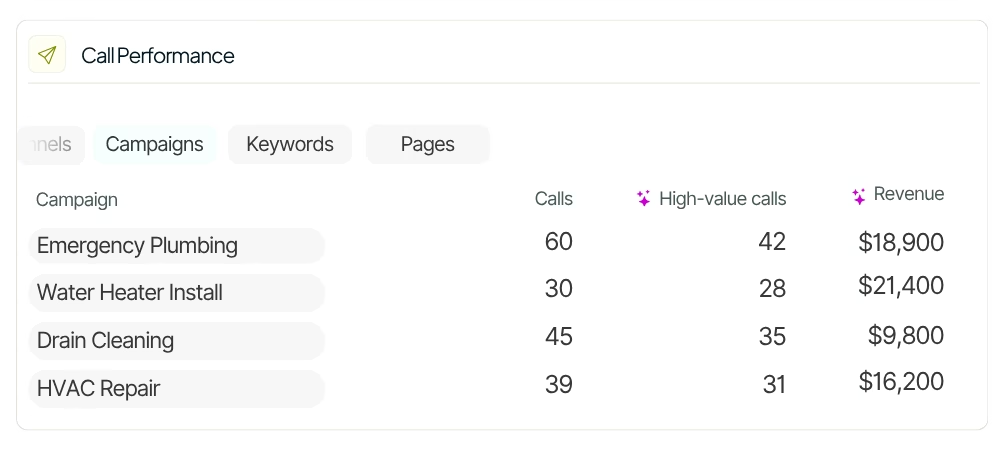
Imagine a marketing campaign generates 100 phone calls. Traditional call tracking might tell you that Campaign A generated 60 calls and Campaign B generated 40. That sounds like Campaign A is the winner.
But AI call tracking could reveal that:
- 15 of Campaign A’s calls were qualified opportunities
- 8 resulted in appointments
- 5 were existing customers
- 20 were price shoppers
- 17 were irrelevant or low-intent calls
Meanwhile:
- 25 of Campaign B’s calls were qualified opportunities
- 15 resulted in appointments
- 10 requested quotes
Campaign B generated fewer calls but significantly more valuable conversations.
That’s the difference between measuring call volume and measuring call outcomes.
This kind of AI call analysis removes the need for manual review or tagging. It gives marketers the ability to measure campaign performance not just by volume, but by outcome and lead quality.
In short, AI call tracking helps businesses understand what’s happening in phone conversations at scale so they can make better marketing decisions, attribute revenue accurately, and optimize campaigns based on real conversation data.
AI Call Tracking vs traditional: what marketers actually get
The easiest way to understand AI call tracking is to compare what each technology can tell you.
Here’s a breakdown of the real marketing value:\
| Can you answer this from your calls? | Traditional Call Tracking | AI Call Tracking |
|---|---|---|
| Which campaign generated the call? | ✅ | ✅ |
| Which keyword generated the call? | ✅ | ✅ |
| Why did the person call? | ❌ | ✅ |
| Was this a qualified lead? | ❌ | ✅ |
| What was the caller interested in? | ❌ | ✅ |
| How likely was the caller to buy? | ❌ | ✅ |
| Did the caller book or buy? | ❌ | ✅ |
| Why didn’t they convert? | ❌ | ✅ |
| What objections did they have? | ❌ | ✅ |
| How much was the opportunity worth? | ❌ | ✅ |
| What was the outcome of the call? | ❌ | ✅ |
| What should happen next? | ❌ | ✅ |
| Can the information be automatically added to your CRM? | ❌ | ✅ |
| Can you optimize campaigns based on qualified leads and revenue, not just call volume? | ❌ | ✅ |
raditional call tracking answers where your calls come from.
AI call tracking helps answer which calls matter and why.
How does AI call tracking work?
AI call tracking generally follows four steps:
1. Track and attribute the call
A call tracking platform connects the phone conversation to its marketing source.
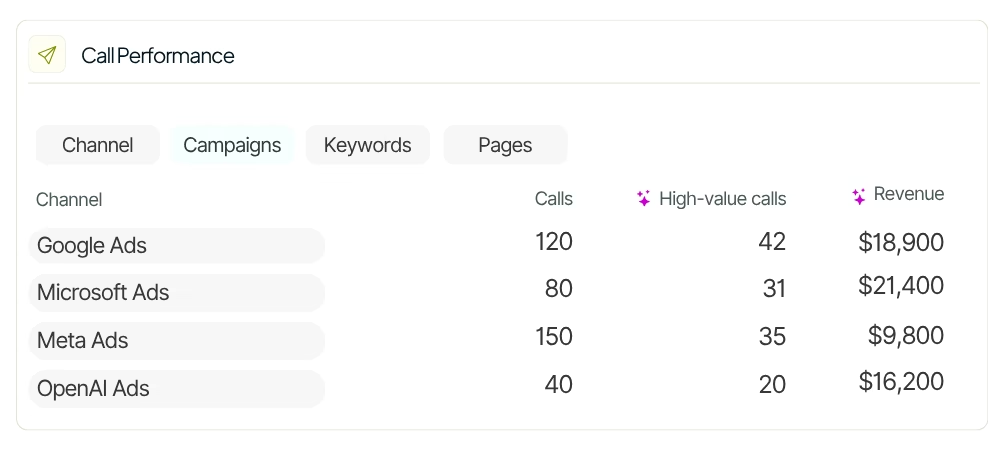
Depending on the setup, this can include:
- Google Ads
- Microsoft Ads
- Organic search
- Social media
- Referral traffic
- Specific campaigns
- Keywords
- Landing pages
This gives you the marketing context surrounding the call.
2. Record and transcribe the conversation
The call is recorded and converted into a text transcript.
The transcript gives AI a searchable representation of the conversation that can be analyzed for intent, outcomes, topics, products, objections, and other business-specific information.
3. Apply AI prompts to the conversation
An AI prompt for calls is a plain-English instruction that tells an AI model what information to extract, classify, score, summarize, or generate from a call transcript.
For example:
Prompt example
Determine whether this call is a qualified sales lead. Return YES only when the caller expresses a genuine interest in purchasing our service.
The same approach can be used to detect call outcomes, score intent, estimate value, extract a service type, summarize the conversation, or generate a follow-up.
You can explore ready-to-use examples in Nimbata’s AI Prompts for Calls library.
4. Turn the result into marketing data or an action
The AI output can become a:
- Tag
- Rating
- Summary
- Note
- Revenue value
- Custom field
- CRM property
- Workflow trigger
- Alert
- Conversion signal
This is where AI call tracking becomes more than call analysis.
The goal is not simply to understand a call. The goal is to turn the conversation into data that improves what happens next.
6 ways marketers can use AI call tracking
1. Qualify and categorize calls automatically
Not every inbound call is a sales opportunity. A business might receive calls from:
- New prospects
- Existing customers
- Vendors
- Job applicants
- Wrong numbers
- Support requests
- Spam
- Price shoppers
- High-intent buyers
AI can classify calls automatically according to rules you define.
For example, a home services company could classify calls as:
- New lead
- Existing customer
- Quote request
- Appointment
- Support
- Spam
- Wrong number
The important part is to give AI clear definitions and exclusion rules.
Instead of asking:
Is this a lead?
A stronger prompt defines what qualifies as a lead and, equally importantly, what does not qualify.
Try this AI prompt
Use case: Call classification
Determine whether this call is a qualified sales lead. Return YES only when the caller expresses a genuine interest in purchasing our service.
For more advanced classification, define the qualifying signals and exclusions explicitly. Nimbata’s prompt library includes examples for lead classification, conversion detection, disposition tagging, and industry-specific categorization.
Explore more prompts: AI prompts for call classification and categorization
Best for
- Lead qualification
- Call disposition
- Spam filtering
- Sales vs. support classification
- Product/service categorization
- Conversion tracking
2. Score lead quality and purchase intent
A call can be relevant without being equally valuable.
A person asking, “How much does this cost?” might be casually researching.
Another caller might say:
“I need this service next week. Can you send someone out Tuesday?”
Both are leads, but their commercial intent is different.
AI call scoring lets you create a consistent scoring framework across every call.
For example:
1 — No commercial value
Wrong number, spam, unrelated inquiry.
2 — Low intent
General information or weak interest.
3 — Relevant interest
The caller has a genuine need but no immediate next step.
4 — Strong intent
The caller is evaluating the service and discussing price, availability, timing, or requirements.
5 — Very high intent
The caller is ready to book, buy, request a quote, or move forward.
The important rule is to score commercial intent, not the agent’s friendliness or the quality of the conversation.
Try this AI prompt
Use case: Call classification
Rate the call by its commercial interest: 1 star for a wrong number or a clearly uninterested caller, up to 5 stars for someone who sounds like a likely client.
For more sophisticated scoring, add explicit criteria for intent, booking potential, service type, location, job size, or the next recommended action.
Explore more prompts: AI prompts for lead quality and intent scoring
Best for
- Lead scoring
- Sales prioritization
- Qualified lead reporting
- Marketing optimization
- CRM routing
- High-value lead alerts
3. Connect calls to revenue
Call volume is not revenue.
If Campaign A generates 500 calls but only $10,000 in opportunities, while Campaign B generates 100 calls and $30,000 in opportunities, optimizing for call volume would lead you in the wrong direction.
AI call tracking can assign a monetary value to a conversation based on your business model.
There are several ways to calculate call value.
Value based on an actual price
If the agent quotes a price during the call, AI can extract it from the transcript.
For example:
“The service will be $180.”
The AI output could be: 180
Value based on service type
You can define values for different services.
For example:
- HVAC installation → $2,000
- Plumbing job → $2,000
- Electrical job → $1,000
- Support request → $0
The AI applies the value according to the service discussed and your qualification rules.
Try this AI prompt
Use case: Call values
Calculate the call value by service type. HVAC: $2,000. Plumbing: $2,000. Electrical: $1,000. Apply the value only if the job is booked.
Commission-based opportunity value
For businesses like real estate, brokerage, or agencies where the caller mentions a total deal size (such as property price, investment amount, or project budget), extract the total opportunity value from the call and categorize it as “Deal Size (Opportunity Value)”. Then calculate the estimated business value by applying a predefined commission rate (e.g., 3%–6%) based on the service type.
Only assign a commission-based value if the lead is qualified and shows intent to proceed (e.g., requests next steps, scheduling, or formal engagement). If the lead is unqualified or exploratory, record the deal size but do not calculate revenue value.
Try this AI prompt
Use case: Call values
Calculate the call value based on this formula Deal Size × Commission Rate (e.g. 10%)
Example: If the caller mentions a property budget of $500,000:
Call Value = $500,000 × 10% = $50,000
Return only the calculated Call Value. If no Deal Size is mentioned, return Unknown.
Explore more prompts: AI prompts for estimating call revenue
Best for
- Revenue attribution
- Cost per qualified lead
- Cost per acquisition
- ROAS
- Marketing budget allocation
- Sending conversion values to ad platforms
4. Understand why calls convert or don’t
One of the most valuable applications of AI call tracking is understanding why a prospect did or did not convert.
A call that didn’t result in a sale isn’t necessarily a bad lead.
Maybe:
- The price was too high
- The requested service wasn’t available
- The prospect needed to speak with someone else
- The appointment time didn’t work
- The customer was comparing competitors
- The agent failed to progress the conversation
- The caller wasn’t ready yet
Without analyzing the conversation, these reasons remain hidden inside recordings.
AI can turn them into structured fields that can be analyzed across hundreds or thousands of calls.
This allows marketers to identify patterns such as:
“Calls from this campaign are high-intent, but 35% are lost because the requested service isn’t available.”
That’s a much more useful insight than:
“This campaign generated 120 calls.”
Try this AI prompt
Use case: Custom Field Enrichment
For non-converted inquiries, instruct AI to identify the primary reason the opportunity was lost, using a fixed list of possible reasons.
For example: Unknown, Price too high, No availability, Service unavailable, Customer comparing options, Customer undecided, Customer will call back, Agent failed to progress, Call disconnected, Other
Explore more prompts: AI prompts for understanding lost calls
Best for
- Conversion optimization
- Sales enablement
- Messaging optimization
- Objection analysis
- Competitor research
- Customer experience analysis
5. Turn calls into useful CRM data
Phone conversations are rich in context, but much of that context disappears after the call. AI can extract the information your sales and marketing teams actually need and store it in structured CRM fields.
For example:
- Call summary: The prospect is interested in replacing six windows and requested a quote.
- Service: Windows
- Intent: High
- Outcome: Quote requested
- Follow-up: Schedule site visit
- Estimated value: $5,000
Instead of asking a salesperson to listen to the recording and manually enter all of this information, AI can generate it automatically.
Use AI prompts to control exactly what gets added
A generic summary is useful, but a structured summary is often more valuable.
For example, you could ask AI to extract:
- Customer need
- Product/service
- Budget
- Timeline
- Objections
- Competitor mentions
- Outcome
- Next step
You can also enforce strict rules such as:
- Don’t guess missing information
- Use “Unknown” when information wasn’t provided
- Don’t infer company names
- Don’t include sensitive information
- Return only the requested fields
These constraints make AI outputs more reliable and easier to synchronize with downstream systems. Nimbata’s prompt library includes examples for structured summaries, factual extraction, CRM routing, and anti-hallucination rules.
Explore more prompts: AI prompts for CRM notes and structured call data
Best for
- HubSpot
- Salesforce
- Pipedrive
- Zoho
- Custom CRM fields
- Sales notes
- Lead enrichment
6. Automate the next action
The best use of AI isn’t always to summarize what happened. Sometimes it’s to determine what should happen next.
For example:
- High-intent lead → notify sales immediately.
- Negative sentiment → alert a manager.
- Quote requested → create a follow-up task.
- Qualified lead → send to CRM.
- Customer asked for a callback → create a task.
- Call didn’t convert because of price → add to an appropriate remarketing audience.
AI can also generate the content required for the next step.
For example, it can draft a follow-up email based on what was actually discussed during the call.
Try this AI prompt
Use case: Custom follow-up email
Generate a clear, concise, professional follow-up email that reflects exactly what was discussed. Include the caller’s needs, concerns, goals, next steps, responsibilities, expected timeline, and any documents or approvals needed.
Explore more prompts: AI prompts for follow-ups, action plans and coaching
Best for
- Sales follow-ups
- Lead routing
- Customer service
- Agent coaching
- Manager alerts
- Workflow automation
How to build better AI prompts for calls
You don’t need to be a prompt engineer to get useful results from call analysis. The most effective prompts usually have five characteristics.
1. Define exactly what you’re looking for
| Bad prompt | Better prompt |
|---|---|
| Is this a good lead? | Determine whether the caller is a new sales opportunity. Return YES only when the caller expresses a current need or intent to purchase. |
The second prompt gives AI a much clearer definition.
2. Define what should NOT qualify
This is particularly important for call classification.
For example:
Do not classify existing customer support calls, billing questions, vendor calls, spam, wrong numbers, or job inquiries as sales leads.
Negative examples help prevent false positives.
3. Use fixed outputs whenever possible
If a CRM field expects one of:
- New Lead
- Existing Customer
- Support
- Spam
tell the AI to choose exactly one of those values.
Don’t ask it to invent a category.
This makes the output easier to filter, report on, synchronize, and use as an automation trigger.
4. Tell AI what to do when information is missing
For example:
If the caller does not mention a budget, return “Unknown.” Do not estimate one.
This reduces hallucinations and keeps your data consistent.
5. Separate business rules from interpretation
The best prompts don’t simply say:
Analyze this call.
They explain how your business defines success.
For example:
Mark the call as a conversion only when the caller explicitly agrees to proceed, books the service, or provides the information required to dispatch the service. Do not mark a conversion for questions, price checks, or “I’ll call back.”
This creates a repeatable definition of a conversion rather than leaving the decision to interpretation.
AI call tracking for different marketing use cases
The same underlying call transcript can produce very different insights depending on what the marketing team needs.
| Use case | What AI extracts | Useful output |
|---|---|---|
| Lead qualification | Whether the call is a real opportunity | Lead / Not Lead |
| Lead scoring | Commercial intent | 1–5 score |
| Attribution | Outcome and value | Conversion + revenue |
| Sales optimization | Objections and next steps | Structured notes |
| CRM enrichment | Product, service, outcome | Custom fields |
| Customer insights | Questions and sentiment | Tags / summaries |
| Campaign optimization | Quality by source | Channel-level reporting |
| Lost-lead analysis | Why prospects didn’t convert | Loss reason |
| Sales coaching | Agent strengths and weaknesses | Coaching note |
| Automation | Conditions requiring action | Workflow trigger |
This is why there isn’t one “best” AI prompt for every call.
The right prompt depends on the business question you’re trying to answer.
From call tracking to AI-powered marketing attribution
The real marketing value of AI call tracking appears when conversation data is combined with attribution data.
Consider this chain:
Ad → Website → Phone Call → AI Analysis → Lead Qualification → Revenue → Marketing Campaign
Traditional call tracking can connect the call to the campaign.
AI call tracking can add what happened inside the call.
That means marketers can move from:
“Which campaign generated the most calls?”
to:
“Which campaign generated the most qualified opportunities?”
And eventually:
“Which campaign generated the most revenue?”
This changes how marketing performance is measured.
Instead of optimizing for call volume, you can optimize for qualified calls, conversions, pipeline, and revenue.
How AI call tracking improves Google Ads and other advertising data
When AI identifies call outcomes and values, those signals can be used to improve advertising measurement.
For example, instead of treating every call as the same conversion:
Call = 1 conversion
you can distinguish between:
- Unqualified call = $0
- Qualified lead = $100
- Appointment = $250
- Sale = $2,000
This gives advertising platforms better conversion signals and gives marketers a clearer view of which campaigns actually produce business results.
The same principle applies beyond paid search: structured call outcomes can improve reporting across channels and make marketing attribution more closely reflect actual business value.
The best AI call tracking strategy starts with definitions
AI is only as useful as the business definitions you give it.
Before creating prompts, define terms such as:
Qualified lead
A qualified lead is a caller who has a relevant need for the company’s product or service and demonstrates enough intent or fit to warrant sales follow-up.
Call conversion
A call conversion is a phone interaction that meets a predefined business outcome, such as booking an appointment, requesting a quote, purchasing a service, or agreeing to move forward.
Lead intent
Lead intent is the degree to which the caller demonstrates a current willingness or likelihood to take a commercially meaningful next step.
Call value
Call value is the estimated or confirmed monetary value associated with a phone conversation based on the outcome, service, quoted price, or predefined business valuation model.
AI call analysis
AI call analysis is the use of artificial intelligence to examine call transcripts and extract structured information such as topics, intent, outcomes, sentiment, summaries, scores, values, and next actions.
AI prompt for calls
An AI prompt for calls is a natural-language instruction that tells an AI system what information to identify, classify, score, summarize, extract, or generate from a phone conversation.
These definitions matter because they give your AI prompts a consistent vocabulary.
They also make your reporting more meaningful.
If “qualified lead” means one thing to marketing and another thing to sales, no amount of AI automation will fix the underlying problem.
A practical framework for implementing AI call tracking
You don’t need to analyze everything on day one.
Start with the business questions that have the greatest marketing impact.
Step 1: Identify your most important call outcome
Ask:
What do I actually want to know about every call?
For many businesses, the answer is:
Was this a qualified lead?
Start there.
Step 2: Create a clear definition
Write down exactly what qualifies and what doesn’t.
Step 3: Create the AI prompt
Tell AI what to look for, what to exclude, and what output to return.
Step 4: Add a second dimension
Once qualification works, add:
- Intent score
- Service type
- Call outcome
- Revenue value
- Loss reason
Step 5: Connect the output to your marketing workflow
Send the information to:
- CRM
- Advertising platforms
- Reporting dashboards
- Slack
- Automation tools
Step 6: Review and refine
AI prompts aren’t “set and forget.”
Review a sample of calls and look for:
- False positives
- False negatives
- Missing categories
- Ambiguous definitions
- Incorrect values
- Outputs that aren’t useful to the next team
Then improve the prompt
AI Call Tracking tools: 4 platforms compared
If you’re looking to get started or to upgrade from basic call tracking several platforms now offer AI-powered capabilities. But not all tools are built with the same focus, and it’s important to look beyond surface features.
Here are a few things to consider before choosing a platform:
- Focus: Many AI call tracking tools are designed for agent coaching or contact center operations, rather than marketing attribution or campaign optimization.
- Pricing: Some platforms offer AI as an add-on with additional usage-based fees, which can impact cost at scale.
- Flexibility: While some tools seem powerful at first glance, they may offer limited customization once you’re actually configuring prompts, reports, or CRM syncs.
Below are 4 platforms offering AI call tracking capabilities:
| Tool | AI Capabilities | Best For | Marketing Relevance | Key Considerations |
| CallRail | Call summaries, follow-up templates, transcription | SMBs, agencies using basic call tracking | Entry-level AI, good for surface insights | AI focused on agent scoring; limited flexibility |
| CallTrackingMetrics (askAI) | Custom tagging, scoring, keyword analysis | Hybrid sales/marketing teams | Allows flexible tracking of call outcomes and intent | AI is a paid add-on; cost scales with usage |
| Nimbata | Custom prompts, summaries, sentiment, value scoring, CRM sync | Marketing teams, agencies, performance marketers | Built specifically for outcome-based attribution, lead quality & reporting | High flexibility with tailored automation workflows |
| Invoca | Purchase intent detection, keyword groups, ad platform integration | Enterprise marketing teams, multi-location brands | Strong attribution and ad integrations at scale | Higher cost and setup complexity |
1. Callrail AI
CallRail offers a solid entry point into AI call tracking, especially for small to mid-sized businesses already using the platform for lead attribution. Its AI features include transcription, call summaries, and lead scoring based on detected phrases. However, the AI is primarily oriented toward evaluating agent performance and call quality, rather than marketing outcomes like revenue attribution or lead value.For marketers, it works well if you want lightweight call insights without deep customization. But if you’re looking to extract specific outcomes, automate workflows, or track call value at a campaign level, the tool may feel limited.
2. CallTrackingMetrics (askAI)
CallTrackingMetrics offers one of the more flexible AI setups through its askAI engine. You can configure custom tags, analyze intent, and score calls using criteria aligned to your funnel. This makes it a good fit for teams balancing both sales and marketing use cases.
That said, the AI layer is offered as an add-on, and costs can increase if you’re running large volumes. For marketing teams focused on clean attribution and first-party data enrichment, askAI offers solid tagging and outcome tracking but may require careful configuration to avoid bloat.
3. Invoca
Invoca is an enterprise-grade platform built for teams managing high call volumes across multiple locations or brands. Its AI capabilities include purchase intent detection, keyword groups, and automated quality scoring. The tool integrates deeply with ad tech platforms like Google Ads and Meta, enabling revenue attribution at scale.
That said, Invoca comes with a higher cost and learning curve, and is best suited for organizations with complex structures and technical support. For advanced attribution modeling and call intelligence at scale, it’s a strong contender but likely more than what smaller teams need.
3. Nimbata
Nimbata takes a marketing-first approach to AI call tracking. Instead of focusing on agent behavior, it emphasizes call outcomes, lead quality, and value-based attribution. Users can define custom prompts for call summaries, tags, and field values allowing the AI to extract exactly what’s relevant to your campaigns.
You can also segment sentiment, automate alerts, sync enriched data into CRMs, and send conversion values to ad platforms. For performance-focused teams that want flexibility, marketing attribution, and actionable call data, Nimbata stands out, especially if you’re looking to operationalize insights across channels.
Final thoughts
Phone calls are no longer a black box. With AI call tracking, marketers finally have the tools to analyze conversations with the same precision they apply to clicks, sessions, and form fills.
But this isn’t just about better data. It’s about putting that data to work whether it’s qualifying leads automatically, sending real value back to ad platforms, enriching CRM records, or triggering workflows based on actual outcomes.
The marketers winning today aren’t just tracking calls. They’re using AI to understand them, segment them, and act on them all at scale.
If you’re still treating call data as an afterthought, now’s the time to make it part of your core strategy.
Frequently Asked Questions about how to use AI call tracking for marketing
AI call tracking uses artificial intelligence to analyze phone conversations alongside traditional call data. Instead of only showing where a call came from, AI can identify why someone called, what happened during the conversation, whether they were a qualified lead, and what value the call generated.
Traditional call tracking focuses primarily on call metadata and attribution, such as source, campaign, caller, and duration. AI call tracking analyzes the conversation itself, allowing businesses to understand why the person called, what happened, and whether the call created a valuable business outcome.
First, a call tracking platform captures and attributes the call to its marketing source, such as a Google Ads campaign, keyword, or website visit. AI then analyzes the conversation and turns it into structured data, such as:
- Call outcome
- Lead intent and quality
- Products or services discussed
- Questions and objections
- Sentiment
- Appointment or purchase information
This data can then be used for reporting, attribution, CRM enrichment, and automated workflows.
Yes. Most AI call tracking platforms allow CRM integration. With tools like Nimbata, you can push AI-generated summaries, tags, sentiment, and lead data into custom CRM fields. You can also format notes using prompts to align with your team’s preferences.
That depends on how the AI is configured. It can identify predefined insights such as whether the caller was a qualified lead, what service they were interested in, whether they booked an appointment, mentioned a competitor, expressed buying intent, or raised a specific objection.
With customizable AI prompts, businesses can extract the information that matters most to their specific sales and marketing process.
Traditional call tracking tells you which campaigns generate calls. AI call tracking helps you understand which campaigns generate valuable outcomes.
By connecting call outcomes and lead quality back to channels, campaigns, and keywords, marketers can move beyond call volume and measure performance based on qualified leads, appointments, sales, or revenue.
Yes. AI can analyze the context and outcome of a conversation to identify high-intent or qualified leads automatically.
This means teams can apply consistent lead qualification criteria across thousands of calls without manually listening to and tagging every conversation.
This means teams can apply consistent lead qualification criteria across thousands of calls without manually listening to and tagging every conversation.
Yes. AI insights can trigger automated workflows based on specific call outcomes.
For example, you could:
- Notify your sales team about a high-intent lead
- Tag a contact based on the service they requested
- Flag negative customer experiences
- Update a lead score in your CRM
- Send qualified conversions and values back to your advertising platforms
This helps turn call analysis into action instead of leaving valuable insights sitting in a report.
Yes. AI call tracking can help advertisers send higher-quality conversion data back to platforms such as Google Ads.
Instead of treating every phone call as an equal conversion, you can differentiate between a qualified lead, an appointment, a sale, or an irrelevant call, and optimize campaigns based on the outcomes that actually matter.
Look beyond basic transcription and summaries. A useful platform should allow you to connect AI insights to your marketing workflow.
Key features to consider include:
- Accurate call attribution
- Customizable AI prompts and insights
- Automatic call classification and lead qualification
- CRM integrations
- Workflow automation and alerts
- Conversion and value tracking
- Reporting based on outcomes, not just call volume
The best option depends on whether you primarily need sales coaching, contact center analytics, or marketing attribution and campaign optimization.
Top options include:
Nimbata – Built for marketers, with customizable AI prompts, workflows, and value-based attribution.
CallTrackingMetrics (askAI) – Flexible scoring and tagging, better suited for hybrid sales/marketing teams.
Invoca – Powerful for enterprise attribution and ad platform integration.
CallRail – Simple and effective for teams starting with AI-enhanced call logging, though more focused on agent performance.
Want to make your decision easier? Check out:
🔗 Nimbata vs Callrail
🔗 Nimbata vs CallTrackingMetrics