To grow with Local Services Ads, focus on the factors that influence visibility and lead quality: your services, service area, reviews, responsiveness, budget, and bidding strategy. Start by building a complete, accurate profile, then scale only when you can handle the additional demand. Track what happens after each lead, qualified, booked, customer, revenue, to know where to invest more.
If you run a local service business, Google Local Services Ads can put your business in front of people who are actively looking for the services you offer.
Unlike traditional Google Ads, Local Services Ads use a pay-per-lead model rather than charging you for every click. Your business can appear prominently on Google Search and Google Maps, and customers can contact you directly through a call, message, or, where available, a booking request.
But getting your profile live is only the beginning.
Your category, service area, reviews, responsiveness, budget, bidding strategy, and overall profile quality can all affect how often you appear and how many leads you receive. And in 2026, Local Services Ads are changing again: Google is moving them into Google Ads as a specialized Performance Max campaign type with pay-per-lead goals.
This guide covers everything you need to know about Google Local Services Ads, including:
- What is changing in 2026 and 2027
- How Local Services Ads work
- How much Local Services Ads cost
- Which businesses and categories qualify
- Google Verified: What the badge means
- How to set up Local Services Ads
- Where to log in and manage your account
- How to get more and better leads
- How to track your LSA calls
What are Local Service Ads
Google Local Services Ads are paid listings designed to connect local service businesses with people searching for those services on Google.
They are different from standard Google Search Ads.
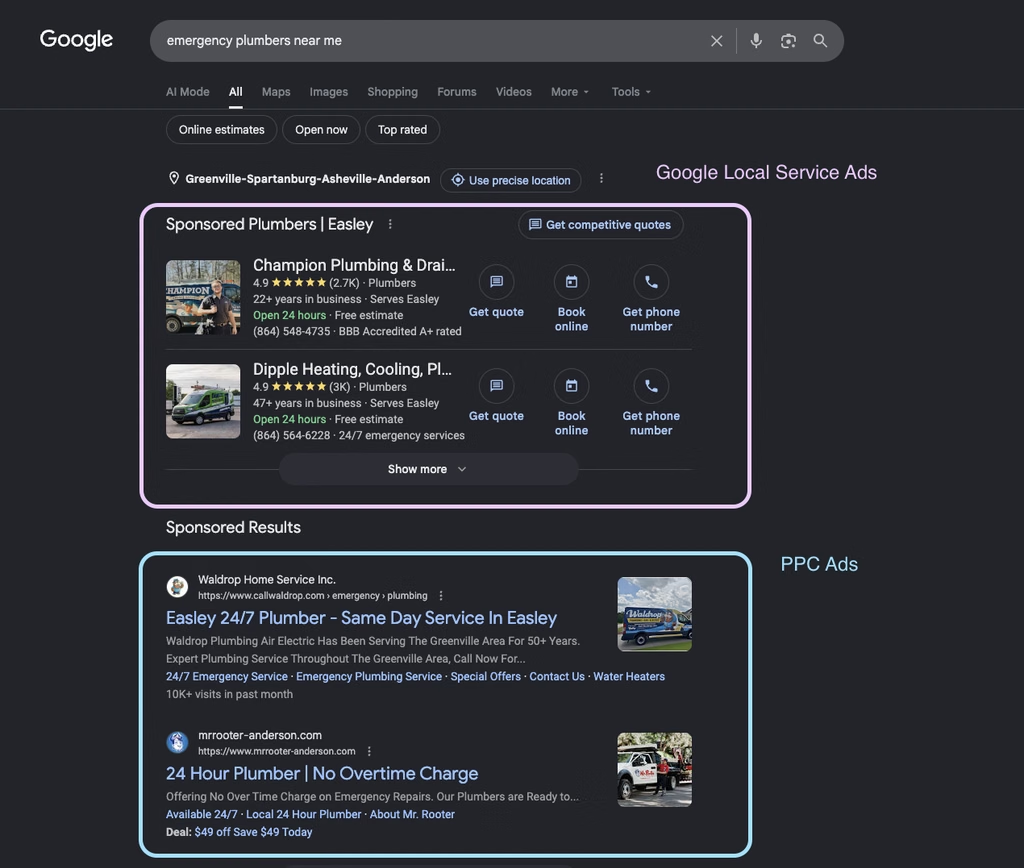
Instead of bidding on individual keywords and paying when someone clicks your ad, Local Services Ads are built around your business, services, service area, and profile. Customers can see your business when they search for a service you provide and can contact you directly.
Depending on your business and location, customers may be able to:
- Call your business
- Send you a message
- Request or schedule a booking
- View your business information
- See your reviews and rating
- See verification badges where applicable
Local Services Ads appear prominently in Google Search and Google Maps. They are also largely keywordless: Google uses your selected service categories, service areas, profile information, and other signals to determine when your business is relevant.
That makes them particularly useful for businesses where the customer has a clear, immediate need.
For example:
- “plumber near me”
- “HVAC repair”
- “personal injury lawyer”
- “electrician near me”
- “roofing company”
- “pet groomer”
- “real estate agent”
The customer isn’t necessarily researching your brand. They’re looking for someone who can solve a problem.
And that’s the fundamental advantage of Local Services Ads: you are reaching people with high commercial intent.
Google says Local Services Ads allow businesses to receive leads directly through phone calls, messages, and, where available, bookings.
How Local Services Ads work: the pay-per-lead model
The biggest difference between Local Services Ads and traditional Google Ads is how you’re charged.
With standard Search Ads, you generally pay when someone clicks.
With Local Services Ads, you pay when you receive a valid lead.
A lead can come through a phone call, message, or another supported contact method.
That makes the economics relatively simple:
You don’t pay for the search. You pay when the searcher becomes a potential customer.
What determines whether your ad appears?
Local Services Ads use an auction to determine which businesses appear and in what order.
Google considers factors including your bid and the quality of your business profile. Responsiveness to customers is also part of the equation.
Your performance can therefore be affected by things such as:
- Your bidding strategy
- Your budget
- Your service categories
- Your service area
- Your reviews and ratings
- How complete your profile is
- How quickly you respond to leads
- Your business hours and availability
- Competition in your market
This is important because being eligible for Local Services Ads doesn’t guarantee that you’ll appear for every relevant search.
Google explicitly notes that your ad won’t appear every time you search for it. Budget, competition, ad status, hours, targeting, and other factors can all affect whether your listing is shown.
Local Services Ads don’t use traditional keywords
You don’t build a keyword list in the same way you would for a Search campaign.
Instead, you tell Google:
- What services you provide
- Which categories you belong to
- Where you serve customers
- What your business does
- When you’re available
Google uses that information to match your business with relevant searches.
This also means that your profile becomes part of your targeting strategy.
The more accurately your profile reflects the services you actually provide, the easier it is for Google to understand where your business fits.
What do Local Services Ads cost?
There isn’t one fixed price for Local Services Ads.
Your cost per lead depends on factors such as:
- Your business category
- Your location
- The services you offer
- Competition in your market
- Your bidding strategy
- The demand for your services
Google’s bidding system lets you control how much you’re willing to spend on leads, while your overall budget determines how many leads you’re trying to generate.
Local Services Ads bidding options
Google currently offers several bidding approaches.
Maximize leads is Google’s recommended automated bidding strategy. Google automatically adjusts your bids with the goal of generating as many leads as possible within your budget.
Target cost per lead (tCPL) lets you specify the average cost per lead you’re aiming for. Google then adjusts bids automatically to try to achieve that average.
Max per lead is the manual option. You specify the maximum amount you’re willing to pay for an individual lead.
Google recommends Maximize Leads for optimal performance and says advertisers should generally allow the system time to learn before judging performance.
How your budget works
Your budget isn’t simply a promise that Google will spend exactly the same amount every week. Your average weekly budget determines how many leads Google attempts to deliver. Spending can vary from week to week depending on demand, but Google applies a monthly maximum.
This makes budgeting for LSAs different from simply setting a daily PPC budget.
The better question isn’t:
“How much can I spend?”
It’s:
“How many profitable leads can my business handle, and what is a lead worth to me?”
For example, if your average customer is worth $2,000 and 25% of qualified leads become customers, a $50 lead isn’t necessarily expensive.
The economics depend on what happens after the lead.
Don’t optimize around cost per lead alone
A $30 lead that never becomes a customer can be worse than a $100 lead that consistently produces profitable jobs.
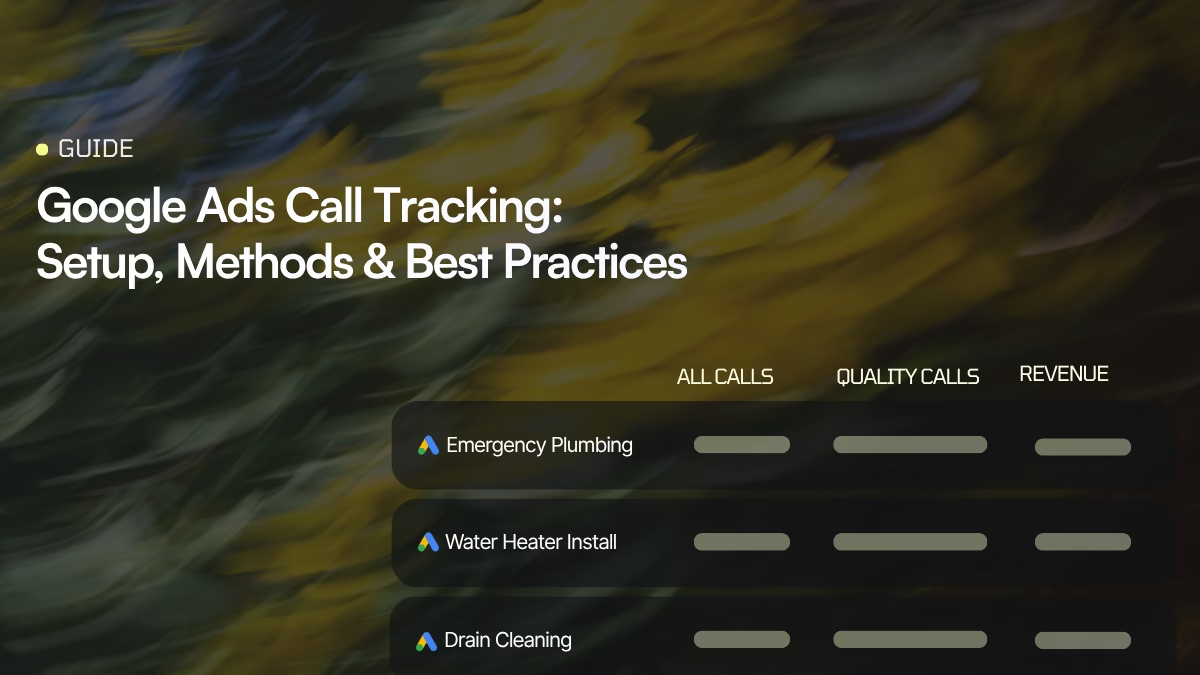
That’s why LSA performance should ultimately be measured through:
Lead → Qualified lead → Appointment → Customer → Revenue
Google gives you lead-level information, but businesses that depend heavily on phone calls can benefit from connecting their advertising data with what actually happens during those calls.
We’ll come back to this in the call tracking section.
Local Services Ads categories and who qualifies
Local Services Ads aren’t available to every business.
Google supports a large and continually changing list of service categories, and availability can vary by country, location, and business type. Google’s current eligibility list includes categories ranging from home services and legal services to healthcare, automotive, beauty, pet services, and restaurants.
Category availability changes, so always check Google’s current eligibility requirements before creating an account.
Some of the major categories you may encounter include:
| Vertical | Example Local Services Ads categories |
|---|---|
| Plumbing & home services | Plumbers, bathroom remodeling, appliance repair |
| HVAC | Heating, ventilation and air conditioning |
| Electrical | Electricians and electrical services |
| Roofing | Roofers and roofing services |
| Landscaping | Lawn care and landscaping |
| Cleaning | House cleaning and related services |
| Legal | Family lawyers, business lawyers, bankruptcy lawyers |
| Real estate | Real estate professionals |
| Automotive | Auto repair, body shops, glass repair |
| Pet services | Pet grooming, boarding and related services |
| Healthcare | Selected medical and wellness professionals |
| Beauty | Selected beauty and personal-care businesses |
Google’s availability list is extensive and changes over time, so this table should be treated as a starting point rather than a permanent eligibility list.
Plumbing
Plumbing is one of the clearest examples of where LSAs make sense.
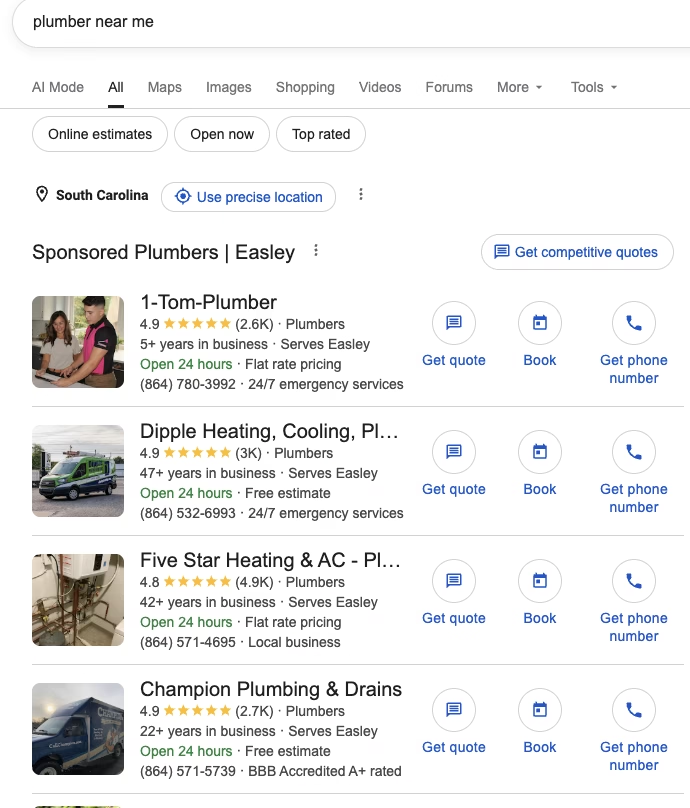
A customer searching for “emergency plumber near me” or “plumber near me” usually isn’t looking for a blog post. They’re looking for someone who can answer the phone and solve the problem.
For plumbing businesses, responsiveness, service area, reviews, and accurate job types can therefore have a direct impact on lead volume.
HVAC
HVAC is another highly competitive local category.
Customers often search when they have an immediate problem e.g. a broken AC, heating failure, installation need, or maintenance request.
That makes lead quality particularly important. A business shouldn’t simply maximize call volume; it needs to know how many of those calls actually represent jobs it can and wants to take.
Legal services
Legal categories can include highly valuable leads, but the economics are very different from a home-service business.
A personal injury lead, for example, may have a very different value from a general inquiry.
That makes measuring lead quality and downstream conversion particularly important.
Pet services
Pet services are another example of a local, high-intent category where customers can quickly move from search to contact.
The same fundamentals apply: accurate categories, strong reviews, relevant service areas, and fast responses.
Real estate
Real estate businesses can also benefit from local search intent, although the customer journey is generally longer.
In this case, measuring only the number of leads can be misleading. A lead may take weeks or months to turn into a transaction.
The takeaway: your LSA strategy should reflect the economics and customer journey of your particular category.
Google Verified: What the badge means
Google has simplified the verification badges used with Local Services Ads.
Previously, businesses could see badges such as Google Guaranteed, Google Screened, or License Verified by Google. These have been consolidated into a single Google Verified badge.
The Google Verified badge signals to customers that the business has completed Google’s applicable screening and verification requirements. What Google checks depends on the business category and location and can include business registration, licenses, insurance, background checks, and other verification steps.
How do you get the Google Verified badge?
New Local Services advertisers must complete the screening and verification process required for their business.
Depending on your category and location, Google may ask for:
- Business registration information
- Professional or business licenses
- Insurance
- Background checks
- Business-owner or professional verification
- Additional advanced verification
The exact requirements aren’t the same for every business. Google determines which checks apply based on your category, location, and other factors.
Existing eligible advertisers who had already completed the required verification were automatically moved to the new Google Verified badge. No additional action was required simply because the badge changed.
What customers see
The Google Verified badge appears on eligible Local Services Ads profiles and can also appear on other Google surfaces when Google determines that it helps consumers evaluate a business.
Google may also show the specific verification checks completed by the business, giving customers more context about why the provider is verified.
What happened to Google Guaranteed?
The old Google Guarantee badge is no longer the current badge system for Local Services Ads.
Google also discontinued the Money Back Guarantee associated with the Google Guarantee badge. The program’s reimbursement provisions applied only to eligible services booked before December 7, 2025.
So if you’re setting up Local Services Ads today, think Google Verified, not Google Guaranteed or Google Screened.
Why the badge matters
Local Services Ads put several businesses next to one another.
Customers have to make a decision quickly.
A strong rating, a substantial review history, professional profile information, and a verification badge can all help reduce the perceived risk of choosing your business.
How to set up LSAs
The setup process can vary depending on your category and location, but the basic process looks like this.
Step 1. Check your eligibility
Start by checking whether Local Services Ads are available for your business category and location.
Google’s eligibility system will ask for information about your business and service category.

Step 2. Create or connect your business information
You’ll need accurate business information, including your business name, contact information, website where applicable, and other details required for your category.
Your information should be consistent across your Google presence.
Step 3. Select your services
Choose the services and job types you actually provide.
Don’t select everything simply because you want more exposure.
The goal is to generate relevant leads, not the maximum possible number of leads.
Step 4. Define your service area
Tell Google where you serve customers. Be realistic.
If you advertise an area that you don’t actually service, you increase the likelihood of receiving poor-fit leads.

Step 5. Complete verification
Depending on your category and location, Google may require business registration, licenses, insurance information, background checks, professional credentials, or other verification steps.
Requirements vary.
Step 6. Add your budget and bidding strategy
Choose your budget and bidding approach. If you’re unsure where to start, Google’s current recommendation is to use Maximize Leads as the automated bidding strategy.

Step 7. Add high-quality photos
Use real, professional photos of your business, team, work, vehicles, equipment, or other relevant assets.
Be aware that Google’s current policies restrict AI-edited or AI-generated images for Local Services Ads in the EU and New York beginning August 2, 2026.
Step 8. Complete or update your profile
Make sure your hours, service areas, and business details are accurate, and upload a clear, professional profile picture.
Step 9. Wait for approval
Google reviews your information and completes the relevant verification process.
Once your account is approved and active, you can begin receiving leads.
Calculate your costs with Google’s budget estimation tool
Local service ads operate on a different model than traditional ads. Instead of paying per click, you pay per lead. The cost differs depending on your location, industry, and competitors. You can use Google’s budget calculator to get an estimate. Remember, it’s an approximate one and the final amount will likely differ.
Of course, you control your budget. You can set it according to the number of leads you want to receive every week and once you reach your monthly limit, the ad stops showing automatically. You can increase the budget if you wish it to keep displaying.
Where to log in and manage your Local Services Ads account
This is one of the biggest things changing in 2026.
Historically, Local Services Ads were managed through a separate Local Services Ads experience.
Google is now migrating Local Services Ads into Google Ads as a specialized Performance Max campaign type with pay-per-lead goals.
The migration began in August 2026 and is rolling out in phases through 2026 and 2027.
Where do I log in?
For accounts that have not yet migrated, you can access your Local Services Ads account through Google’s Local Services interface.
Once your account has migrated, management moves into Google Ads.
The important thing is that the migration does not mean Local Services Ads suddenly become ordinary Performance Max campaigns.
Google says the migrated campaigns retain the core Local Services model:
- Pay per valid lead
- Google Search and Google Maps placements
- Keywordless targeting
- Local service intent
- Lead-focused optimization
The management interface is changing, but the fundamental advertising model remains.
What happens to your old data?
This is important.
Google says historical campaign-level performance metrics from the old Local Services Ads experience will not transfer to Google Ads.
That means you should export any historical performance data you want to retain before your account migrates.
What does the new Google Ads experience change?
The goal is to bring Local Services Ads into the same broader environment as your other Google advertising.
You’ll increasingly manage things such as:
- Budgets
- Targeting
- Leads
- Campaign settings
- Customer inquiries
from Google Ads.
For businesses already managing Search and other Google campaigns, this should eventually make account management more centralized.
But it also makes historical data and measurement even more important.
How to get more and better Local Services Ads leads
Getting your account approved doesn’t mean your campaign is optimized.
The businesses that get the most value from LSAs treat the profile, budget, lead handling, and measurement as one system.
1. Complete your profile
Your profile is one of the primary sources Google uses to understand your business.
Make sure your:
- Business information is accurate
- Services are complete
- Job types are relevant
- Service areas are accurate
- Hours are current
- Photos are professional
- Verification information is complete
Don’t leave fields blank simply because they aren’t mandatory.
2. Be precise with your service area
A larger service area doesn’t automatically mean more profitable growth.
If you’re a plumber in Brooklyn, getting calls from an area that takes your technicians 90 minutes to reach isn’t necessarily a win.
Start with the areas you can serve profitably.
Expand when the economics justify it.
3. Choose the right services and job types
Don’t try to match every possible search.
The objective is to tell Google exactly what your business does.
If you specialize in commercial HVAC installation but don’t handle residential emergency repairs, your profile should reflect that.
Better targeting can mean fewer irrelevant leads and a better lead-to-customer rate.
4. Build and maintain reviews
Reviews matter both for customer trust and visibility.
A strong review profile can make the difference between a customer choosing you or a competitor when several businesses appear together.
Don’t wait for reviews to happen automatically.
Build a repeatable process for requesting reviews from customers after successful jobs.
And respond to reviews consistently.
5. Respond quickly
A lead that calls at 10:03 AM doesn’t have much value if nobody answers until 4:30 PM.
Google explicitly says that responsiveness can affect ad ranking.
More importantly, responsiveness affects whether the lead becomes a customer.
Make sure someone is responsible for answering LSA calls during your advertised hours.
If you can’t answer, use appropriate call handling, routing, or voicemail processes so the lead doesn’t simply disappear.
6. Don’t confuse more leads with better performance
Imagine two campaigns:
| Campaign A | Campaign B | |
|---|---|---|
| Leads | 100 | 100 |
| Spend | $5,000 | $4,000 |
| Customer | 10 | 18 |
Campaign A generated more leads.
Campaign B generated more customers.
The second campaign is clearly more valuable.
This is why optimizing Local Services Ads around qualified leads and revenue is more useful than optimizing around lead volume alone.
7. Choose your bidding strategy carefully
Google currently recommends Maximize Leads as its automated bidding strategy.
If you’re using manual or target-based bidding, understand what you’re optimizing for before changing your settings.
Don’t constantly change your bid because one week looks bad.
Give the system enough time to learn, then evaluate the results against your actual business goals.
8. Watch your budget against capacity
There is another side to growing LSA volume.
If you’re already missing calls, increasing your budget may simply create more opportunities for competitors to answer your customers.
Before scaling spend, ask:
- Can we answer more calls?
- Can we handle more jobs?
- Are we responding quickly enough?
- Are we getting too many poor-fit leads?
- Do we know which leads actually become customers?
Sometimes the fastest way to improve LSA performance isn’t spending more.
It’s fixing the leak between lead received and lead answered.
How to track and measure your Local Services Ads calls
For many local businesses, the most valuable LSA leads are phone calls. And that’s where measurement becomes difficult. Google can tell you that a call happened. But a business often needs to know much more:
For example:
- Was it a real lead?
- What service did they want?
- Did someone answer?
- How long did they stay on the phone?
- Was the caller qualified?
- Did they book?
- Did they become a customer?
- How much revenue did they generate?
That’s where call tracking can help.
What is call tracking?
Call tracking connects inbound phone calls to their marketing source and provides data about what happened during the call.
Instead of treating every phone call as an anonymous conversion, you can capture information about the call and use it to understand which marketing activities are actually producing valuable customers.
For Local Services Ads, this is especially useful because the lead often happens offline.
A customer searches on Google. → They see your Local Services Ad. → They call. → Your sales or service team answers. → The conversion then happens entirely over the phone.
Without call-level data, that part of the customer journey can become a black box.
Use call data to measure lead quality
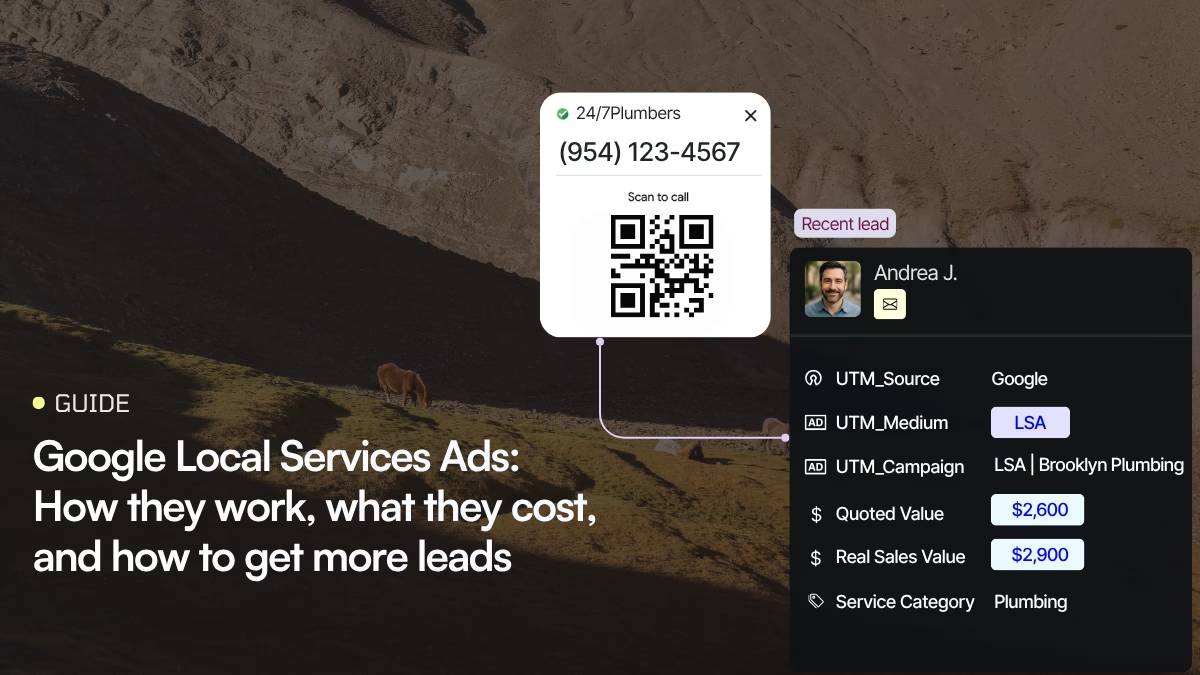
With Nimbata, you can track and analyze inbound calls and connect them to your marketing activity.
You can:
- Track calls
- Record and transcribe conversations
- Analyze calls
- Classify leads
- Add custom tags
- Generate call summaries
- Build call workflows
- Route calls to the right team
- Create automations
- Connect call data with other marketing systems
The important part isn’t simply knowing how many calls you received.
It’s understanding which calls were valuable.
For example, you might discover that:
100 LSA calls → 65 qualified leads → 30 booked jobs → 22 customers
That is far more useful than:
100 LSA calls
Once you know the conversion rate between those stages, you can make better decisions about your LSA budget.
Measure the leads Google can’t fully explain
Google’s LSA reporting gives you valuable information about your leads.
But your business ultimately cares about what happens after the lead.
Call tracking can help bridge that gap.
Instead of asking:
“How much did we spend on Local Services Ads?”
you can start asking:
“How much revenue did our LSA leads generate?”
That’s the number that should inform your next budget decision.
Recent changes to Local Services Ads
Local Services Ads are changing significantly in 2026.
August 2026: migration to Performance Max
Google began migrating Local Services Ads to a specialized Performance Max campaign type with pay-per-lead goals in August 2026.
The rollout is phased. Selected U.S. home and storefront service advertisers are among the first groups being migrated, with broader advertiser groups following later in 2026 and remaining categories and non-U.S. accounts moving through 2027.
The important point is that this is a platform change, not the end of Local Services Ads.
Google says the migrated campaigns continue to use:
- Pay-per-lead pricing
- Search and Maps placements
- Keywordless targeting
- Local service intent
What changes is where advertisers manage the campaigns.
October 2026: missed-call charging change
Google is also changing how certain missed calls are treated.
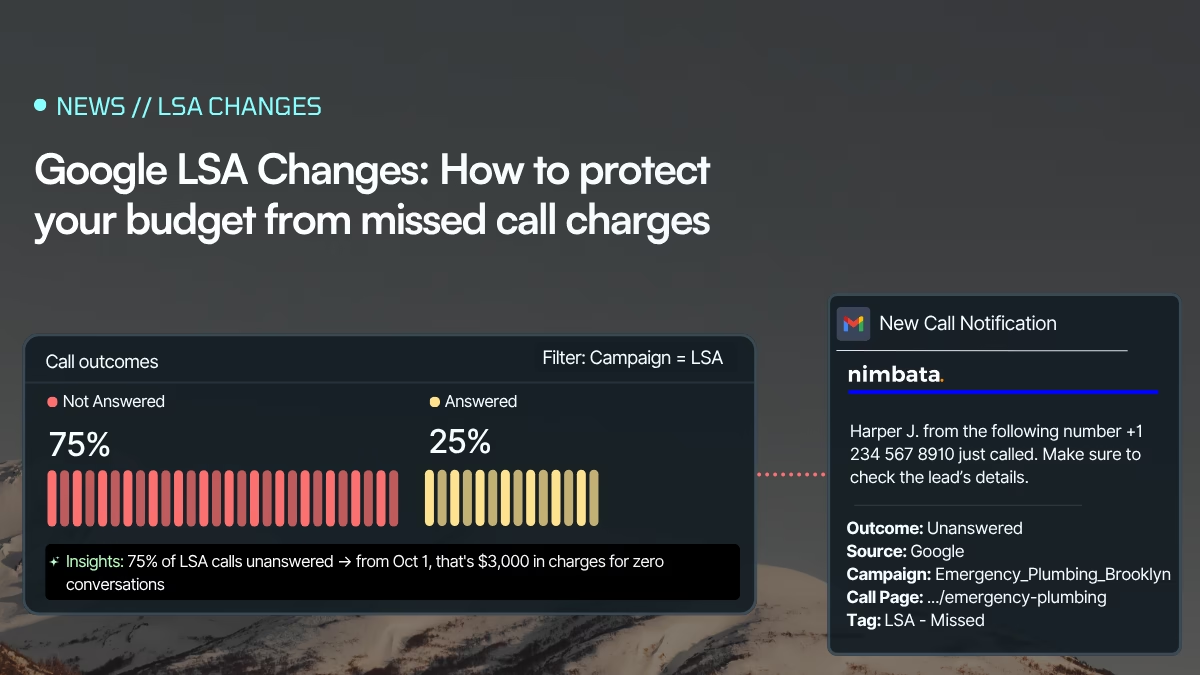
Starting October 1, 2026, a Local Services Ads call where the caller remains connected for more than 20 seconds during your stated business hours can become a billable lead even if nobody at the business answers.
For businesses that rely heavily on phone leads, this makes call handling and missed-call monitoring even more important.
Your LSA budget is no longer just a media-buying question.
It’s also an operational one.
If you are paying for leads, you need a system for making sure those leads are actually handled.
Local Services Ads FAQ
No.
Local Services Ads have historically been a separate advertising product with a pay-per-lead model and a focus on local service businesses.
Google is now migrating LSAs into Google Ads as a specialized Performance Max campaign type with pay-per-lead goals.
The management experience is becoming more integrated, but the LSA model remains distinct from standard CPC advertising.
There is no universal price.
Your cost depends on your category, location, competition, bidding strategy, and other factors.
You pay for valid leads rather than clicks, and your budget determines how many leads Google attempts to deliver.
No. LSA campaigns are keywordless. Google uses your business information, services, service areas, and other signals to determine when your business is relevant.
Start with the fundamentals:
- Complete your profile
- Select accurate services
- Set the right service areas
- Build reviews
- Use appropriate photos
- Maintain competitive bidding and budget
- Respond quickly to calls and messages
- Monitor lead quality
- Track which leads become customers
More budget can increase lead volume, but only if your profile and lead-handling operation can convert that additional deman
They no longer exist as separate badges.
Google Guaranteed, Google Screened and License Verified by Google have been consolidated into a single Google Verified badge, and the Money Back Guarantee associated with the Google Guarantee badge was discontinued.
If your business had already completed the required verification, it was moved to the new badge automatically. Verification requirements still vary by category and location.
For accounts that haven’t migrated, Local Services Ads can still be managed through Google’s Local Services experience.
As Google migrates accounts, management moves into Google Ads.
The migration began in August 2026 and will continue in phases through 2027.
The biggest change is the migration of Local Services Ads into Google Ads as a Performance Max campaign type with pay-per-lead goals.
The pay-per-lead model, Search and Maps placements, and keywordless targeting remain.
Google is also changing how some missed calls can be charged beginning October 1, 2026.
The bottom line
Local Services Ads can be one of the most direct ways for a local service business to generate demand from Google.
The model is simple:
Someone searches → they find your business → they contact you → you turn the lead into a customer.
But getting the most from LSAs requires more than turning the campaign on.
You need:
- The right category
- The right service area
- A complete profile
- Strong reviews
- A competitive bidding strategy
- A realistic budget
- Fast lead response
- Reliable measurement
And as Google moves Local Services Ads into Google Ads, measurement becomes even more important.
The businesses that win won’t necessarily be the ones generating the most leads.
They’ll be the ones that understand which leads are worth paying for, which ones become customers, and how much revenue those customers generate.
If phone calls are a major part of your LSA leads, Nimbata can help you track, analyze, classify, and act on those calls, so you can see what happens after someone picks up the phone.
Don’t just count your LSA leads. Know which ones turn into business.