The best call tracking software for agencies in 2026 is Nimbata for the best overall value and full white-label, CallRail for large multi-service agencies, and WhatConverts for reporting-heavy teams. The right choice comes down to your white-label needs, client count, and budget per account.
For an agency, call tracking is not a nice-to-have. The highest-value leads your clients get usually come by phone, and if you cannot tie a call back to the campaign, keyword, or ad that drove it, you are reporting half the story. Agency-grade call tracking ties every call to a source, lets you manage multiple client accounts from one place, and gives you the tools to make reporting look like part of your own service.
This guide compares the seven best call tracking options for agencies, focusing on the things that matter when you manage call tracking at scale: multi-account management, white-labeling, client reporting, account duplication, integrations, and pricing.
If you run a single business, use our best call tracking software roundup instead.
Best Call Tracking Software for Agencies at a Glance
| Tool | Best for | Account management | Starting price* | Where it is not ideal |
|---|---|---|---|---|
| Nimbata | Agencies managing multiple accounts | Excellent | $39 | Brand-name recognition |
| CallRail | Small & mid-sized agencies | Good | $55 | Costs climb fast across many clients |
| WhatConverts | Agencies tracking calls, forms, chats & transactions | Excellent | $30 | More lead tool than pure call tool |
| CTM | Agencies needing advanced routing & analytics | Very good | $79 | Feature depth adds complexity |
| CallScaler | Agencies prioritizing scalability & margins | Excellent | $65 | Lighter reporting and integrations |
| Ringba | Pay-per-call agencies | Very good | $147 | Overkill for standard lead-gen |
| Infinity | Enterprise and global agencies | Good | $246 | Enterprise pricing and setup; heavy for small agencies |
Account management reflects how well each platform supports centralized management of multiple accounts, users, locations, or sub-accounts.
How we evaluated call tracking software for agencies
We evaluated each platform from the perspective of an agency managing multiple client accounts, not a single business tracking its own calls.
Our evaluation criteria:
- Multi-account management: Can you manage multiple accounts, projects, locations, or sub-accounts without constantly switching logins?
- Client access & permissions: Can you give clients access without exposing settings or data they shouldn’t see?
- White-label capabilities: Can the platform disappear behind your agency’s branding?
- Account duplication & scalability: Can you reproduce tracking numbers, call flows, tags, workflows, and configurations across accounts?
- Client reporting: Can you create custom dashboards and reports that clients can understand without manually rebuilding the data every month?
- Attribution & lead quality: Can you prove not only which campaign generated the call, but whether that call was a qualified lead?
- Agency economics: What happens to your margins as the number of accounts and calls increases?
- Support & onboarding: Can you get help quickly when you’re managing tracking for multiple businesses?
What makes call tracking different for agencies?
For a single business, call tracking usually means connecting phone calls to marketing campaigns. For an agency, the challenge is operational: doing that consistently across many accounts while keeping each account separate, making reporting easy for clients, and controlling the time and cost involved.
An agency-grade setup needs to handle more than attribution. It needs to support repeatable implementation, centralized management, client access, branded reporting, automation, and pricing that scales with the number of accounts you manage.
What agencies should look for in call tracking software
For an agency, the challenge isn’t simply tracking calls accurately. It’s building a setup that can be rolled out across accounts, maintained by your team, and turned into something clients can actually use and understand. The right platform should fit into your existing delivery process rather than becoming another system your team has to manage manually.
Start with your account structure. Before looking at individual features, consider how the platform will fit your agency’s organizational model. Can you manage multiple accounts, projects, locations, and users without creating unnecessary complexity? More importantly, can that structure support you as you grow? A setup that works perfectly for five accounts may become frustrating at 30.
Think about what your team will have to repeat. Agencies often run similar campaigns and tracking setups across different businesses. Look for ways to replicate configurations, call flows, tracking numbers, tags, and automations rather than rebuilding them from scratch. The less your team has to configure manually every time you onboard or change an account, the more scalable your operation becomes.
Consider the client experience, not just the backend. Your team may care about attribution, call data, and integrations, but clients care about seeing clear evidence that their marketing is working. Think about how easily you can turn the data into branded, understandable reports and how much control you have over what each user can access.
Make sure the economics work for your agency. Don’t judge a platform only by its entry-level price. Model what it would cost when you have 10, 25, or 50 accounts and factor in numbers, call volume, users, and any features you need. If you’re packaging call tracking as part of your service, the pricing model needs to leave enough room for your agency to make money.
Finally, ask whether the platform helps you deliver better results or simply more data. The real value of call tracking is being able to connect marketing activity to meaningful outcomes. If your team can identify which campaigns generate qualified calls, feed that information into the tools you already use, and act on it automatically, call tracking becomes part of your performance service rather than another reporting layer.
Keep those seven in mind as you read. Most tools nail two or three. The ones below get closest to all seven.
How much does call tracking cost for an agency?
Call tracking pricing can work very differently for an agency than it does for a single business. You’re not just paying for the number of calls you receive. You’re potentially managing tracking numbers, accounts, users, locations, and reporting across an entire client portfolio.
The price you see on the pricing page isn’t necessarily your agency’s real cost.
A platform that costs $50 per month for one account can become expensive if you need to pay separately for every client, number, or additional user. On the other hand, a platform with a higher starting price may be more cost-effective if it lets you manage many accounts under one subscription.
That’s why agencies should compare pricing at the scale they actually operate. Consider what the platform would cost with 5, 25, or 50 clients, rather than comparing only the entry-level plans.
There is also an operational cost to consider. If your team has to manually create every account, rebuild tracking setups, configure call flows, and prepare reports for every client, you’re paying for the platform with both money and internal hours.
For agencies, scalability isn’t just about handling more calls. It’s about handling more clients without proportionally increasing the work required to manage them.
Before choosing a platform, calculate both your software cost and your cost to deliver call tracking as a service. This gives you a much more realistic picture of which platform actually fits your agency.
What should you charge clients for call tracking?
Once you’ve chosen a platform, there’s another question: who actually pays for it?
Agencies generally use one of two models.
1. The client pays for call tracking
The client creates and pays for their own call tracking subscription, while your agency manages the implementation and uses the platform as part of its marketing service.
This model keeps software costs separate from your agency’s pricing. The client has a direct relationship with the vendor, and you don’t need to build the software cost into your margins.
The trade-off is that the client also owns the account and billing relationship. If you want complete control over the setup, branding, reporting, and customer experience, this may be less attractive.
Best for: Agencies that want software costs to remain transparent and separate from their service fees.
2. The agency pays and charges the client
The agency owns the call tracking account and pays the software bill. You can then either include the cost in your monthly retainer or charge the client a separate call tracking fee.
For example, instead of passing on a $50 software subscription, you could package:
Call tracking + attribution + reporting + lead-quality analysis — $150/month
The difference between the software cost and what you charge becomes part of your agency’s revenue, while the client gets call tracking as part of a managed service.
This model also gives you more control over the client experience. You can standardize setups, manage accounts centrally, create branded reporting, and decide exactly how much of the underlying technology the client sees.
Best for: Agencies that want to own the client experience and turn call tracking into a recurring service rather than simply passing on a software cost.
The right model depends on your agency’s positioning, but the economics matter. If you pay for the software yourself, your client fee needs to cover the platform, usage, and the time your team spends managing it.
What does agency call tracking actually look like?
For a single business, call tracking can be relatively straightforward: install tracking, connect your marketing channels, and start attributing calls.
For an agency, the same process happens repeatedly across different businesses, campaigns, and account structures. That’s where the operational challenge begins.
A typical client might go through a workflow like:
Client onboarding → Account setup → Tracking → Attribution → Lead qualification → Reporting → Optimization
Your team might create tracking numbers, connect Google Ads and GA4, configure call routing, define call tags or qualification rules, connect the client’s CRM, and build their reporting dashboard.
The problem is that you don’t want to repeat the entire process manually for every new client.
Build it once. Reuse it across accounts.
If you’ve developed a reliable tracking setup for a particular type of client, being able to replicate the structure can save significant implementation time. The same applies to call flows, automations, tags, dashboards, and reporting templates.
Once the setup is running, the agency’s role moves from implementation to optimization. Instead of simply telling a client how many calls their campaigns generated, you can use call data to answer more valuable questions: Which campaigns generated qualified leads? Which calls turned into opportunities? Which channels are actually driving revenue?
And that’s where agency call tracking becomes more than a reporting tool.
The goal isn’t to report more calls. It’s to give clients better evidence of which marketing activity creates business.
The complexity increases with scale. Managing this for five clients may be relatively easy. Managing it for 50 means that account structure, permissions, reusable setups, automated reporting, and integrations can have a direct impact on your team’s workload and margins.
Which agencies need which type of call tracking?
Not every agency needs the same call tracking setup. The right choice depends on the services you provide, the types of clients you manage, and what you need to prove to them.
| Agency type | Primary goal | What to prioritize |
|---|---|---|
| PPC agencies | Prove which campaigns and ads generate qualified calls | Google Ads attribution, keyword-level tracking, conversion imports, campaign reporting |
| SEO agencies | Prove the impact of organic and local search on phone leads | Organic attribution, landing-page tracking, local numbers, call analytics |
| Lead generation agencies | Identify and deliver high-quality leads | Call scoring, qualification, CRM integrations, conversion tracking |
| Local marketing agencies | Track and report on calls across locations | Location-level tracking, geographic numbers, centralized account management |
| Pay-per-call agencies | Route, qualify, and monetize inbound calls | Call routing, call capping, qualification, buyer routing, real-time reporting |
| Full-service agencies | Manage and report on multiple marketing channels | Multi-account management, white-labeling, reporting, integrations, automation |
| Enterprise agencies | Standardize and scale call tracking across large portfolios | Advanced account structures, permissions, APIs, automation, scalability |
The important distinction
The type of agency you run should influence what you optimize for.
A PPC agency may care most about sending accurate call conversions back to Google Ads. A lead generation agency may care more about determining whether each call is actually qualified. A pay-per-call business may prioritize routing and monetization. And a full-service agency may put more weight on account management, white-labeling, and client reporting.
There is no single “best” agency call tracking platform. The best fit depends on what you’re delivering to clients and how your agency operates.
The 7 Best Call Tracking Software for Agencies to try in 2026
1. Nimbata
Best for: Agencies managing multiple client accounts that want centralized account management, flexible reporting, customizable AI analysis and predictable call tracking costs.
Nimbata is a call tracking and intelligence platform that goes beyond simply attributing calls to marketing channels. Agencies can use it across different client use cases from understanding which campaigns generate qualified calls to analyzing conversations, building custom dashboards, automating follow-ups, and keeping client teams informed with real-time alerts.
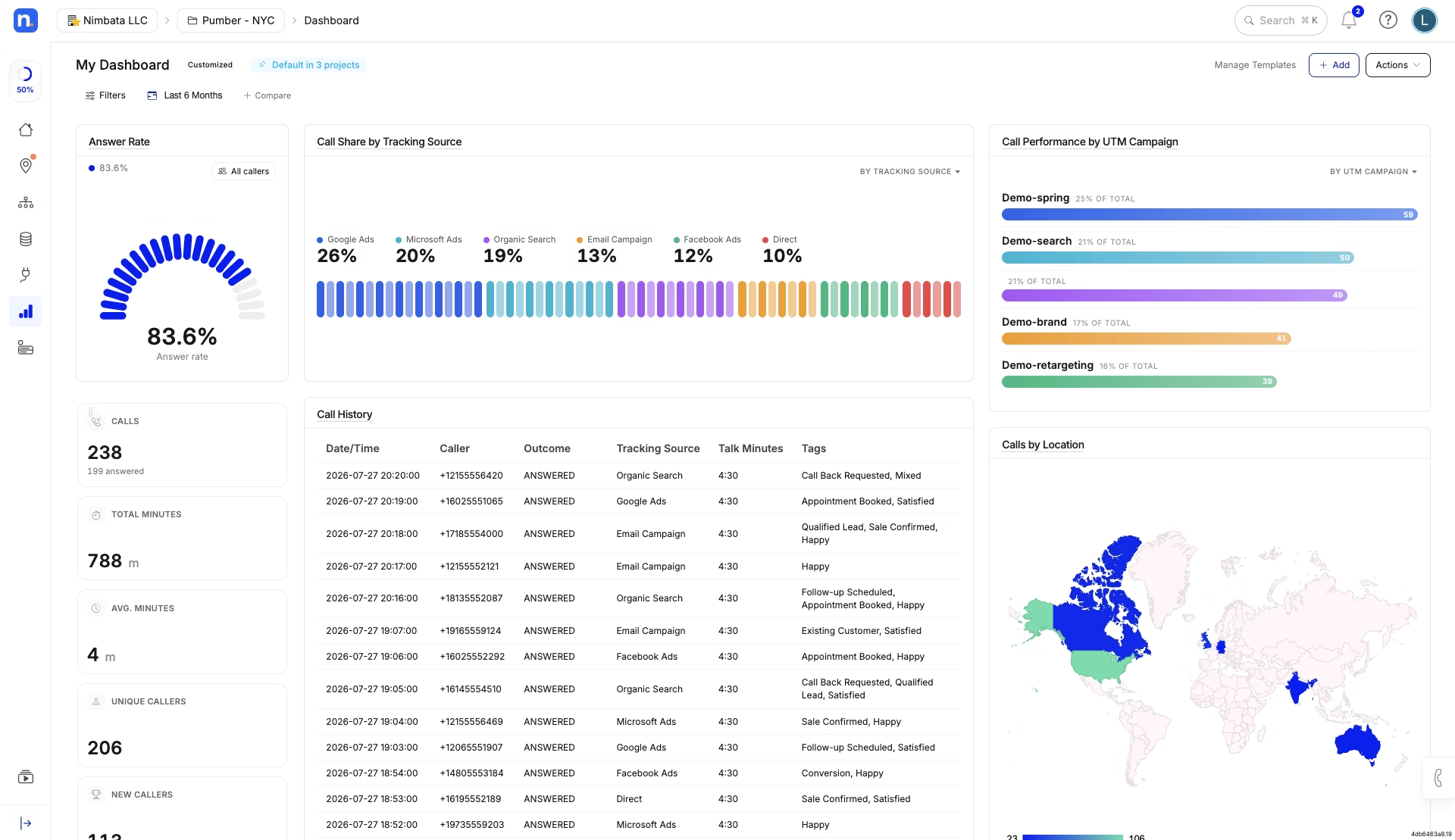
Nimbata Customizable Dashboard via Nimbata
Nimbata Overview
Nimbata is built around marketing attribution and call-level lead intelligence, with agency features designed to make managing multiple accounts easier. Its Manager Account lets agencies manage client accounts from one place, while the Agency plan includes unlimited seats and projects.
Key features and highlights
- Flexible call analysis: Analyze calls using AI summaries, transcription, sentiment, intent, tags, ratings, custom fields, and call values.
- Custom dashboards: Build dashboards around the metrics that matter to each client, rearrange reports, filter data, and share or export them for clients and teams.
- Easy client reporting: Use ready-made reports or create custom views, then share dashboards or export data without manually building reports from scratch.
- Alerts & notifications: Automatically alert teams about missed calls, high-value leads, sales opportunities, or other events through email, Slack, or connected tools.
- Workflow Builder: Build multi-step workflows that use call data and AI insights to trigger different actions—for example, scoring a call, updating a CRM, sending a Slack alert, and syncing a conversion.
- Multi-account management: Keep each client’s tracking numbers, calls, reports, workflows, and integrations separated into individual projects while giving the agency centralized visibility. Agencies can also view performance across multiple projects.
- White-labeling: Customize the client-facing experience with your own branding, domain, colors, and logo.
- Inbound + outbound calling: Track both inbound and outbound calls, including outbound calls made using tracking numbers as caller ID.
Pricing
The Agency plan starts at $149/month ($120/month when billed annually), plus usage. Nimbata charges for answered calls rather than billing by the minute. Current US Agency usage starts at $1.60/month per local tracking number and $0.03 per answered local call.
Why agencies choose Nimbata
The biggest advantage for an agency isn’t any single feature. It’s the ability to adapt the same platform to very different client requirements.
One client might only need Google Ads attribution and a simple monthly dashboard. Another might need AI-powered call scoring to identify qualified leads. A third might need missed-call alerts sent to Slack, automatic CRM updates, and a custom workflow that treats different call outcomes differently.
Nimbata lets agencies build these setups without forcing every client into the same reporting or automation structure. Each project can have its own tracking numbers, call flows, workflows, reports, and integrations, while the agency retains centralized management across projects.
The Workflow Builder is particularly useful when an agency wants to turn call data into actions rather than another report to check. Workflows can use more than 30 conditions—including call source, duration, and AI-derived information—to determine what happens next. A single workflow can branch into different actions, such as updating a CRM, sending an alert, or syncing a conversion.
The reporting layer is similarly flexible. Instead of giving every client the same generic dashboard, agencies can create dashboards around the metrics each business actually cares about—marketing attribution for one client, lead quality and revenue for another, and call activity or missed opportunities for another
Nimbata is a strong choice for agencies that need more than basic call attribution and don’t want every client to fit into the same call-tracking setup. Its combination of multi-account management, customizable dashboards, call intelligence, alerts, reporting, and workflow automation makes it adaptable to different clients, industries, and agency workflows, all from one platform.
What are real users saying about Nimbata?
What do you like best about Nimbata?
As an agency, we’ve used a lot of different tools, but Nimbata has really blown us away. It’s super simple to use with the AI notes + Sheet integration.
One of our favorite features is the AI-powered notes. It’s a huge time-saver, giving us quick insights we can actually use. The best part? Nimbata was so easy to set up. We had it up and running in a week. To add, the customer support team is top-notch. We had a few questions during setup, and they were quick to help us out.
The Google Sheet Integration was a god send. We’re able to share this link with clients and they’re able to see directly how effective our ad campaigns are.
Their script has the technology to dynamically swap the phone numbers on the website based on where the visitor comes from (organic vs paid vs social).
What do you dislike about Nimbata?
Nothing. Honestly such a good tool specially for performance-based marketing agencies.
Also read: How to prove ROI to clients and the agency call tracking dashboard.
2. CallRail
Best for: Small and mid-sized agencies that want a mature, easy-to-use call tracking platform with established agency workflows.
Callrail, is one of the most established names in call tracking. Its core offering covers call tracking, attribution, recording, routing, transcription, and conversation analysis, with additional products for forms and AI-powered lead engagement.
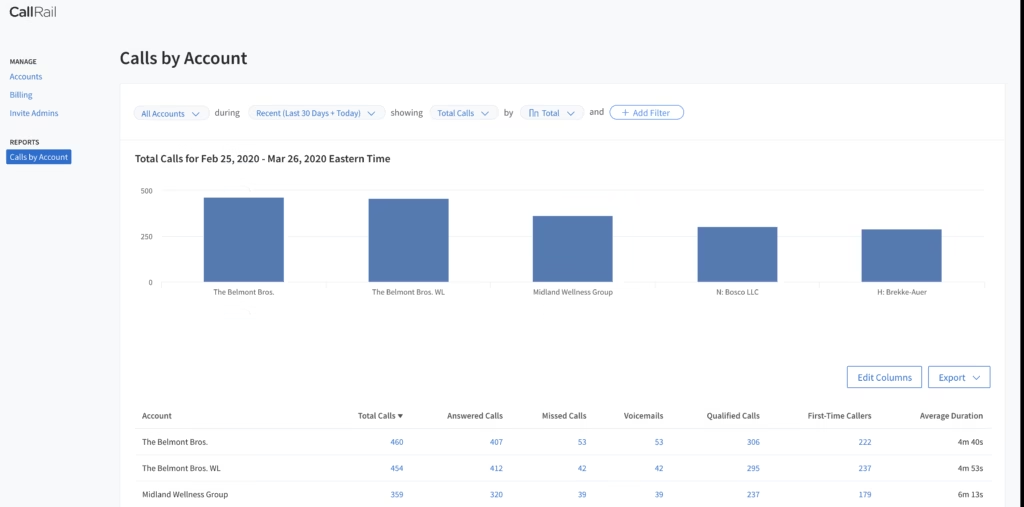
Callrail Overview
CallRail’s Account Center allows agencies to manage multiple client companies from one login. Agency Tools add capabilities such as white-labeling and agency-level management, while user permissions allow agencies to control access to client data.
Key features and highlights
- Account Center: Manage multiple companies from one login.
- Attribution: Track calls back to marketing sources and campaigns.
- Dynamic Number Insertion: Track website visitors and their marketing sources.
- Conversation Intelligence: Transcribe and analyze conversations and identify lead insights.
- Outbound calling: CallRail has a built-in outbound dialer that can place calls using existing tracking numbers as caller ID.
- White-labeling: Agency Tools can provide a custom domain, branded dashboard, and branded email notifications.
- Integrations: Supports major advertising, analytics, CRM, and marketing platforms.
Pricing
CallRail’s current pricing starts at $55/month/client for Lead Tracking, with additional usage and products priced separately. Its agency pricing estimator allows agencies to model costs based on their required products and usage.
Why agencies choose CallRail
CallRail’s biggest advantage is maturity and ease of adoption. It has a large installed base, a broad integration ecosystem, and a familiar workflow for agencies that simply need to connect marketing activity with phone leads.
The Account Center also makes it possible to manage multiple companies without maintaining a separate login for every client. For agencies that want a relatively straightforward implementation and don’t require an unusually complex account hierarchy, that’s a significant advantage.
CallRail also supports outbound calling, so it shouldn’t be positioned as an inbound-only solution. Its outbound dialer uses the agency/client’s tracking number as caller ID, and outbound calls can be recorded
When CallRail is not an ideal choice: costs can climb quickly once you multiply base fees and usage across a full client roster, which is exactly why “CallRail alternatives” is such a common search. See the full CallRail vs Nimbata breakdown.
CallRail is a safe all-around choice for agencies that value ease of use, established integrations, and a mature platform. It is especially appropriate for smaller and mid-sized agencies that want reliable attribution without building a highly customized call infrastructure.
What are real users saying about CallRail?
What do you like best about CallRail?
I like how easy the UX is. It is very easy to find reports, especially working at an agency where we have multiple call rail accounts/numbers. The integrations with our reporting dashboard, Agency Analytics, is super helpful for our agency and clients. The speed/workload is never slow; performance from the account is superb. The pricing matches with what we receive on our agency account. CallRail support always gets back to my team almost instantly; there are never long wait times.
What do you dislike about CallRail?
I wish we could have individual clients’ cards associated with their accounts. Instead, we have our agency card that covers all numbers, and then we bill clients.
3. WhatConverts
Best for: Lead-generation and PPC agencies that need to track calls alongside forms, chats, and other lead sources.
WhatConverts, takes a broader approach to lead tracking than a traditional call tracking platform. Calls are one part of a larger system that also captures forms, chats, transactions, appointments, and other lead types.
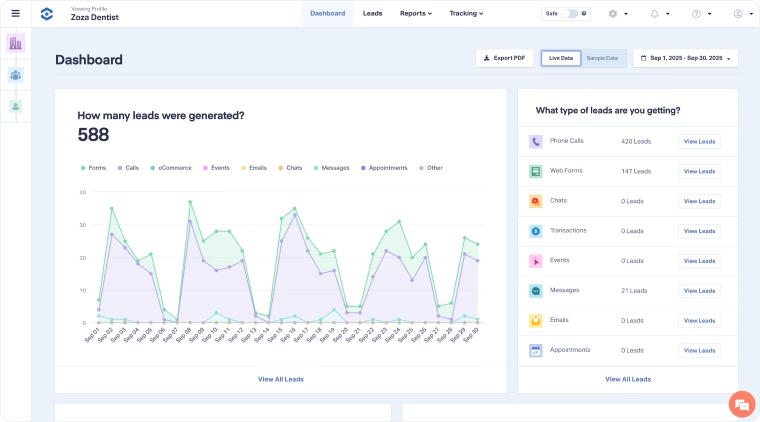
WhatConverts Overview
WhatConverts is particularly agency-friendly at the account-management level. Its Master Account can contain multiple Accounts and Profiles, while the Control Center lets agencies manage users, roles, integrations, alerts, reporting, and other settings centrally.
Key features & highlights
• Master Account: Manage multiple client accounts under one agency structure.
• Lead tracking: Track calls, forms, chats, transactions, appointments, emails, and other lead types.
• Campaign & keyword reporting: Connect leads back to campaigns, keywords, landing pages, and other marketing dimensions.
• Lead Intelligence: Automatically qualify and score leads using rules and conversation data.
• Reporting: Custom Report Builder and scheduled reports make client reporting a major part of the platform.
• White-labeling: Custom domain, logo, colors, dashboard branding, and notification emails are available for agencies
Pricing
Agency plans start at $500/month, with Agency Pro at $800/month and Agency Elite at $1,250/month. Agency plans support unlimited accounts and include monthly usage credits; white-labeling costs an additional $50/month.
Why agencies choose WhatConverts
The strongest reason to choose WhatConverts is that it treats the lead, rather than the call, as the central unit of measurement. That matters for agencies whose clients generate leads through several channels and want one system for understanding which marketing activities produce those leads.
Its Lead Intelligence features can also go beyond basic duration-based qualification. Agencies can create rules around things such as intent, keywords, sentiment, and other lead attributes, then use those outcomes in reporting and campaign optimization.
The trade-off is cost. The $500/month Agency Plus entry point is substantially higher than the starting price of many individual-business plans. However, that price includes unlimited accounts, so the economics become more interesting for agencies managing a large number of clients.
When WhatConverts is not an ideal choice: if calls are your primary focus, you may pay for lead-management breadth you do not need. Compare them side by side in WhatConverts vs Nimbata.
WhatConverts is a particularly strong choice for agencies that want to unify calls, forms, chats, and other lead sources rather than operate a call-only reporting system. Its Master Account structure, lead qualification tools, and white-label reporting make it one of the more complete agency-oriented options, especially for lead-generation agencies.
What are real users saying about WhatConverts?
What do you like best about WhatConverts?
It does a good job simplifying the conversion tracking process. Setting up conversion tracking with whatconverts is easy, and I’m sure that every lead that comes in will be in one easy to find place for both our team members and for our clients. I feel comfortable using it every day for work, and we’re confident scaling it across our whole marketing agency.
What do you dislike about WhatConverts?
I have noticed that there are instances where WhatConverts can be a little buggy. But even then, the support team is super quick to respond and help you fix your issue.
4. CTM (CallTrackingMetrics)
Best for: Agencies that need marketing attribution plus sophisticated call routing, sales, and contact-center functionality.
CTM, combines marketing attribution and call tracking with communication and contact-center capabilities. That makes it a broader platform than tools focused primarily on marketing attribution.
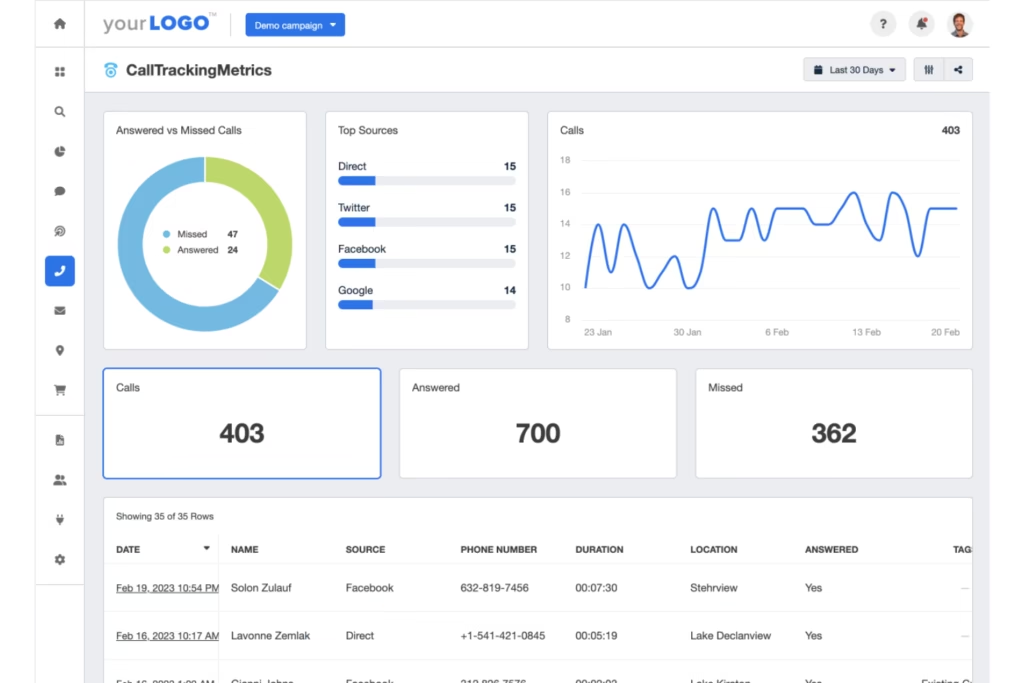
CTM Overview
CTM’s Marketing Pro plan is explicitly agency-friendly, with included sub-accounts and white-label options. The platform also supports advanced call routing, form tracking, AI analysis, marketing integrations, and API access.
Key features & highlights
- Sub-accounts: Built-in agency support for managing multiple client environments.
- White-labeling: Available as part of the agency-oriented offering.
- Marketing attribution: Attribute calls and other interactions to marketing sources.
- Conversation analytics: AI-powered analysis, transcription, and AskAI capabilities.
- Call routing: IVR, routing logic, and advanced call-flow functionality.
- Outbound calling: CTM supports outbound calls, with its Sales Engage plan adding a customizable softphone, Smart Dialer, and advanced outbound functionality.
- Integrations & API: Google Ads, GA4, HubSpot and other marketing/sales integrations, alongside API access.
Pricing
Marketing Lite starts at $79/month, Marketing Pro at $179/month, and Sales Engage at $329/month, plus usage. Outbound calls are currently listed at $0.031/minute.
Why agencies choose CTM
CTM makes more sense when the phone operation itself is part of the problem. An agency working with clients that have sales teams, multiple departments, complicated IVRs, or larger call-center operations may benefit from having routing and communication capabilities alongside attribution.
The Sales Engage tier is particularly relevant when the client needs outbound calling as well as inbound call tracking. Its softphone and Smart Dialer move the product further toward sales engagement rather than purely marketing analytics.
That breadth can also make CTM more complex than a platform an agency would use purely to attribute calls to campaigns.
When CallTrackingMetrics is not an ideal choice: the depth adds a learning curve, and simpler agencies may not use half of it. See CallTrackingMetrics vs Nimbata for a lighter alternative.
CTM is a strong option for agencies whose clients need both marketing attribution and sophisticated call operations. Choose it when routing, IVR, outbound sales, or contact-center functionality is important; if you primarily need marketing attribution and client reporting, some of the simpler platforms may be easier to operate.
What are real users saying about CallTrackingMetrics?
What do you like best about CTM?
I would say that their routing features have improved a lot in the recent years. Now setting up an IVR menu and smart routing makes it easy for the team members to get the right amount of calls.
We started using their speech to text transcriptions and keyword spotting. Instead of listening to audio for hours, we use the transcript scan.
What do you dislike about CTM?
Because costs are split across tracking numbers, minutes, texts and premium features, it’s a bit difficult to easily forecast or audit our monthly expenses.
For those managing multiple sub accounts or websites like us, pulling a single unified report is still a bit tedieous without constantly switching back and forth.
5. CallScaler
Best for: Agencies managing many client accounts that want unlimited businesses and client portals under one agency subscription.
CallScaler is built with an agency-oriented pricing and account model. Its Agency plan provides unlimited businesses, users, and client portals for one platform fee, with usage billed separately.
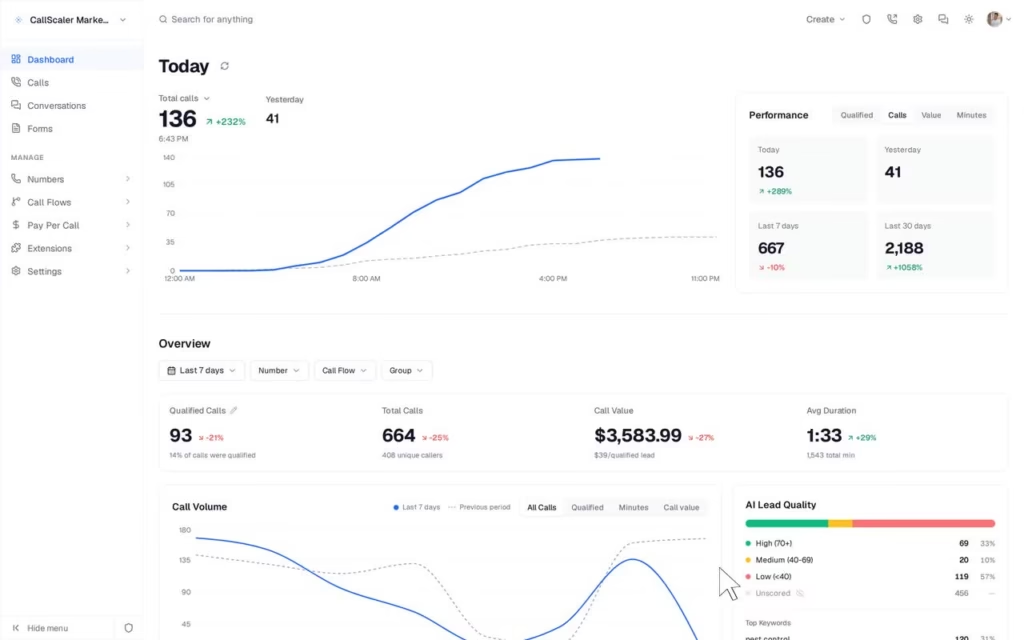
CallScaler Overview
The Agency plan is designed around the idea that agencies shouldn’t pay a separate platform subscription every time they add another client. CallScaler also provides client-facing portals, configurable permissions, white-labeling, and centralized reporting.
Key features & highlights
- Unlimited businesses: Add client businesses without a separate platform fee per business.
- Unlimited users: Useful for agencies with internal teams and client access requirements.
- Client portals: Give individual clients isolated access to their data.
- White-labeling: Custom domain, logo, colors, favicon, and branded client experience.
- Attribution: Source, campaign, keyword, landing-page, UTM, and click-ID data.
- AI: Automatic transcription, summaries, sentiment, and AI lead scoring.
- Outbound calling: Browser dialer, phone bridge, Power Dialer, tracking-number caller ID, recording, and AI analysis are available.
Pricing
The Agency plan currently starts at $130/month plus usage. Local numbers are $0.50/month, local calls are $0.045/minute, and white-labeling is a $49/month add-on.
Why agencies choose CallScaler
CallScaler’s clearest differentiator is its agency economics. Instead of increasing the platform subscription every time an agency adds another client, the Agency plan provides unlimited businesses for one flat platform fee. That can become particularly attractive once an agency manages a large portfolio.
Its client portals and white-label functionality also make it possible to separate client access while keeping the agency in control of the overall system. And, unlike the common assumption that call tracking is primarily inbound, CallScaler also supports outbound calling directly from the platform.
The main consideration is vendor maturity. CallScaler is newer than established platforms such as CallRail and Nimbata, so agencies that place a high value on a long track record may prefer a more established provider.
Skip CallScaler if: you need polished, fully branded client dashboards and deep CRM pushes.
CallScaler is worth considering for agencies where the number of client accounts is the biggest pricing and operational concern. Its unlimited-business Agency plan, client portals, white-labeling, and increasingly broad call intelligence make it particularly interesting for agencies scaling beyond a small client roster.
6. Ringba (Best for pay-per-call agencies)
Best for: Pay-per-call agencies, lead networks, and businesses that need advanced call routing and call monetization.
Ringba is fundamentally different from most of the platforms on this list. It is an inbound call tracking and analytics platform built heavily around pay-per-call, with infrastructure for routing, partner management, call marketplaces, and real-time optimization.
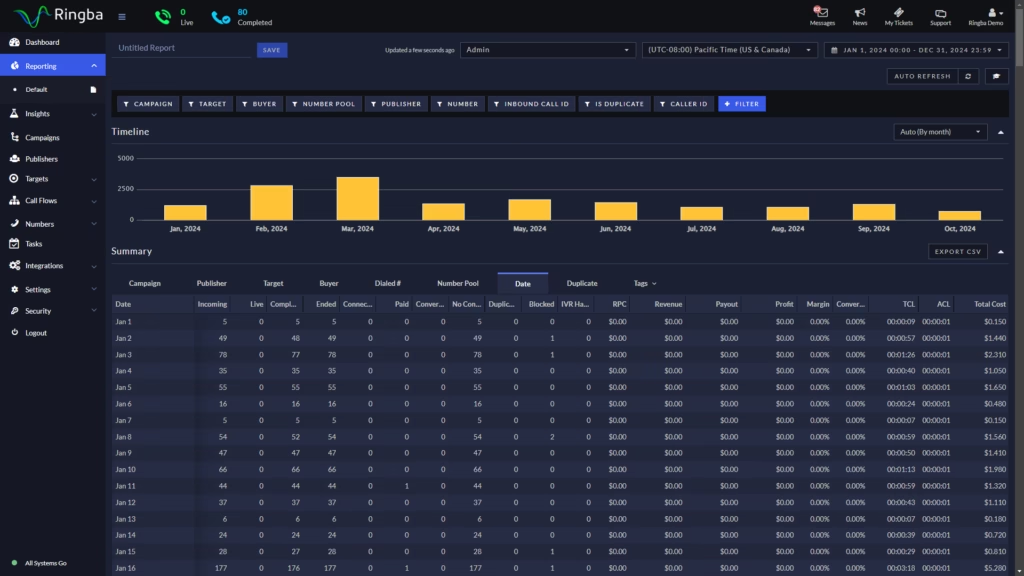
Ringba Overview
Ringba provides call tracking, pixels and webhooks, partner sub-accounts, call flows, real-time reporting, and caller-profile enrichment. Its Professional plan adds white-labeling, Ring Trees, predictive routing, and revenue recovery, while Enterprise adds real-time bidding and dedicated support.
Key features & highlights
- Partner sub-accounts: Built for managing partners and call businesses.
- Advanced call flows: Route calls based on complex rules and real-time conditions.
- Pay-per-call infrastructure: Support for buyer/publisher workflows and call monetization.
- Ring Trees: Build private call marketplaces and connect calls with buyers.
- Caller intelligence: Real-time caller data can influence routing, bidding, and payouts.
- White-labeling: Brand the platform under an agency or pay-per-call network’s own domain and identity.
- Real-time reporting: View, filter, group, and export call data at scale.
Pricing
Business starts at $147/month, Professional at $297/month, and Enterprise is custom. Usage is charged separately, including tracking minutes, numbers, recording, and other services.
Why agencies choose Ringba
Ringba makes the most sense when a call has economic value beyond being a marketing conversion. For a traditional PPC agency, the workflow might end when a qualified call is delivered to the client. For a pay-per-call business, the call itself may need to be qualified, routed to the highest-value buyer, tracked through multiple legs, and ultimately monetized.
That’s where Ringba’s routing engine, partner functionality, caller profiles, and Ring Tree infrastructure become much more relevant than they would be for a typical SEO or PPC agency.
When Ringba is not an ideal choice: it is overkill for agencies doing conventional lead attribution for local clients. See Ringba vs Nimbata.
What are real users saying about Ringba?
What do you like best about Ringba?
Ringba makes our small team feel “bigger.” The routing function, reporting, and live analytics help our team manage campaigns without needing extra manpower. It’s reliable and makes it way easier to understand which ads or partnres are giving us the best return.
What do you dislike about Ringba?
It would be the initial learning phase to be familiar with the application. Some of the settings and routing options needs additional time to learn, especially when we were just getting started. Once I got used to the layout, it made sense, but those first few days took a bit of effort.
7. Infinity
Best for: Larger marketing organizations and agencies that need advanced visitor-level attribution, customer-journey analysis, and enterprise integrations.
Infinity takes a more enterprise-oriented approach to call tracking. Its platform focuses heavily on visitor-level attribution, customer-journey mapping, channel reporting, call revenue, and integrations across advertising and analytics platforms.
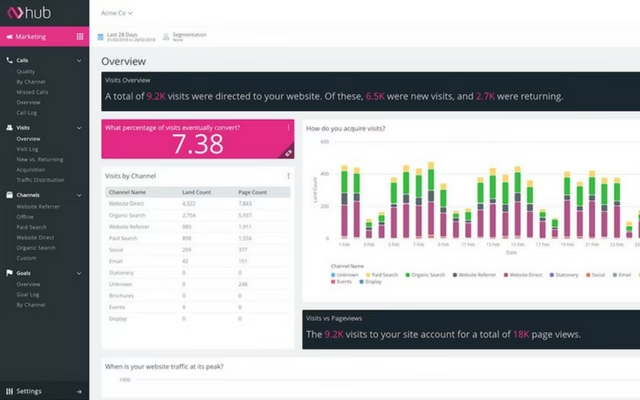
Infinity Overview
Infinity’s Visitor Trace technology connects calls with the visitor journey before and after the conversation. Its platform supports Google, Microsoft, and Meta integrations, custom goals and channel reports, call recording, missed-call alerts, and call revenue tracking. The Pro plan adds a Reporting API, while Enterprise adds more advanced integration and support options.
Key features & highlights
- Visitor-level attribution: Connect calls to campaigns, keywords, landing pages, and visitor journeys.
- Customer journey mapping: Understand what visitors did before and after calling.
- Multi-channel attribution: Integrations with Google, Microsoft, Meta, and Google Analytics.
- Custom reporting: Build reports around goals, channels, and marketing performance.
- Revenue tracking: Assign revenue information to calls to connect marketing activity with business outcomes.
- API access: The Pro plan includes a Reporting API; Enterprise adds Reporting and Config APIs.
Pricing
Infinity’s US pricing starts at $249/month for Essentials and $349/month for Pro, with Enterprise available on a custom basis. Essentials charges $0.20 per call and Pro $0.15 per call.
Why agencies choose Infinity
Infinity’s strength is depth of attribution rather than agency account economics. Its visitor-level tracking can provide a detailed picture of how a visitor interacted with marketing channels before generating a call, which can be valuable for organizations with complex customer journeys.
However, this distinction is important for an agency buyer. Infinity’s own comparison material acknowledges that agencies managing many smaller client accounts may find Nimbata’s unlimited client sub-accounts, per-client billing, and white-label dashboards better suited to that specific model.
Infinity’s published pricing is also significantly higher than the entry-level plans of most other tools in this comparison. Its public pricing currently starts at $249/month, and agency-specific packages are handled separately rather than through a published agency tier.
When Infinity is not an ideal choice: the price and setup are hard to justify for smaller agencies, which is why “Infinity alternatives” is a common search. See Infinity vs Nimbata for a lighter, white-label option.
What are real users saying about Infinity?
What do you like best about Infinity Call Tracking?
The core product of Infinity Core Tracking works well. It is able to tell us from which of our sources the call originated, so we can distinguish between Paid Search, Organic Traffic, and emails. This attribution is helpful for working out which channels have resulted in contacts.
Customer support has always come through with an answer when we’ve had questions.
What do you dislike about Infinity Call Tracking?
The interface looks like it was last updated 10 years ago. The help documentation is confusing and poor in parts, and the integrations with third-party services are tricky to set up. More investment in the customer journey would be good.
Customer support may be good, but the flipside is we’ve had to ask about a bunch of stuff that we’d expect to self-serve, because the docs are unclear or out of date.
Best call tracking by agency type
| App | Best for this agency type | Standout reason | Skip it if |
|---|---|---|---|
| Nimbata | Most agencies wanting white-label value | Own the brand, resell the margin | You need a full phone system |
| CallRail | Large, multi-service agencies | Name recognition + integrations | Budget matters at scale |
| WhatConverts | Reporting-first agencies | Lead-level reporting | Calls are your only focus |
| CallTrackingMetrics | Analytics-driven teams | Conversation intelligence | You want simple and fast |
| CallScaler | Freelancers and small shops | Flat, low pricing | You need deep reporting |
| Ringba | Pay-per-call operators | Real-time routing and bidding | You do standard lead-gen |
| Infinity | Enterprise and global agencies | Enterprise call intelligence at scale | You are an SMB-focused or budget agency |
Ready to turn calls into a service you own?
The best call tracking software for an agency isn’t necessarily the platform with the most features. It needs to work at the portfolio level: make it easy to add and manage clients, standardize tracking setups, give clients the right level of access, create reports without hours of manual work, and keep your costs predictable as your client base grows.
Nimbata is the strongest all-around choice for marketers who want call attribution, AI-powered call analysis, customizable reporting, and workflow automation without enterprise-level complexity. Its pricing is also based on answered calls rather than call duration, which can make it particularly attractive for businesses with longer conversations or higher call volumes.
CallRail is a strong choice for small and mid-sized businesses that prioritize ease of use, mature integrations, and a well-established call tracking platform. CallTrackingMetrics is better suited to teams that need call tracking alongside more advanced contact-center, routing, and outbound calling capabilities.
WhatConverts stands out when you want to track calls, forms, chats, and other lead sources in one platform. Convirza is a better fit for organizations focused on high-volume call analysis, quality assurance, and agent performance.
For more specialized requirements, Infinity is worth considering for sophisticated attribution and enterprise analytics, Invoca for enterprise conversation intelligence, Marchex for industry-specific conversation analytics, and Ringba for pay-per-call operations and advanced call routing.
Start a free trial or book a white-label demo and see how it looks with your logo on it.
Frequently Asked Questions about Call Tracking for Agencies
Nimbata is the strongest overall choice for agencies that need multi-account management, flexible call analysis, customizable reporting, and automation. WhatConverts is another strong agency-focused option, particularly for agencies that want to track calls alongside forms, chats, and other lead sources.
The best choice ultimately depends on the type of clients you manage and how much customization you need across accounts.
Agencies should evaluate multi-account management, account structure, user permissions, white-labeling, client reporting, integrations, automation, call intelligence, and pricing at scale.
The important consideration is how these features work across your entire client portfolio—not just what is available for one account.
Most agency-focused platforms provide some form of centralized account structure, such as sub-accounts, projects, or a Master Account.
For example, Nimbata uses projects to keep individual clients’ tracking numbers, call data, workflows, reports, and integrations separate while allowing the agency to manage them centrally. WhatConverts uses a Master Account with individual client Accounts, while CallTrackingMetrics provides sub-accounts for agency management.
The important thing is to check whether adding another client also adds another platform subscription, user cost, or administrative burden.
Not every agency needs white-labeling, but it can be valuable if call tracking is part of your client-facing service.
White-labeling allows the agency to present dashboards, reports, emails, and sometimes the entire platform under its own brand instead of exposing the underlying software provider.
For agencies selling call tracking as part of a monthly marketing package, this can make the service feel more integrated and professional. CallRail, WhatConverts, CallTrackingMetrics, and CallScaler all offer agency-oriented white-label capabilities
There are two common approaches.
The client pays directly: The client owns the call tracking subscription while the agency manages setup, optimization, and reporting. This keeps software costs separate from the agency’s fee.
The agency pays and bundles it into its service: The agency owns the subscription and includes call tracking, reporting, attribution, or call analysis within its monthly retainer or as a separate service fee.
The second model gives agencies more control over the client experience and can create an additional revenue stream, but the agency needs to make sure its pricing covers both software usage and the operational cost of managing the accounts.
Yes. Agencies commonly either pass the software cost through to the client or package call tracking into a broader managed service.
For example, an agency might charge separately for the software, or offer a package that includes call tracking + attribution + reporting + call analysis for a monthly fee.
The second approach can be more valuable when the agency is doing more than providing access to the software—for example, analyzing calls, optimizing campaigns based on lead quality, or building automated workflows.
Agency pricing depends heavily on the number of clients, call volume, tracking numbers, and features required.
The biggest pricing difference is often how the platform handles multiple accounts. Some providers charge separately for each client account, while agency plans from providers such as Nimbata, WhatConverts, and CallScaler are designed to support multiple clients under a centralized structure.
When comparing platforms, calculate the cost at your actual agency scale, for example, 10 clients, 50 clients, and 100 clients, rather than comparing only the advertised starting price.
Call tracking is particularly useful for PPC agencies, SEO agencies, lead generation agencies, local marketing agencies, full-service digital agencies, and pay-per-call businesses.
The use case differs by agency. PPC agencies typically care about campaign and keyword attribution, while lead-generation agencies may care more about qualified leads and revenue. Full-service agencies may prioritize multi-account management, reporting, integrations, and white-labeling. Pay-per-call businesses need more sophisticated routing and call monetization.
Regular call tracking is built for one business. Agency call tracking adds multi-client management from one login, white-label branding, client-ready reporting, and reselling or partner pricing, so you can run and monetize attribution across an entire roster without logging in and out or exposing the vendor’s brand to your clients.