CallTrackingMetrics is considered one of the best call tracking platforms out there. Despite this, it consistently ranks poorly in user satisfaction, as is evident by the sea of customer reviews pointing out the lack of support and 90s-spreadsheet-inspired UI. Still, they are renowned for offering a wide range of tools and features, typically more comprehensive than the range offered by most CallTrackingMetrics alternatives.
The best CallTrackingMetrics alternative depends on what you need. Nimbata is designed around marketing attribution and call intelligence, CallRail focuses on lead tracking and conversation intelligence, WhatConverts combines call, form, chat, and lead tracking, Invoca targets enterprise marketing and revenue teams, RingCentral is focused on contact-center communications and CallScaler focuses on call tracking, lead generation, and agency workflows.
A tool mainly built for enterprises to scale with, it comes with the expected price tag and a granular level of detail that many small businesses find to be superfluous. This, together with other issues lead many customers, like yourself, to explore different options that may be a better fit. Our team has gathered a list of CallTrackingMetrics alternatives to assist your search, like Nimbata, Callrail, Invoca, Ringcentral, HubSpot and CallScaller.
Pricing note: Prices below are based on publicly advertised pricing checked in September 2026. Usage fees, number costs, add-ons, annual discounts, taxes, country-specific pricing, and contract terms can change. Where a provider does not publish a price, we use custom pricing rather than estimating one.
CallTrackingMetrics alternative: Why users look elsewhere
CallTrackingMetrics, just like its alternatives, isn’t without its merits. It boasts a respectable 4.5/5 rating on G2, with users frequently praising its robust features and integrations. However, several recurring issues have many users considering other options. These issues include:
1. Interface issues
While many users report an overall pleasant experience with CallTrackingMetrics, most users find the User Interface to be quite difficult to navigate, with user intuitiveness leading to poor guidance, therefore requiring a steep learning curve for a user to utilize the tool well enough.
2. Data accuracy concerns
There are multiple reports of missing GCLID data, which can hinder accurate tracking and attribution. Users report this data dissonance occurring at random times, leading to a feeling of uncertainty in terms of the platform’s data reliability.
3. Steep pricing
With the enterprise plan coming in at $1999 per month + usage, some users have rightly pointed out that the overall experience offered does not match the high price tag that CallTrackingMetrics command, leading many to consider cheaper alternatives with similar capabilities.
4. Learning curve
CTM offers extensive customization across call tracking, routing, analytics, and communications, but that flexibility can also mean more time to learn and configure the platform. For teams that only need straightforward call tracking and marketing attribution, the additional workflows and settings may feel like unnecessary complexity. That’s why some CTM users may look for alternatives that are quicker to learn and easier to manage day to day.
Alternatives to CallTrackingMetrics: Best call tracking platforms in 2026
We picked these CallTrackingMetrics alternatives after careful consideration. Their features, customer service and pricing plans were the top factors that we took into account, before presenting them:
| Platform | Best For | Starting Price | Main Strength |
|---|---|---|---|
| CallTrackingMetrics | Marketing, sales and contact-center teams | $79/mo + usage | Attribution + communications + routing |
| Nimbata | SMBs, marketers, agencies | $39/mo annual + usage | Call attribution and call intelligence |
| CallRail | SMBs and marketing teams | $55/mo + usage | Call, text, form and conversation tracking |
| WhatConverts | Lead-focused marketers and agencies | $30/mo | Calls, forms, chats and lead attribution |
| Invoca | Enterprise and revenue teams | Custom pricing | Enterprise attribution and conversation intelligence |
| RingCentral RingCX | Contact centers and support teams | From $75/user/mo | Omnichannel support, workforce engagement tools |
| CallScaler | Lead generators and agencies | $65/mo + usage | Call tracking and client management |
CallTrackingMetrics pricing
Before comparing alternatives, it helps to understand what you are actually replacing.
CTM currently advertises four plans:
| CTM Plan | Monthly Billing | Annual Billing | General Fit |
|---|---|---|---|
| Marketing Lite | $79/mo | $65/mo equivalent | Small businesses and basic marketing attribution |
| Marketing Pro | $179/mo | $149/mo equivalent | Agencies and advanced marketing teams |
| Sales Engage | $329/mo | $274/mo equivalent | Sales teams and communication workflows |
| Enterprise | $1,999/mo | $1,999/mo | Large organizations and complex deployments |
All plans can incur usage charges. CTM currently lists local numbers at $2/month, local call-forwarding minutes at $0.04/minute, toll-free numbers at $3/month, and toll-free forwarding minutes at $0.055/minute.
All plans can incur usage charges. CTM currently lists local numbers at $2/month, local call-forwarding minutes at $0.04/minute, toll-free numbers at $3/month and toll-free forwarding minutes at $0.055/minute. Other communications and AI-related services can also have usage charges.
For a detailed pricing analysis for CTM you can visit our guide.
What does that mean in practice?
A business shouldn’t compare $79 vs. $50 simply by looking at the subscription price.
The actual monthly cost can depend on:
- Number of tracking numbers
- Inbound call minutes
- Toll-free vs. local numbers
- SMS usage
- Outbound calling
- Transcription
- Conversation analytics
- AI features
- Users or agents
- Additional communications features
That’s why the best comparison is total expected cost for your actual usage, not just the advertised starting price.
1. Nimbata: CallTrackingMetrics alternative for attributing, analyzing & managing leads
Best for: Small & Medium Businesses, Agencies, In House Marketers & Business Owners.
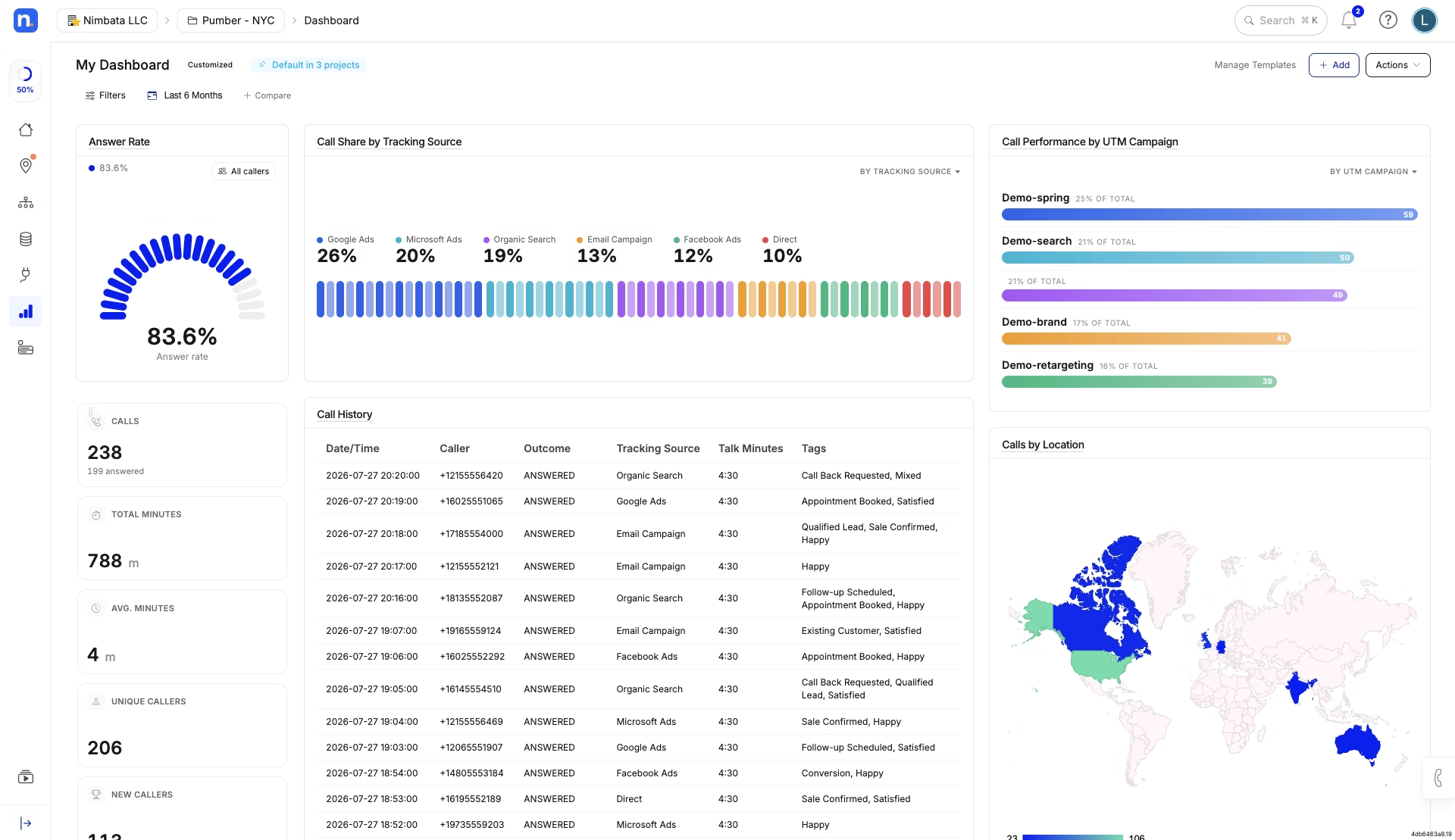
Nimbata Customizable Dashboard via Nimbata
Starting price: $39/month + usage for Pro; $89/month + usage for Marketing; $149/month + usage for Agency. An Entry plan is available at $0 + usage. Annual billing displays lower equivalent prices.
Nimbata focuses primarily on call tracking, marketing attribution, lead analysis and conversation intelligence rather than trying to be a complete contact-center platform.
Its current plans include capabilities such as dynamic number insertion, call flows, AI tagging and scoring, Google Ads and GA4 integrations, form tracking, automations, CRM integrations, API/webhooks and agency management depending on the plan.
Nimbata vs. CTM
| Feature | Nimbata | CallTrackingMetrics |
|---|---|---|
| Pricing | -Starts at $39/mo + usage -Pay only for answered calls | Starts at $79/mo + usage |
| Core Features | -DNI, AI summaries, sentiment tagging -35+ prebuilt reports | -Smart Router -AskAI -Form Reactor |
| Integrations | -20+ integrations -All integrations included in all plans | -40+ integrations -Some integrations limited to higher-tier plans |
| Customer Support | -24/7 live chat with experts -Knowledge base -Guided walkthroughs -Ticket support | -Knowledge base -Live and recorded training -Ticket portal |
| Ease of Setup & Use | -Onboarding assistance included -Prebuilt dashboards for fast ROI | -Guided onboarding available on select plans -Template-based call flows for quicker setup |
| Coverage & Compliance | -Local & toll-free numbers in 100+ countries (incl. the US, Canada, EU, the UK & Australia) -Full HIPAA compliance -Full GDPR compliance | -Phone number coverage in 80+ countries -HIPAA compliance on select plans -GDPR-compliant practices |
| Transparency | -Flat base fee + usage; no hidden add-ons | -Tiered pricing with varying access to features; usage-based billing |
Consider Nimbata when: your main requirement is marketing attribution and call intelligence.
Consider CTM when: you need a broader communications environment with advanced routing, calling and contact-center capabilities.
2. CallRail: CTM alternative for lead classification for agencies & enterprises
Best for: Large Agencies & Enterprise Marketing Teams.
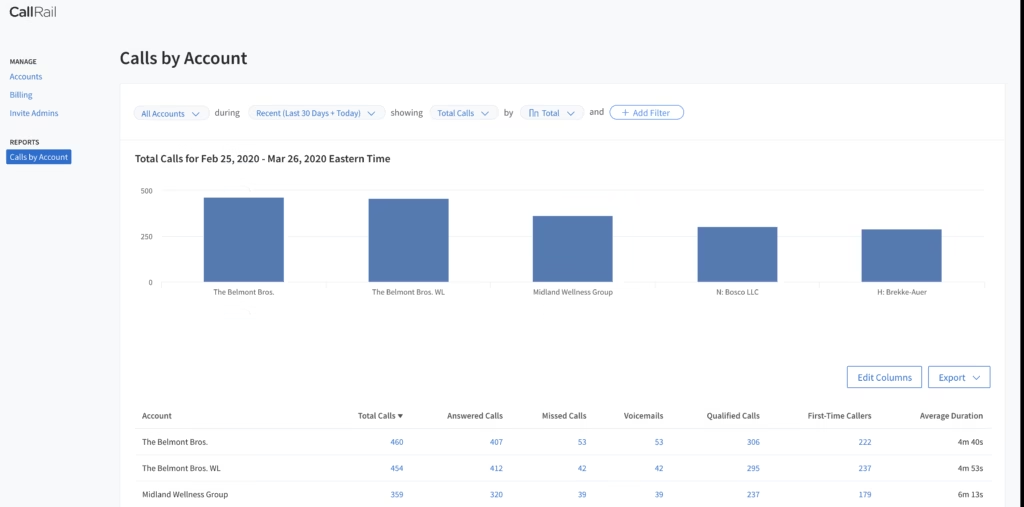
CallRail is one of the most recognized CallTrackingMetrics alternatives, trusted by over 200,000 businesses across the U.S. While it doesn’t serve users in the EU, CallRail packs a powerful set of AI tools for agencies and enterprise teams looking to classify leads faster and scale smarter.
CallRail currently offers four primary Lead Engagement plans: Lead Tracking at $50/month, Lead Tracking Complete at $95/month, Lead Conversion at $150/month, and Lead Conversion Complete at $195/month.
CallRail also charges for usage beyond the included allowances. Its current pricing page lists additional local numbers at $3 each, local minutes at $0.06 each, toll-free numbers at $5 each, toll-free minutes at $0.08 each, SMS at $0.03 each, and other usage-dependent charges.
Here’s what stands out:
- CallRail scans transcripts to highlight the most used keywords in calls and maps them to lead qualification signals.
- With sentiment analysis, CallRail’s AI detects emotional tone in each call, helping marketers spot urgent or frustrated leads without manually reviewing call recordings.
- Before you even answer the phone, Copilot pulls data on the caller, helping reps prepare better and close faster.
- Build lead attribution models across channels with custom reporting, although advanced dashboards may cost extra.
CallRail’s toolset helps marketers spend less time tagging and more time optimizing, but there’s a catch; many features come at an additional cost, and support isn’t always consistent.
CallRail vs. CTM
| Feature | CallRail | CallTrackingMetrics |
|---|---|---|
| Pricing & Plans | -Starts at $55/mo + usage -Add-ons may increase cost quickly | Starts at $79/mo + usage |
| Core Features | -Keyword spotting -Sentiment analysis -Caller Copilot | -Smart Router -AskAI -Form Reactor |
| Integrations | Salesforce, HubSpot, Google Ads (some require higher tiers) | 40+ integrations (some features gated behind premium plans) |
| Customer Support | -Ticket-based support -Knowledge base -Demo request | -Knowledge base -Live/recorded training -Ticket portal |
| Ease of Setup & Use | -Intuitive interface -Some features require setup assistance | -Guided onboarding available -Template-based call flows |
| Coverage & Compliance | -US, Canada, UK and Australia -Not available in the EU -HIPAA on select plans | -Available in 80+ countries -HIPAA & GDPR compliant |
| Transparency | -Pricing not always clear -Costs add up quickly with extras | Tiered pricing, some usage-based add-ons |
CallRail is a powerful CallTrackingMetrics alternative if you’re running big campaigns and need call insights fast. It’s especially handy for lead scoring and pre-call prep. Just be mindful of the extra fees for integrations and add-ons. And if you’re based in the EU, this one’s off the table. For a detailed CallRail’s pricing guide click here.
3. WhatConverts: CTM alternative for lead generation and PPC agencies
Best for: Lead-focused marketers and agencies tracking calls, forms and chats
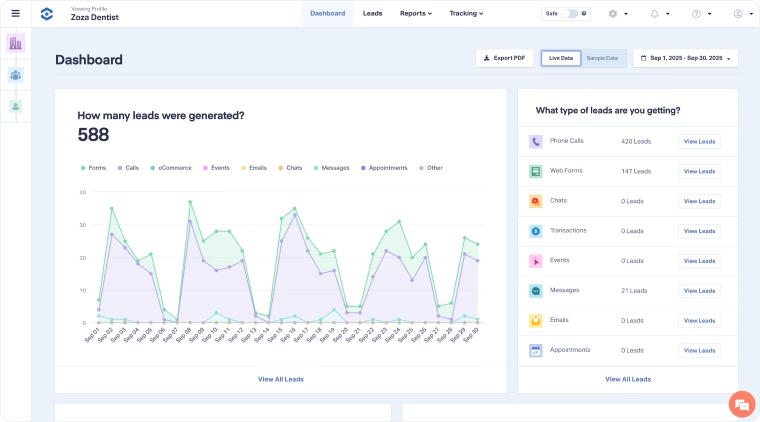
WhatConverts offers several pricing plans based on the level of lead tracking and attribution you need. The Call Tracking plan starts at $30/month, followed by Plus at $60/month, Pro at $100/month, and Elite at $160/month for individual accounts. For agencies managing multiple clients, Agency Plus costs $500/month, Agency Pro costs $800/month, and Agency Elite costs $1,250/month. WhatConverts uses a subscription-plus-usage-credit model, so additional charges can apply when the included monthly usage credit is exceeded.
WhatConverts plan differences
| Capability | Call Tracking | Plus | Pro | Elite |
|---|---|---|---|---|
| Call tracking | ✓ | ✓ | ✓ | ✓ |
| Call recording | ✓ | ✓ | ✓ | ✓ |
| Forms | – | ✓ | ✓ | ✓ |
| Chat | – | ✓ | ✓ | ✓ |
| Campaign/keyword reporting | – | ✓ | ✓ | ✓ |
| Call flows | – | – | ✓ | ✓ |
| Custom reports | – | – | ✓ | ✓ |
| Scheduled reports | – | – | ✓ | ✓ |
| HIPAA tracking | – | – | ✓ | ✓ |
| Customer journey | – | – | – | ✓ |
| Multi-click attribution | – | – | – | ✓ |
WhatConverts also charges for usage such as call minutes, forms, chats and optional services. Its help documentation states that call minutes are rounded up to the nearest full minute and that transcription is an additional $0.02.
Small-business example
Consider a local law firm with:
- 1 business
- 3 tracking numbers
- 150 calls/month
- Average call length of 4 minutes
- 600 tracked call minutes/month
- 40 website forms/month
- Google Ads
- 2 users
- Call recording and transcription
If the business uses the Plus plan at $60/month, the plan includes a $30 monthly usage credit and up to 80 phone-call leads. The firm would therefore have roughly 70 calls beyond the included call-lead volume, although the exact additional charge depends on the applicable usage rates and the mix of numbers, minutes, forms and other tracked activity.
For example, if all 600 call minutes were subject to the published $0.075 additional local-minute rate, the gross minute charge would be about $45 before applying the plan’s included usage credit. Three tracking numbers would also cost $9/month if all three were additional numbers at the published $3 rate. The actual invoice can be lower because the $30 usage credit is applied across eligible usage rather than simply added to the subscription.
This illustrates why a business should not assume that $60/month is the final cost. With 150 calls and 600 minutes, its actual monthly spend could be higher depending on the number of included versus additional resources and the exact usage mix.
Agency example
Now consider a marketing agency managing 15 clients.
Each client generates approximately:
- 100 calls/month
- 300 call minutes/month
- 3 tracking numbers
- 20 forms/month
Across 15 clients, that becomes:
- 1,500 calls/month
- 4,500 call minutes/month
- 45 tracking numbers
- 300 forms/month
For this 15-client scenario, the agency would compare the $500 Agency Plus against the $800 Pro and $1,250 Elite plans based on whether it needs call flows, custom reporting, scheduled reports, HIPAA tracking, customer journey and multi-click attribution.
The agency should also account for usage beyond the included credit. WhatConverts specifically provides account-level usage reporting so agencies can monitor phone numbers, minutes and other usage across individual clients.
4. Invoca: CTM alternative for AI conversational analysis
Best for: Large Agencies, Enterprises, & Contact Centers.
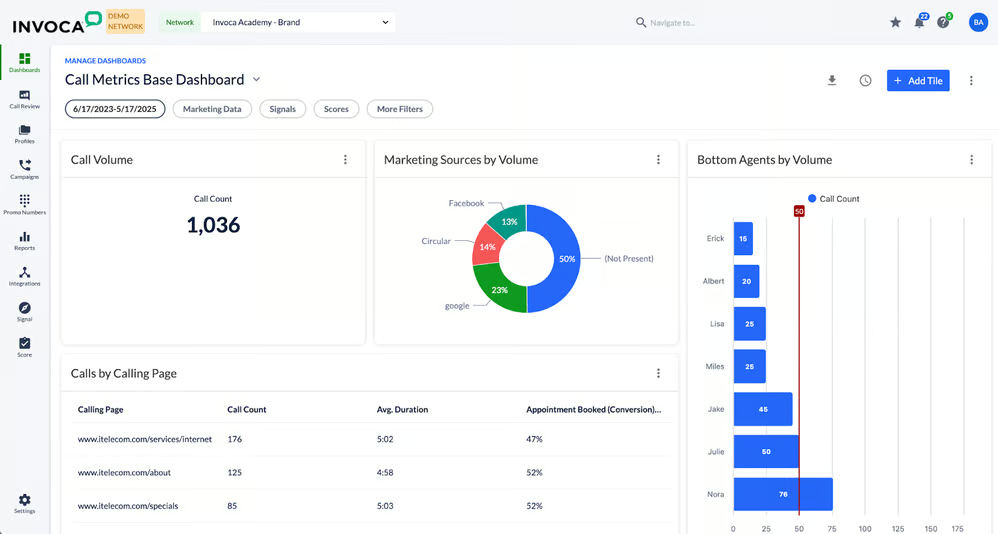
Invoca stands out as one of the most sophisticated call tracking platforms on the market. Built for enterprises and contact centers with high call volumes, Invoca uses machine learning to unlock deep insights from conversations and turn raw dialogue into actionable data.
Invoca publishes plan structures and capabilities but does not publish a standard monthly subscription price.
Its current public pricing includes Pro, Enterprise and Elite tiers, along with Performance plans for pay-per-call programs.
Invoca’s real strength lies in large-scale automation and performance intelligence. But it comes with an undisclosed price tag. Pricing isn’t listed publicly, and many advanced features are sold as paid add-ons.
Invoca vs. CTM
| Feature | Invoca | CallTrackingMetrics |
| Pricing & Plans | -Pricing not disclosed -Add-ons for advanced features | Starts at $79/mo + usage |
| Core Features | -Conversation analytics -Predictive modeling -Agent scoring | -Smart Router -AskAI -Form Reactor |
| Integrations | -Integrates with CRMs and ad platforms (request required) | -40+ integrations (some features gated behind premium plans) |
| Customer Support | -Not clearly stated on website | -Knowledge base -Live/recorded training -Ticket portal |
| Ease of Setup & Use | -Custom enterprise setup -Requires onboarding assistance | -Guided onboarding available -Template-based call flows |
| Coverage & Compliance | -Built for enterprise security -HIPAA-compliant | -HIPAA & GDPR compliant -Available in 80+ countries |
| Transparency | -Quote-based pricing -Custom contracts and pricing models | -Tiered pricing with usage-based add-ons |
Example
A national insurance company may run:
- Paid search
- Display
- Social
- CTV
- Thousands of calls
- Multiple contact centers
- Offline revenue systems
Its requirement is not simply “track which ad generated a call.” It may need to connect advertising, calls, transactions and revenue across a large organization.
That’s the type of deployment where enterprise-oriented platforms such as Invoca become more relevant.
5. RingCentral RingCX: CTM zlternative for contact centers
Best for: Contact centers and omnichannel customer communications
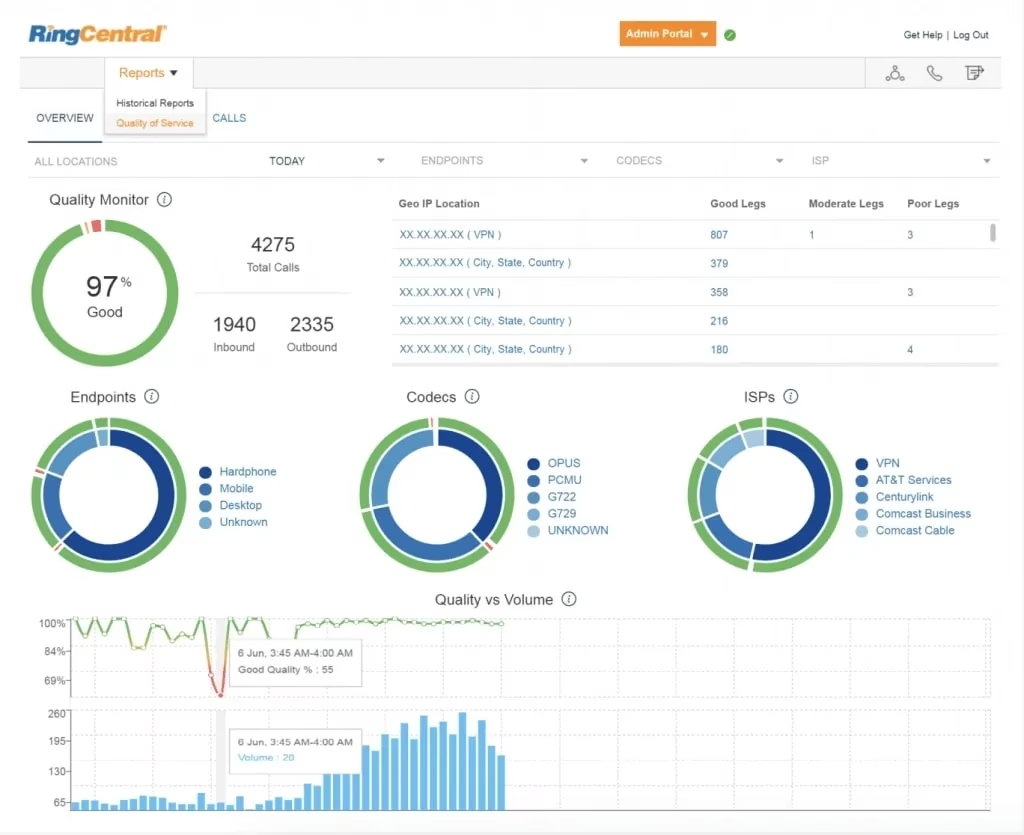
Starting price: RingCentral currently advertises RingCX from $65/user/month, with unlimited minutes and core contact-center and AI features included.
This is an important distinction: RingCX is not simply another marketing attribution tool.
Its emphasis is on:
- Contact-center communications
- Voice
- Digital channels
- Routing
- Outbound dialing
- AI representatives
- Workforce/customer experience
RingCX supports voice plus more than 20 digital channels, according to RingCentral’s current product information.
RingCentral CX vs. CTM
| Feature | RingCentral RingCX | CallTrackingMetrics |
|---|---|---|
| Pricing & Plans | Starts at $65/user/month with unlimited minutes and core contact-center and AI features included | Starts at $79/month + usage; annual billing starts at $65/month |
| Core Features | AI-powered contact center; Voice + 20+ digital channels; AI Agent Assist & Supervisor Assist; Outbound dialing; Workforce engagement & quality management | Smart Router; AI-powered conversation analysis; Form Reactor; Dynamic Number Insertion; Call recording, transcription & scoring |
| Integrations | 50+ essential integrations; 120+ integrations for advanced deployments; CRM and digital-channel integrations | 40+ no-code integrations; Salesforce, Google Ads, GA4 and other marketing/business integrations; API & webhooks |
| Customer Support | Deployment support; Customer support resources; Training and implementation options; Contact-center support | Knowledge base; Live and recorded training; Ticket portal; Standard onboarding |
| Ease of Setup & Use | Designed for rapid contact-center deployment; Integrated agent workspace; RingCentral app integration; Supports distributed teams | Marketing-focused implementation; DNI and tracking-code setup; Template-based call flows; Standard onboarding |
| Coverage & Compliance | Global contact-center capabilities; Voice and digital channels; Enterprise security and compliance options | Phone numbers available in 80+ countries; GDPR and HIPAA compliance; Number porting support |
| Transparency | $65/user/month starting price publicly advertised; Unlimited minutes included in base RingCX pricing | Public plan pricing from $79/month; Usage-based charges for numbers, minutes, SMS and other communications |
Small-business example
A small local business primarily interested in:
“Which Google Ads campaign generated this phone call?”
would probably have a different requirement from a contact center handling:
“How do we route 10,000 customer interactions across agents and channels?”
RingCX is oriented toward the second problem.
Contact-center example
A support organization with:
- 30 agents
- Inbound queues
- Outbound campaigns
- Voice
- SMS/chat/social channels
- AI-assisted workflows
may be better served by evaluating a contact-center platform than a marketing-only call tracking system.
6. CallScaler: CTM alternative service for billing clients
Best for: Lead generators, local businesses and agencies managing multiple clients
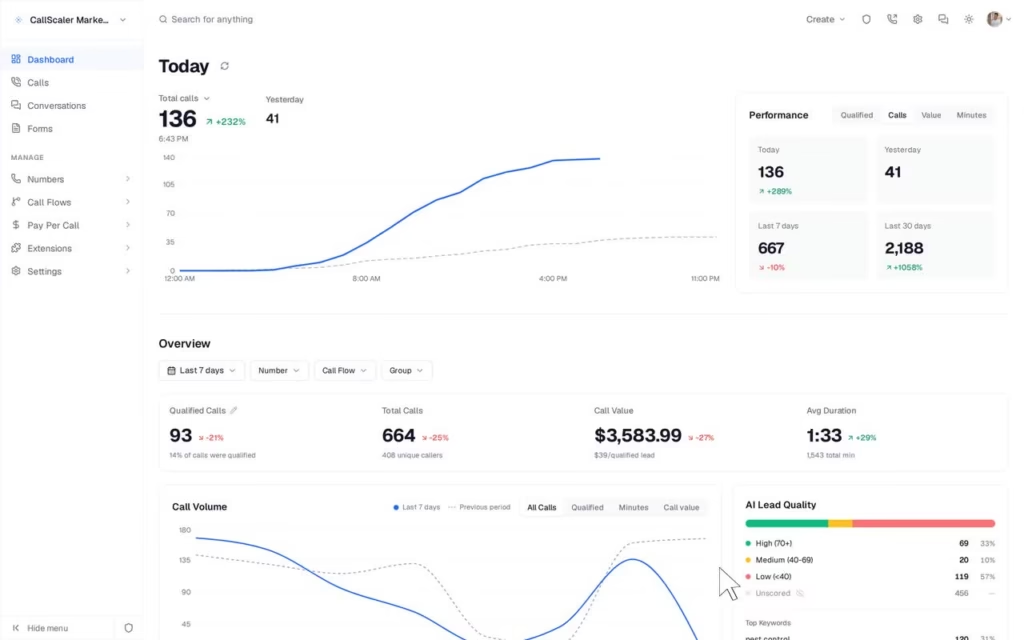
Starting price: $45/month when billed annually + usage for Pro.
Current advertised annual prices are:
- Pro: $45/month
- Agency: $130/month
- Pay Per Call: $400/month
Monthly prices are higher: $65, $195 and $600 respectively.
CallScaler vs. CTM
| Feature/Criteria | CallScaler | CallTrackingMetrics |
|---|---|---|
| Core Focus | – Call tracking & marketing attribution – Pay-per-call and lead generation – AI call intelligence – Simple usage-based billing | – Call tracking & marketing attribution – Advanced routing & lead management – Conversation intelligence – Workflow automation |
| Best For | Lead generators, local businesses, marketing agencies, and pay-per-call networks | Marketing teams, agencies, sales teams, and organizations needing advanced routing and campaign attribution |
| Most Important Limitation | Some advanced capabilities and add-ons, such as white labeling and AI transcription, have separate usage or add-on costs | Higher-tier plans are required for some advanced marketing, routing, automation, and agency features |
| Pricing | Pro: $65/month or $45/month billed annually + usage Agency: $195/month or $130/month billed annually + usage Pay Per Call: $600/month or $400/month billed annually + usage | Marketing Lite: $79/month or $65/month billed annually Marketing Pro: $179/month or $149/month billed annually Sales Engage: $329/month or $274/month billed annually Enterprise: $1,999/month + usage |
| Usage Costs | Local numbers: $0.50/month Toll-free numbers: $2/month Local minutes: $0.045/min Toll-free minutes: $0.055/min SMS: $0.02/message | Local numbers: $2/month Local forwarding: $0.04/min Toll-free numbers: $3/month Toll-free forwarding: $0.055/min SMS: $0.016/message |
| Support | In-app chat and email support; free migration assistance is available | Knowledge base, training resources, onboarding, and ticket-based support |
| Free Trial | 7-day free trial; 30-day money-back guarantee | Trial availability depends on the current plan and signup terms |
| Call Tracking & Attribution | Call tracking, Dynamic Number Insertion (DNI), form tracking, and campaign attribution | Call tracking, Dynamic Number Insertion (DNI), Google Ads attribution, form tracking, and campaign reporting |
| AI & Conversation Intelligence | AI transcription, summaries, lead qualification, lead scoring, and keyword detection | AI-powered conversation analysis, summaries, sentiment analysis, custom AI prompts, call scoring, and keyword spotting |
| Agency Features | Agency plan includes unlimited businesses, unlimited users, and unlimited client portals | Agency-focused features include subaccounts, white labeling, flexible billing, reporting, and developer tools |
CallScaler is a lean, client-focused call tracking solution perfect for marketers who value simplicity and need unlimited users without high costs. It won’t replace CallTrackingMetrics’s automation depth, but for straightforward call tracking and recurring billing, it gets the job done, and then some.
If your agency is just getting started or managing lots of small clients, CallScaler is a worthy contender.
Which alternatives offer AI call analysis?
Most major alternatives now offer some form of AI or conversation intelligence, but the functionality differs.
| Platform | AI capabilities |
|---|---|
| Nimbata | Call classification, sentiment, custom AI notes, ratings and data capture |
| CallRail | Transcription, summaries, sentiment, conversion tagging and coaching |
| CTM | AI prompts, summaries, sentiment and conversation analysis |
| Invoca | Signal AI, summaries, sentiment, custom AI models and quality management |
| RingCX | AI representatives, AI contact-center tools and conversation intelligence |
| CallScaler | AI transcription, summaries, lead qualification and scoring |
The important distinction is what the AI is analyzing and what action it can trigger.
What should you consider before switching from CallTrackingMetrics?
Switching platforms isn’t simply a matter of signing up for another account.
Before migrating, check:
1. Tracking numbers
Determine whether you need to port existing numbers or purchase new ones.
2. Attribution setup
Document:
- Google Ads integrations
- Analytics integrations
- UTM parameters
- Dynamic number insertion
- Campaign rules
- Conversion actions
3. Call flows
Document:
- Business hours
- IVR
- Routing rules
- Ring groups
- Voicemail
- Call recording
- Call forwarding
4. Integrations
List every system receiving CTM data:
- CRM
- Analytics
- Advertising platforms
- Reporting tools
- Webhooks
- Data warehouse
5. Historical data
Decide whether historical call data must remain accessible after the migration.
6. Reporting
Recreate the reports stakeholders actually use before shutting down the old platform.
When should you stay with CallTrackingMetrics?
An alternatives article should not assume that switching is always the right answer.
CallTrackingMetrics may remain a good fit if you need:
- Advanced call routing
- Softphone functionality
- Marketing attribution
- Form tracking
- Conversation analytics
- Outbound calling
- Agency functionality
- Contact-center workflows
- Extensive integrations
- Complex communication workflows
CTM’s current feature set includes dynamic number insertion, call recording/transcription, intelligent routing, softphone functionality, form tracking, workflow automation, AI conversation analysis and agency tools.
If your organization already uses these capabilities extensively, switching solely to reduce the subscription price may not make sense.
FAQ about CallTrackingMetrics alternatives
The answer depends on the use case. Nimbata and CallRail are options for marketing-focused call tracking, WhatConverts is designed around calls and other lead types, Invoca targets enterprise attribution, RingCX focuses on contact centers and CallScaler targets lead-generation and agency workflows.
It’s a powerful platform, but if you’re not using its full suite of tools, it may be more than you need. Consider alternatives with simpler pricing or more intuitive UIs.
Yes, CallTrackingMetrics comes with a built-in softphone available via browser and mobile app, making it a strong choice for teams needing unified communications.
Among the platforms compared here, WhatConverts currently advertises a $30/month starting plan, Nimbata starts at $39/month + usage, and CallScaler starts at $45/month when billed annually + usage. However, starting prices do not represent the total cost for a specific call volume or feature set.
CallRail currently starts at $50/month, while CallTrackingMetrics starts at $79/month when billed monthly. Both can charge usage fees, so the difference in advertised subscription prices does not necessarily equal the difference in your final monthly bill.
Nimbata, WhatConverts, CTM and CallScaler all have agency-oriented capabilities. Compare client-account management, user limits, reporting, white labeling, API access, forms, CRM integrations and billing before choosing.
Small businesses should generally compare platforms based on their actual needs. Nimbata, CallRail and WhatConverts are relevant when the requirement is primarily marketing attribution and lead tracking. CTM becomes more relevant when the business also needs advanced routing, communications or contact-center functionality.
Nimbata, CallRail, CTM, Invoca, RingCX and CallScaler all advertise AI or conversation-intelligence capabilities, but they focus on different use cases. Compare the specific capabilities, such as summaries, sentiment, classification, coaching, scoring and automated actions, instead of treating all AI features as equivalent.
Yes. CTM’s current pricing includes usage-based charges, including minute-based charges for calls. Its public pricing currently lists local call-forwarding minutes at $0.04/minute and toll-free call-forwarding minutes at $0.055/minute, alongside other usage charges.
In most cases, phone numbers can be ported between supported telecommunications providers, but the exact process depends on the destination provider, country and number type. Before cancelling CTM, confirm porting eligibility and keep the existing service active until the transfer is complete.