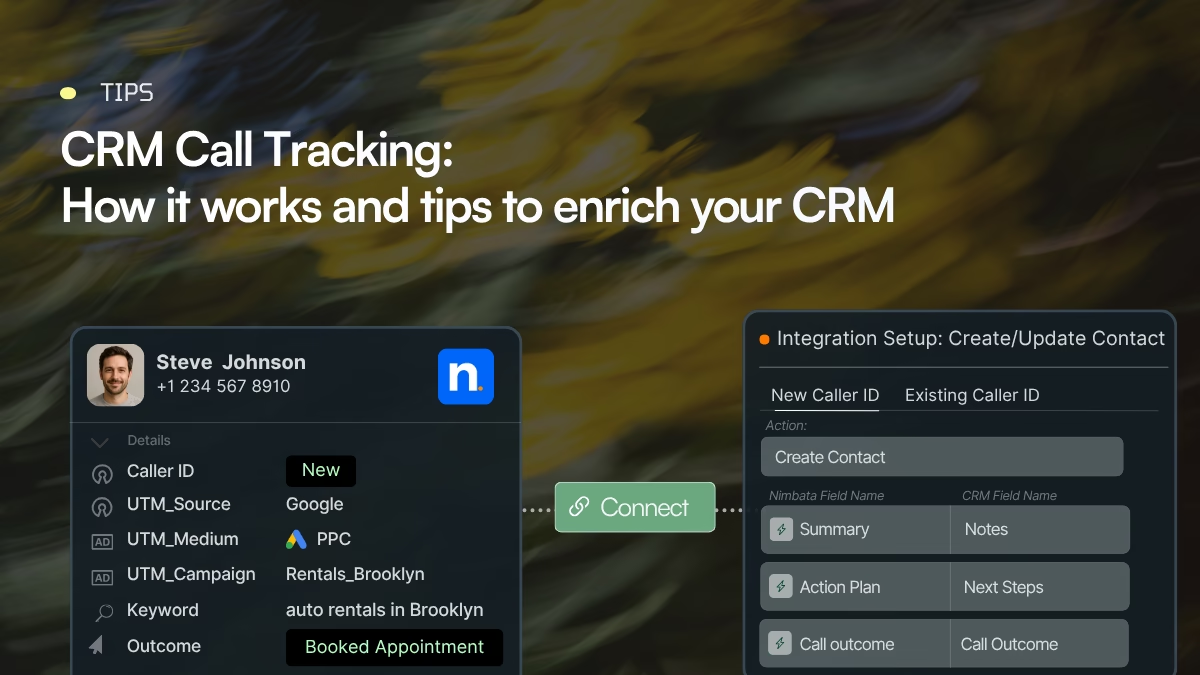
CRM call tracking connects every inbound phone call to a record in your CRM, together with the marketing data behind it: the source, campaign, keyword, landing page and click ID. CRMs like HubSpot, Salesforce, Pipedrive and Zoho can log calls, but they can’t tell which ad or keyword made the phone ring. A dedicated call tracking platform fills that gap. It uses dynamic number insertion to attribute each call, AI to analyse and qualify the conversation, and then sends the results to the right CRM record. That way, phone leads can be reported, scored and turned to revenue just like form fills.
A CRM may tell you that a lead exists, which pages they viewed, which emails they opened, and what stage they are in. But unless your phone system and CRM are connected properly, the CRM may not tell you which marketing campaign generated the call, what happened during the conversation, whether the caller was qualified, or how the call affected the opportunity.
That is the problem CRM call tracking solves.
CRM call tracking connects phone calls with CRM records and marketing attribution data. For each call, it records who called, where they came from (source, campaign, keyword, landing page), how long the call lasted, and how it went. It can also save the recording and transcript and rate the lead’s quality. All of this is then used to create or update records in your CRM automatically.
In simple terms:
Marketing source → website visit → tracked phone call → call intelligence → CRM record → lead qualification → opportunity → revenue
This guide explains how that process works, what data can be transferred to a CRM, the difference between call logging and call tracking, and how a dedicated call-tracking platform can enrich HubSpot, Salesforce, Pipedrive and Zoho.
What is CRM call tracking?
CRM call tracking is the process of capturing information about inbound phone calls and connecting that information to customer records, marketing sources and sales activity inside a CRM.
Traditional CRM call logging tells you that a call happened. On the other hand, CRM call tracking dive deeper to insights about the caller profile data, the campaign that drove the lead and what should happen next to follow-up.
A call-tracking platform can capture information such as:
| Data category | Examples |
|---|---|
| Caller | Phone number, caller name, location |
| Marketing source | Google Ads, organic search, Meta, referral, direct |
| Campaign | Campaign name, ad, keyword, UTM campaign |
| Website journey | Landing page, pages visited, action page |
| Call | Date, time, duration, tracking number, destination |
| Call outcome | Answered, missed, qualified, booked, converted |
| Conversation | Recording, transcript, summary |
| Lead intelligence | Intent, tags, lead score, qualification |
| Revenue | Lead value, opportunity value, sale value |
| CRM action | Create contact, update contact, create lead, update deal, log activity |
How does CRM call tracking work?
CRM call tracking is easier to understand as a data pipeline than as a single feature. Here is a basic flow:
1. A prospect interacts with marketing
A person searches Google, clicks an advertisement, visits your website, or arrives through another marketing channel.
2. The visitor is assigned a tracking number
Dynamic number insertion (DNI) can display a unique phone number based on the visitor’s source or session. DNI ties the number shown to a visitor back to the session, campaign and keyword that generated the visit.
3. The prospect calls
The tracking platform receives the call and knows which tracking number was called.
4. Attribution data is attached to the call
The platform links each call to where it came from: the source, medium, campaign and keyword, plus the click ID, landing page, visitor session and the tracking number that was dialled.
5. Call data is captured
For every call, the system records the caller’s number, the number they reached, the time, how long the call lasted and its status. It can also keep the outcome, a recording, a transcript, any keypad choices and post-call survey answers.
6. The conversation can be analyzed
AI or conversation-intelligence tools can analyze the call identify information such as:
- buying intent
- lead quality
- product interest
- appointment requests
- sales objections
- call outcome
- important topics
- estimated lead value
7. The caller is matched to the CRM
If the phone number already exists, the call can be associated with the existing contact or lead. For the new callers, the integration can create a new CRM record.
8. The CRM record is enriched
The CRM can receive both the call and the context around it.
9. Automation takes over
The call can automatically update your CRM, route the lead to the right person and kick off follow-up actions, so nobody has to do it by hand. In this way you can separate qualified leads from spam, score each lead and move it to the right lifecycle stage.
The important point is that the CRM does not simply receive a phone call. It receives a structured set of information about the customer and the event.
CRM call tracking data flow: what actually happens to the data?
Consider a prospect who searches Google for:
“emergency plumber near me”
They click a paid search advertisement, visit your website and call the number displayed on the page.
Without call tracking, your CRM might receive:
John Smith
Phone: +1 XXX XXX XXXX
Call duration: 4:32
That tells your sales team that John called.
With CRM call tracking, the record could contain:
| Stage | Information captured |
|---|---|
| Marketing | Google Ads |
| Campaign | Emergency Plumbing |
| Keyword | emergency plumber near me |
| Click ID | GCLID |
| Landing page | /emergency-plumber |
| Tracking number | +1 XXX XXX XXXX |
| Caller | John Smith |
| Call duration | 4:32 |
| Call status | Answered |
| Recording | Recording URL |
| Transcript | Transcript URL/text |
| AI outcome | Qualified lead |
| Intent | Emergency service |
| Lead value | $450 |
| CRM action | Create/update lead |
| Sales action | Schedule technician |
Now the CRM is no longer just a database of contacts. It brings marketing attribution and sales conversations into one place.
CRM call logging vs CRM call tracking
These terms are often used interchangeably, but they solve different problems.
| Capability | CRM call logging | CRM call tracking |
|---|---|---|
| Records that a call happened | ✓ | ✓ |
| Caller information | ✓ | ✓ |
| Call duration | ✓ | ✓ |
| Call notes | ✓ | ✓ |
| Call outcome | Usually | ✓ |
| Recording | Sometimes | ✓ |
| Transcript | Sometimes | ✓ |
| Marketing source | Usually limited | ✓ |
| Campaign attribution | Usually limited | ✓ |
| Keyword attribution | Usually limited | ✓ |
| Landing-page attribution | Usually limited | ✓ |
| Click IDs | Usually limited | ✓ |
| Dynamic tracking numbers | No | ✓ |
| New vs. returning caller | Limited | ✓ |
| AI call analysis | Depends on platform | ✓ |
| Lead scoring from conversations | Depends on platform | ✓ |
| Revenue attribution | Limited | ✓ |
| Marketing optimization | Limited | ✓ |
CRM call logging
Call logging primarily records the interaction.
For example:
John called Sarah on September 29.
Duration: 12 minutes.
Notes: Discussed pricing.
Salesforce’s native “Log a Call” function, for example, creates a completed activity/task so users can document a customer communication.
Pipedrive similarly allows calls to be logged as activities, with notes and outcomes depending on the calling method and configuration.
CRM call tracking
Call tracking adds marketing and behavioral context.
For example:
John came from Google Ads → Campaign: Emergency Plumbing → Keyword: emergency plumber near me → visited /emergency-plumber → called tracking number X → spoke for 12 minutes → AI classified the call as qualified → estimated lead value $450.
Why CRM call tracking matters for marketing attribution
Phone calls create a blind spot in digital marketing. When calls aren’t connected to your attribution data, you can’t see which channels, campaigns, or keywords are driving valuable conversations.
You may know how many calls you’re getting, but not where they came from, which ones became qualified leads, or which generated revenue.
A CRM call tracking integration solves this problem by automatically creating log data and keeping track of the source that led to the call. You will have clear visibility into which marketing channels, campaigns and efforts generate the most high-quality leads and what happened to those leads afterward.
A practical CRM field-mapping example
Instead of dumping all call information into one notes field, map it to structured CRM properties.
| Nimbata data | CRM property | Example |
|---|---|---|
| Caller number | Phone | +1 555 123 4567 |
| Caller type | Custom field | New caller |
| Source | Lead source | Google Ads |
| Campaign | Campaign | Emergency Plumbing |
| Keyword | Custom field | emergency plumber |
| Landing page | Custom field | /emergency-plumber |
| Call duration | Call activity | 04:32 |
| Call outcome | Call outcome | Qualified |
| Lead score | Lead score | 85 |
| Intent | Custom field | Emergency service |
| Recording | Activity/URL | Recording link |
| Transcript | Activity/URL | Transcript link |
| AI summary | Notes | Customer needs same-day service |
| Lead value | Deal/value | $450 |
The goal is to make every CRM record actionable. Nimbata’s native HubSpot integration lets you choose what goes into each call activity. You can map call data, marketing source and AI-generated fields (like call rating, intent tags and outcome) to existing HubSpot properties, or to custom fields you create for it.
CRM tools with call tracking capabilities
The major CRM platforms approach calling differently. Some have native calling or telephony capabilities. Others rely heavily on marketplace or third-party calling integrations. And none of those capabilities should automatically be confused with marketing call tracking.
Here’s what each CRM covers on its own, and where call tracking adds value.
| HubSpot | Salesforce | Pipedrive | Zoho CRM | |
|---|---|---|---|---|
| Native calling | Yes, built-in calling tool | Yes, through Sales Dialer or Salesforce Voice (add-ons) | No built-in dialer. Click-to-call and mobile app calling only | Yes, through Zoho Voice or PhoneBridge telephony integrations |
| Call logging | Automatic for HubSpot and integrated providers | Automatic with Salesforce telephony or integrated providers | Automatic from the mobile app or Marketplace calling apps | Automatic for inbound and outbound calls |
| Recording | All plans | Through the telephony provider | Only through third-party apps | Through Zoho Voice or the connected provider |
| Transcription and AI | Transcripts and AI summaries for Sales Hub or Service Hub Professional/Enterprise seats | Einstein Conversation Insights: summaries, objections, next steps (Sales Cloud editions, hour limits apply) | None natively. Depends on the calling app | Zia transcription on Professional and above, with most providers |
| Where call tracking adds value | Maps source, keyword and AI call scoring to contact properties and triggers workflows | Ties calls to campaigns and opportunities for revenue reporting | Fills the biggest gap: calling, recording and attribution in one | Adds attribution and qualification on top of built-in telephony |
The exact capabilities and plan requirements change, so implementation should always be checked against the current vendor documentation. HubSpot currently supports reviewing recordings from its calling tool and integrated third-party providers, with transcription and AI-generated call summaries available for specified Professional and Enterprise seats. Zoho provides built-in telephony and can automatically log inbound and outbound calls, while its telephony documentation also describes recording and AI transcription/insights.
HubSpot
HubSpot already covers a lot of the calling workflow. Reps can make and receive calls from the CRM, every call is logged on the contact record, and recordings are available on all plans. With Sales Hub or Service Hub Professional or Enterprise seats, calls are also transcribed and summarised by AI. That’s a strong setup for any team that wants phone conversations visible next to emails, meetings and deals.
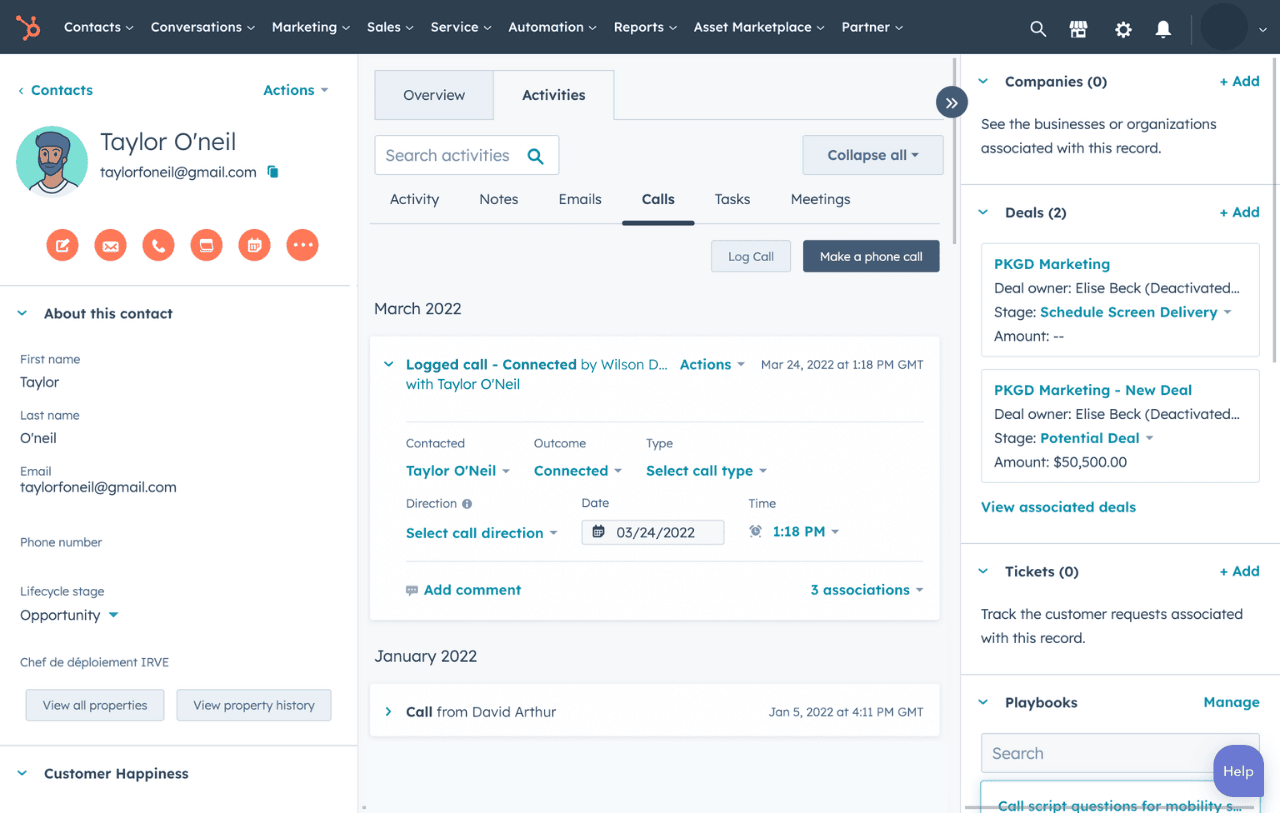
But making calls through your CRM isn’t the same as attributing those calls to marketing.
HubSpot knows what happened during the call. It doesn’t know what happened before it. When someone clicks a Google Ads ad, browses a few pages and then dials the number on your site, that journey isn’t connected to the call. The contact usually lands in HubSpot with a generic source, such as offline conversions or direct, rather than the campaign that brought them in.
A third-party call-tracking platform can add their source, medium, campaign, keyword, landing page and Google Click ID. It passes that data into HubSpot with the call, along with the recording and any AI analysis.
That changes what you can do inside HubSpot:
Better Google Ads bidding: with the click ID stored on the contact, qualified calls and closed deals can go back to Google Ads as offline conversions and Smart Bidding then optimizes for revenue.
Qualified leads: AI scoring and call outcomes can be mapped to contact properties, so you can separate sales opportunities from spam, support calls and wrong numbers.
Workflow triggers: HubSpot workflows can trigger on those properties to assign the lead, update the lifecycle stage or create a follow-up task.
Salesforce
Salesforce has robust activity management. Calls, emails and meetings are captured in the lead details, and teams using Sales Dialer or a partner telephony provider can log calls automatically. With Einstein Conversation Insights, recorded calls can also be summarized, with objections and next steps pulled out.
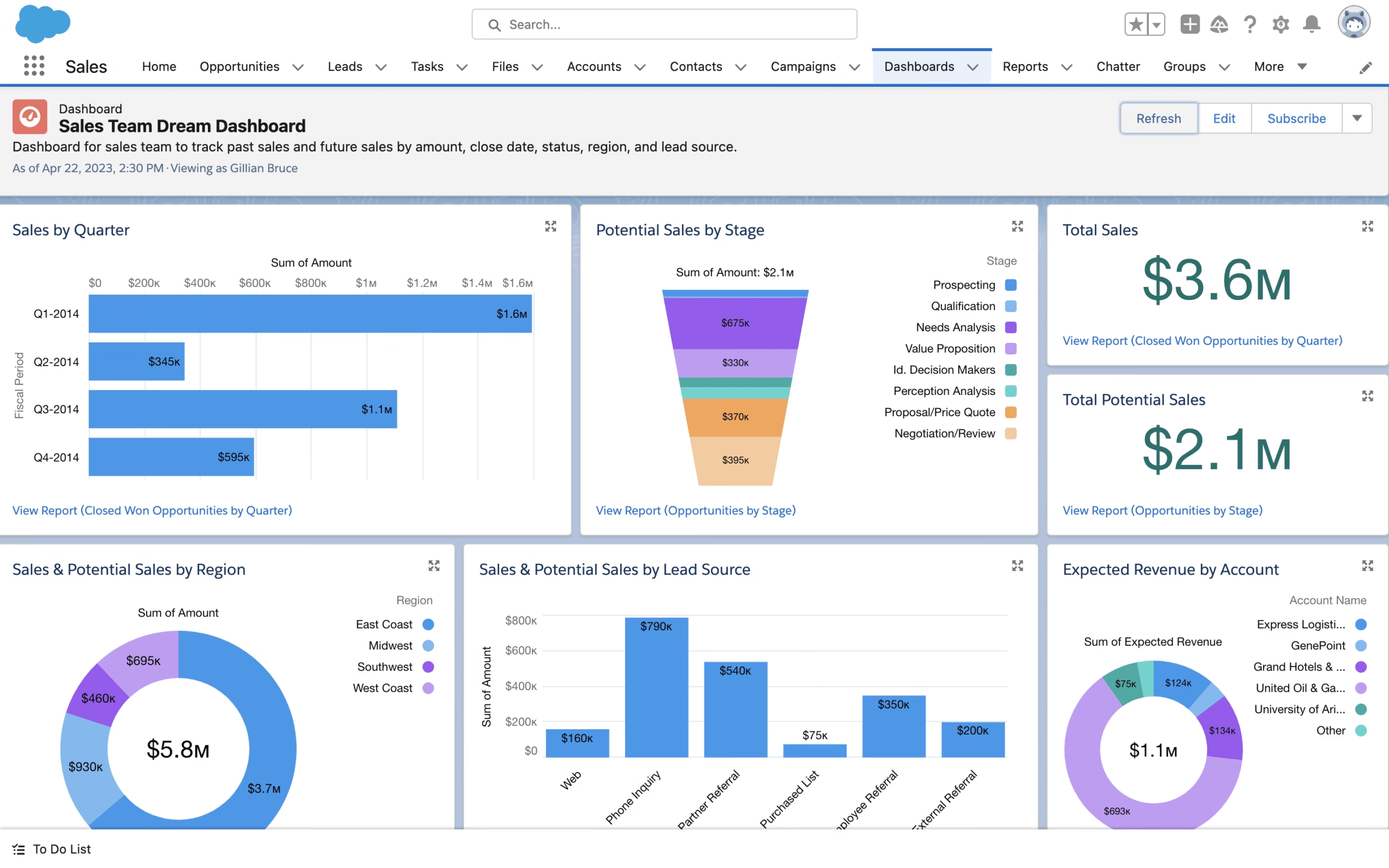
[Sales dashboard source: Salesforce]
Although, the native Log a Call feature can provide data about the interaction create a completed task that documents a conversation.
Attribution insights about the campaign, keyword and the landing page that drove the lead are missing. That makes it harder to identify real sales opportunities and the sources worth investing in.
Without that context, phone leads usually end up with a manually chosen Lead Source. Because it’s a picklist reps can edit, it’s often the first field to be guessed or overwritten. Your campaign reports then undercount phone leads, or credit them to the wrong channel.
With a dedicated call tracking platform, source data is written to Salesforce automatically from the caller’s session, so nobody has to choose it after the call. Calls can be tied to campaigns and followed through to opportunities, and call scoring keeps spam out of the CRM. With the click ID saved on the record, qualified calls and won deals can also go back to Google Ads as offline conversions, so your bidding learns from revenue rather than call volume.
Pipedrive
Pipedrive is designed around sales activities, contacts, organizations and deals. Its current mobile functionality supports call logging, notes and outcomes, while its calling ecosystem also includes third-party providers. Pipedrive explicitly notes that it does not offer a built-in calling integration in its standard web platform and supports calling through marketplace applications.
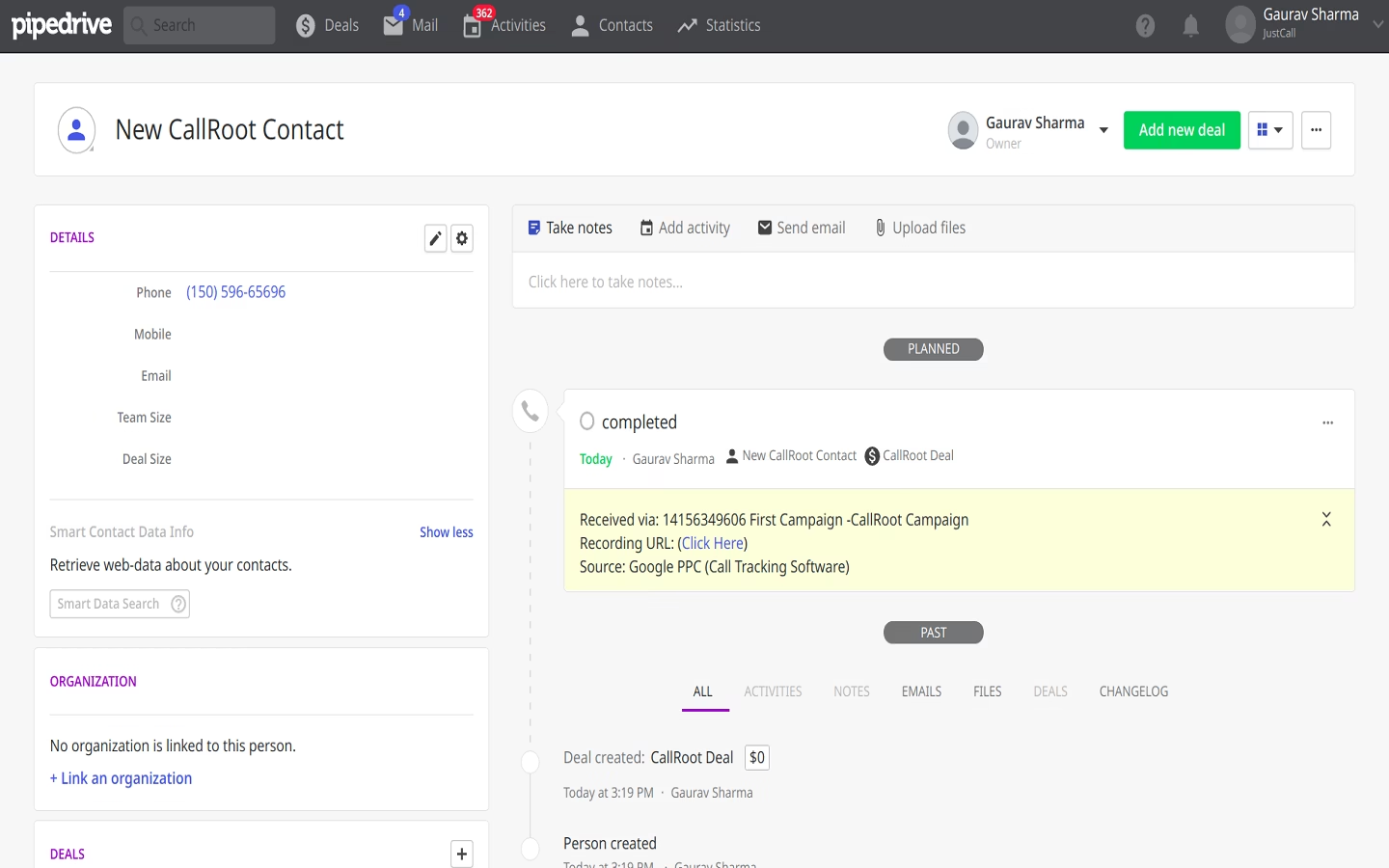
So, Pipedrive can store the sales activity, while a dedicated call-tracking platform can add the acquisition and conversation context.
With the recording and transcript of each call, you can enrich the conversation data in Pipedrive. AI analysis can pick out the caller’s intent, the product or service they asked about, any objections and the outcome. It can then score the lead and pass that information to the deal. Reps start their follow-up with the full context instead of a blank activity, and managers can see which calls turned into real opportunities and which campaigns brought them in.
Zoho CRM
Zoho CRM has more native telephony functionality than simply recording a call activity. Its current documentation describes inbound/outbound calling, automatic call logging, caller identification, call recording and telephony workflows.
That makes Zoho capable of managing the phone interaction itself.
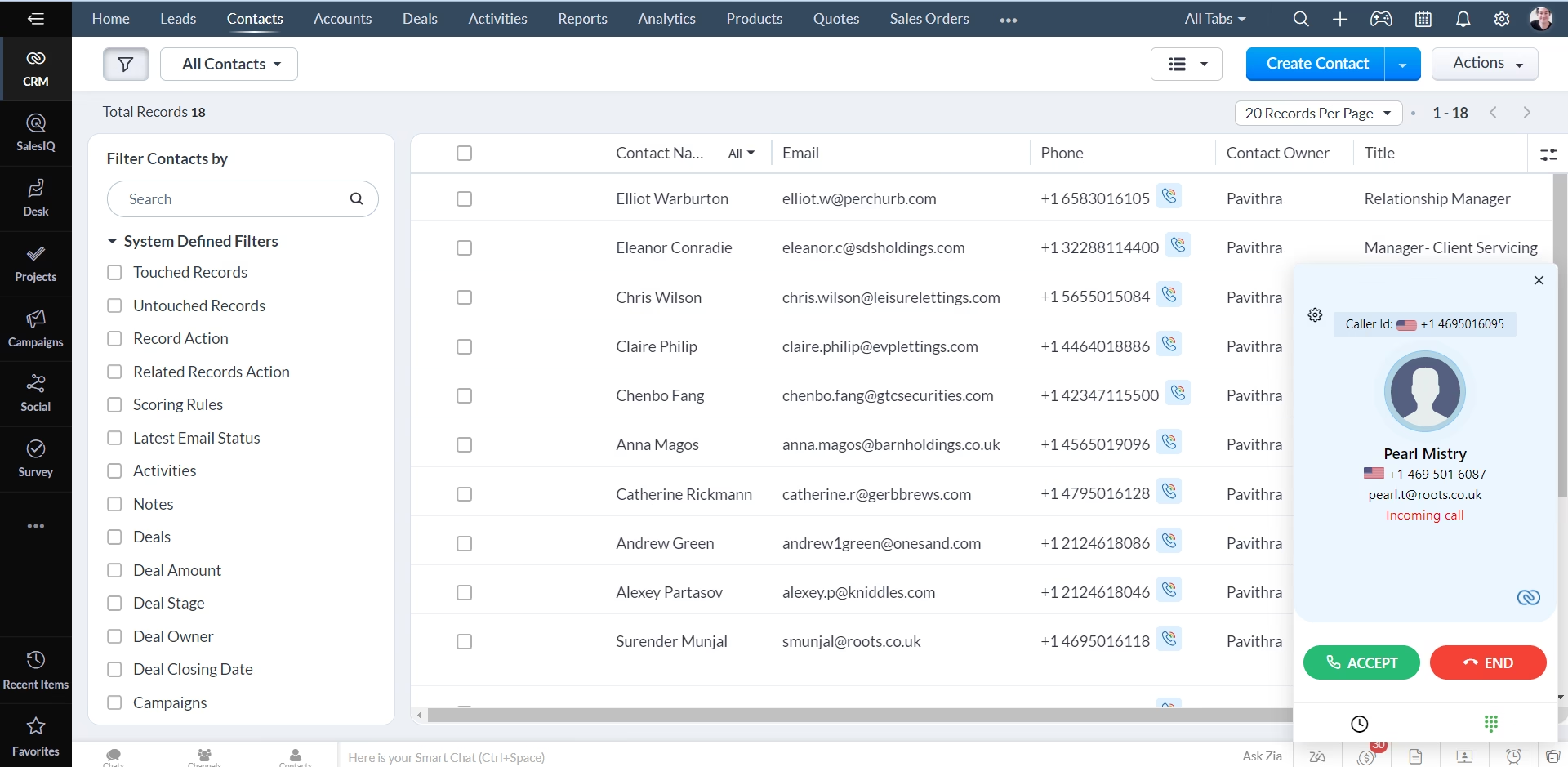
[Zoho Voice source image: Zoho CRM]
A dedicated call-tracking platform can still add another layer. It shows where each call came from and which campaign or keyword generated it. It also tells you whether the caller is new or returning, and whether the conversation was a qualified lead or just noise.
If you need more details about how to setup call tracking for Zoho, click here.
Native CRM calling vs dedicated call tracking
The point is not about choosing between a CRM and call tracking, but knowing how to combine two different tools. The CRM remains the system of record for customers, leads and opportunities. The call-tracking platform specializes in capturing and interpreting phone interactions.
| Function | CRM | Dedicated call-tracking platform |
|---|---|---|
| Contact management | ✓ | – |
| Lead management | ✓ | – |
| Pipeline | ✓ | – |
| Deal management | ✓ | – |
| Sales activities | ✓ | Sometimes |
| Phone calls | ✓/integration | ✓ |
| Dynamic number insertion | Usually not core | ✓ |
| Marketing call attribution | Limited/varies | ✓ |
| Keyword attribution | Limited/varies | ✓ |
| Campaign attribution | ✓/enrichment | ✓ |
| Call recording | Depends | ✓ |
| Transcription | Depends | ✓ |
| AI call classification | Depends | ✓ |
| Call scoring | Depends | ✓ |
| Lead-quality detection | Depends | ✓ |
| CRM enrichment | ✓ | ✓ |
| Marketing automation | ✓ | Can trigger it |
| Revenue attribution | ✓/enrichment | ✓/enrichment |
The two systems therefore play different roles.
Example 1
A homeowner searches:
“AC repair near me”
They click a Google advertisement and call to home services business.
The call-tracking system identifies:
- Google Ads
- campaign
- keyword
- landing page
- caller
- call duration
The conversation is analyzed and classified as “Qualified – emergency repair”
The CRM receives the caller and creates a lead.
A workflow assigns the lead to the local sales team.
The result? Marketing can connect the phone lead to the advertising campaign, while sales immediately sees that the caller needs urgent service.
Example 2
A business operates 20 locations.
The marketing team needs to know which location and campaign generated qualified calls.
Call tracking can associate each call with:
- location
- tracking number
- campaign
- source
- caller
- outcome
The CRM can then route the lead to the appropriate location or sales team.
How your CRM data can be enriched using third-party call tracking tools
Your CRM probably already stores names, phone numbers, lead sources, deals and sales activities. What it usually misses is the context behind an inbound call: what brought the person to call and what happened on the call.
Third-party call tracking tools fill that gap. They connect each call to its marketing source, the caller’s details and an analysis of the conversation, then send that data to your CRM. If the caller already exists, their record is updated. If it’s their first call, a new contact or lead is created with full attribution from the start.
In practice, a call can add four layers of data to a CRM record:
- Attribution: source, medium, campaign, keyword, landing page and click ID, so phone leads are credited to the campaign that produced them.
- Caller context: caller number, location, whether they’re new or returning, and which tracking number or business location they called.
- Conversation insights: recording, transcript, intent, products or services mentioned and the call outcome.
- Qualification: a lead score or quality tag that separates sales opportunities from spam, support calls and wrong numbers.
To keep that data reliable, map call tracking values to their own fields rather than overwriting fields your team edits by hand, such as Lead Source. Then you can always see the original attribution, even after a rep updates the record.
The result is a CRM that tells you not only who called, but where they came from, what they wanted, whether they were qualified and what your team should do next.
Best practices for enriching CRM data with call tracking
To make enrichment useful, establish a clear data model before connecting your systems.
- Map fields deliberately. Store campaign, call outcome, lead qualification and other important attributes in structured CRM properties wherever possible.
- Match existing records carefully. Use appropriate identifiers and matching rules to reduce duplicates and avoid updating the wrong contact.
- Separate call activity from contact attributes. A contact’s original source, for example, is not necessarily the source of every subsequent call. Preserve call-level attribution so that repeat interactions remain distinguishable.
- Use conditional syncing. Decide whether every call should be logged, whether only qualified calls should create leads, and how missed calls or existing customers should be handled.
- Make enrichment actionable. Use the new fields in reports, lead scoring, assignment rules and follow-up workflows instead of collecting data that nobody uses.
- Validate the entire data flow. Test attribution capture, caller matching, field mapping, activity creation and workflow execution with real test calls.
Ultimately, third-party call tracking helps turn your CRM from a record of customer interactions into a more complete view of the customer journey. By connecting marketing source, phone conversation, lead qualification and sales outcomes, your team can make better decisions about which leads to prioritize and which marketing activities generate meaningful business results.
What should trigger a CRM update?
Not every call deserves the same treatment.
A useful CRM call-tracking implementation can use conditions.
| Condition | Possible CRM action |
|---|---|
| First-time caller | Create lead |
| Existing caller | Update contact |
| Call > 60 seconds | Log call |
| Qualified call | Create opportunity |
| Appointment booked | Update lifecycle stage |
| High-value call | Notify sales |
| Missed call | Create follow-up task |
| Spam/test call | Do not create lead |
| Existing customer | Update contact activity |
| Specific campaign | Add campaign field |
| AI detects buying intent | Increase lead score |
Triggering workflows in a dedicated call tracking platform helps you optimize every call before pushing it into the CRM. In this way, you have useful data into the right CRM records and clear reporting.
Nimbata currently supports trigger logic based on conditions including source, duration, caller type and AI-detected outcomes.
Frequently Asked Questions
CRM call tracking connects phone calls to CRM records and marketing attribution data. It can capture caller information, marketing source, campaign, keyword, call details, recordings, outcomes and conversation intelligence, then use that data to create or enrich CRM records.
A tracking number is associated with a marketing source or website session. When someone calls, the tracking system captures the call and its attribution data, analyzes the interaction when enabled, matches the caller to a CRM record and sends the relevant information into the CRM.
Yes, you can track calls in your CRM. A call tracking software can integrate with your CRM and send data related to the marketing action that drove the call to your CRM.
Call logging records that a call occurred. Call tracking adds context such as marketing source, campaign, keyword, landing page, caller type, call outcome and conversion information.
Yes, when the call-tracking setup captures the relevant Google Ads attribution information and passes it into the CRM. Depending on the implementation, this can include click IDs, campaign and keyword information.
Yes. Many CRM/call-tracking integrations can create a new lead or contact when an inbound call comes from a number that does not already match a CRM record. Nimbata’s current HubSpot, Salesforce, Pipedrive and Zoho integrations support new-record creation workflows.
Yes. Caller identification can be used to match an inbound call to an existing CRM record and add the new call activity, attribution and other configured fields.
Yes. AI can extract structured information from conversations, including summaries, intent, tags, outcomes and lead-quality indicators. That information can then be mapped to CRM properties or used to trigger workflows.
Not necessarily.
If you only need sales representatives to make calls and keep activity records, native CRM calling may be sufficient.
A dedicated call-tracking platform becomes more useful when you need marketing attribution, dynamic numbers, keyword-level attribution, detailed inbound-call analysis, call classification, lead scoring or advanced CRM enrichment.
Yes. Conditional integrations can be configured to send calls based on criteria such as duration, source, outcome, tags or AI classification. Nimbata currently documents this type of trigger-based CRM synchronization.
Yes. The call itself needs to be connected to the appropriate lead/contact/opportunity and the eventual commercial outcome needs to be recorded. This creates the data chain required to connect marketing source → call → opportunity → revenue.
No, call tracking primarily answers where the call came from and what happened to the call.
Conversation intelligence analyzes what was said during the call.
They work well together because attribution explains where the lead came from, while conversation intelligence explains what the lead wanted and whether the conversation was valuable.