INTEGRATIONS / Cometly

Cometly

Send call conversion data to Cometly to track ROI and improve the performance of your ad campaigns.

Why Cometly + Nimbata?

Automatically analyze ad performance, capture call outcomes, and gain a comprehensive view of the customer journey.

Call outcomes-Tags- AI insights from Nimbata directly to Cometly
Conversion accuracy

Every tracked phone call automatically sends a Contact event to Cometly, ensuring all call data is captured without manual effort.

Conditional sync logic- Choose when to fire Cometly Integration with custom triggers
Conditional conversion logic

Automatically push call conversions to Cometly only when they meet your criteria — like caller type, call duration, or AI-powered classifications.
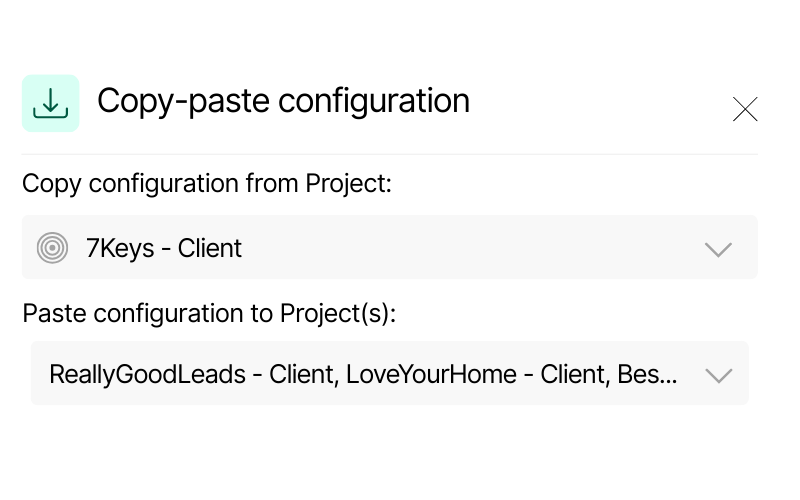
Screenshot of Nimbata’s copy-paste configuration feature. It displays a source project “7Keys – Client” and options to paste configuration into multiple Dynamics projects, including “ReallyGoodLeads – Client” and “LoveYourHome – Client.”
Scalable configuration

Replicate your Cometly sync rules across multiple campaigns in seconds — eliminating repetitive manual setup.

Call Tracking for Cometly integration capabilities

(that help you launch, test, and optimize ad strategies faster)

Cometly automation-Real time performance

Real-time performance across channels, effortlessly

Every call tracked in Nimbata instantly generates or updates a contact event in Cometly — keeping your campaign data complete and always up to date.

This ensures your ROI reports always reflect the most accurate, real-time call conversions.

Push Attribution data such as GCLID, Click ID and Keyword from Nimbata to Cometly

Rich marketing attribution data

Seamlessly feed call outcomes into Cometly to see exactly who called, where they came from, what was discussed, and whether it was a qualified lead.

No guesswork. Clear performance insights.

AI call tracking - enrich your ad's data in Cometly with Nimbata's AI

AI-driven call intelligence

Nimbata’s AI automatically tags, qualifies, and assigns values to calls, then syncs them into Cometly for smarter attribution.

Know which calls are worth your ad spend.

Have call data flowing into your Cometly account instantly — no hassle

Cometly meets real-time call intelligence

HOW IT WORKS
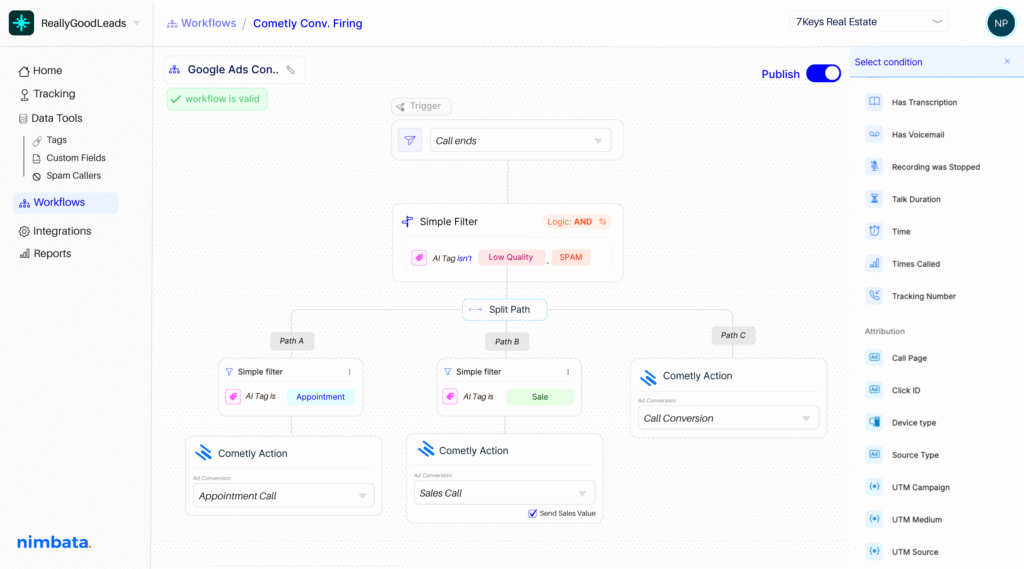
Nimbata integration workflow — automate post-call actions across your stack

Make Cometly react to the right calls.

Use 30+ real-time conditions — like source, duration, caller type, or AI-detected outcomes — to control exactly which calls sync to Cometly. No more one-size-fits-all logic.

Every call becomes a qualified Cometly event.

Let AI summarize conversations, detect buying intent, assign lead value, and apply tags — so your ad reporting reflects real outcomes, not assumptions.

Automate the right Cometly action, every time.

Decide exactly what Nimbata should send to Cometly after a call — from creating new events to updating fields or syncing conversion values. Fully customizable to fit your attribution needs.

Nimbata + Cometly Integration FAQs

What call data can I send to Cometly?

With the Nimbata–Cometly integration, you can send detailed call data such as caller info, time, duration, and status, along with full marketing attribution like source, campaign, keyword, and landing page. AI insights including conversation summaries, buying intent, lead scores, values, and tags are also synced,

Can I see which ads or campaigns drove each call in Cometly?

Yes, when you integrate Nimbata with Cometly, every tracked call is automatically tied back to the exact ad, campaign, keyword, and source that drove it. This allows you to see precisely which ad spend generated each call, giving you clear attribution for ROI analysis and optimization.

How do I enable call tracking for Cometly with Nimbata?

Simply connect your Cometly account through the Nimbata integrations menu. Then configure which call data to sync, and every call will automatically appear in Cometly with full campaign and ad attribution.

Why should I use Nimbata for Cometly call tracking?

Using Nimbata for Cometly call tracking gives you accurate, ad-level attribution by linking every call to the exact campaign, keyword, and source that drove it. It also enriches Cometly with AI-powered insights like lead scoring, buying intent, and call outcomes, so you can measure ROI more precisely and optimize ad spend with confidence.

Can I trigger Cometly workflows with call events?

Yes. When you integrate Nimbata with Cometly, every qualified call is sent as a contact event into Cometly. These events can then be used to trigger workflows, letting you automate follow-ups, reporting, or optimization steps based on call data such as source, campaign, duration, tags, or AI-detected outcomes.

How long does it take to set up the integration?

The Nimbata–Cometly integration can be installed in just a few minutes— no coding required.

Which Nimbata plan supports the Cometly integration?

The Cometly integration is available on all plans. Check our Pricing Plans is a fast-growing local... to see what else is included.

Discover more integrations