CallRail vs CallTrackingMetrics: the most important question isn’t simply which platform has more features or the lower starting price. What you need is platform fits the way your business generates, routes, tracks, and analyzes phone leads.
CallRail and CallTrackingMetrics both provide call tracking and marketing attribution, but their current plans and feature sets approach the problem differently.
CallRail’s current plans start at $50/month plus usage, with five local numbers and 250 local minutes included. Its higher plans add form tracking and more advanced conversation intelligence. It is a great choice for small businesses and marketers who mainly need call attribution and a simple setup. CallTrackingMetrics currently starts at $79/month for Marketing Lite, with additional charges for numbers and call usage. Its platform suits agencies and sales teams that need advanced routing, a softphone functionality and broader communications workflows.
Quick comparison: CallRail vs CallTrackingMetrics
| CallRail | CallTrackingMetrics | |
|---|---|---|
| Starting monthly price | $50/month + usage | $79/month + usage |
| Included local numbers | 5 | Numbers billed separately at $2/month each |
| Included local minutes | 250 | Usage billed at $0.04/min for call forwarding |
| Call tracking | Yes | Yes |
| Call recording | Yes | Yes |
| Conversation intelligence | Yes (advanced capabilities on higher plans) | Yes |
| Call routing | Yes | Yes, including more advanced routing workflows |
| Softphone | Not positioned as a core product capability | Yes |
| Form tracking | Included on Lead Tracking Complete and above | Available as part of the broader platform |
| Google Ads / Analytics | Yes | Yes |
| CRM integrations | Yes | Yes |
| API / developer tools | API and webhooks | API, webhooks and developer tooling |
| Agency capabilities | Available | Dedicated agency functionality |
| International coverage | US, Canada, UK and Australia | Numbers and plans available across 80+ countries |
| Best fit depends on | Marketing attribution, lead tracking and conversation analysis | Marketing attribution plus more complex routing, communications and workflow requirements |
CallRail’s official pricing page confirms its current plans, included numbers and minutes, call tracking, recording, transcription, form tracking and conversation-intelligence capabilities.
CTM’s current global pricing page lists four main plans, Marketing Lite, Marketing Pro, Sales Engage and Enterprise, and states that it offers plans and numbers in more than 80 countries.
How we compared CallRail and CallTrackingMetrics
A call-tracking platform can look inexpensive until you add the numbers, call usage, advanced analytics, integrations and other functionality your business actually needs.
For that reason, this comparison looks at:
- Pricing and usage costs
- Call tracking and attribution
- Conversation intelligence
- Call routing and communications
- Integrations
- Reporting
- Ease of implementation
- Agency and multi-location use cases
- International coverage
- Practical fit for different types of businesses
Where a feature depends on a particular plan, we call that out rather than treating the feature as available across the entire product.
We also cross-checked user ratings and reviews on G2’s CallRail vs. CTM comparison. The written reviews reinforce some of these themes. G2’s current review summaries frequently mention CallRail’s ease of use, setup, call tracking, attribution, and reporting. CTM reviews highlight its feature set and customer support, while some reviewers mention a learning curve or more complex navigation.
CallRail vs CallTrackingMetrics: Pricing Comparison
Pricing is one of the easiest parts of the comparison to misunderstand because the advertised subscription price isn’t necessarily your total monthly cost.
Both platforms combine a base subscription with usage-related charges, but they structure those costs differently.
| Feature | CallRail | CallTrackingMetrics |
|---|---|---|
| Plans & Pricing* | Lead Tracking: $50/moLead Tracking Complete: $95/mo Lead Conversion: $150/mo Lead Conversion Complete: $195/mo | Marketing Lite: $79/mo Marketing Pro: $179/mo Sales Engage: $329/mo Enterprise: $1,999/mo |
| Included Numbers | 5 local numbers | $2/mo each local number |
| Included Minutes | 250 local minutes | No bundled local minutes; $0.04/min for call forwarding |
| Add-On Local Number Cost | $3/mo per number | $2/mo per number |
| Additional Local Minute Cost | $0.05/min | $0.04/min for call forwarding |
| Add-On Toll-Free Number Cost | $5/mo per number | $3/mo per number |
| Toll-Free Minute Cost | $0.08/min | $0.055/min for call forwarding |
| Annual Pricing | Save up to 10% with yearly billing | $65/mo, $149/mo, $274/mo when billed annually for Marketing Lite, Marketing Pro and Sales Engage |
| SMS | 25 SMS/month included; $0.03/SMS additional | $0.016/inbound or outbound SMS + carrier fees |
| Form Submissions | 1,000/month on Complete plans; $0.02/additional submission | Available depending on plan/configuration |
| Call Transcription | 250 min included on Lead Tracking/Complete; 10,000 min on Lead Conversion plans | Available as part of CTM’s conversation/AI capabilities; usage pricing depends on service |
| Analysis Minutes | 2,500/month on Lead Conversion plans; $0.04/min additional | Usage/pricing depends on applicable CTM service |
| Softphone Local Minutes | – | $0.027/min |
| Outbound Calls | – | $0.031/min |
*All base-subscription fees featured above come with additional usage fees.
CallRail’s Complete plan bundles form and conversation features into a $195/mo package.
CallTrackingMetrics’s plans waive your first month; ideal for those seeking a no-risk trial.
For a more in-depth view of CallRail’s pricing, check out our CallRail pricing guide. For a detailed breakdown of CallTrackingMetrics’ pricing, have a look at our CallTrackingMetrics pricing guide.
Which pricing model makes sense for a small business?
Consider a local business with:
- 5 tracking numbers
- 1,000 local call minutes per month
- no toll-free numbers
- no additional services
- monthly billing
Using the currently published rates as a simple illustration:
CallRail Lead Tracking
$50 base + 750 additional local minutes × $0.05 = approximately $87.50/month
CTM Marketing Lite
$79 base + 5 numbers × $2 + 1,000 minutes × $0.04 = approximately $129/month
These calculations are illustrative rather than like-for-like product recommendations. They exclude taxes, other usage and the value of differences in functionality between the plans. The underlying published prices are from the vendors’ current pricing pages.
As you can see it is very important not to compare $50 with $79 and assume that tells you the total cost.
Your actual bill depends on:
- how many tracking numbers you need
- how many minutes you use
- whether you need toll-free numbers
- whether you need form tracking
- whether you need advanced conversation intelligence
- whether you use softphone or outbound functionality
- which integrations and plan-level features are required
How billing works for agencies?
CTM explicitly positions several of its tools for agencies, including flexible sub-account structures, white-label capabilities, billing options, analytics and reporting.
CallRail also offers integrations and marketing-oriented functionality that can support agencies. Its integrations directory includes Google Ads, Google Analytics 4, HubSpot, Salesforce, Microsoft Ads, Meta Ads, Slack, RingCentral and other marketing and business tools.
Example: a 15-client digital agency
The agency manages 15 local clients and each one needs:
- PPC call tracking and Google Ads attribution
- call recording
- call source reporting
- lead-quality analysis
- monthly reporting
- CRM integration
The important questions aren’t simply “Which platform has more integrations?”
Instead, ask:
- Can the agency separate clients cleanly?
- Can each client have its own numbers and reports?
- Can users have different permissions?
- Can reports be branded?
- Can data flow into the agency’s preferred CRM?
- Can the agency scale from 15 clients to 50 without rebuilding its workflow?
CTM explicitly highlights agency features such as sub-accounts, white-labeling and flexible billing.
For CallRail, the relevant evaluation should focus on its specific agency workflow and the plan requirements for the integrations and features the agency intends to use.
CallRail vs CallTrackingMetrics: Feature Comparison
After exploring pricing, you should consider the features available next. A low or high price tag mean nothing when there is a feature mismatch. Conversely, when a plan offers exactly the features you need, then the price may become a secondary consideration. Once again, CallRail offers features that suit an SMB nicely, while CallTrackingMetrics comes in with heavier artillery for wider-scale usage. Have a look below and decide for yourself:
| Feature | CallRail | CallTrackingMetrics (CTM) |
|---|---|---|
| Lead & Interaction Hub | Lead Center: brings calls, texts, forms, and lead activity into one workspace | Activity Stream: real-time view of tracked calls, texts |
| Lead Scoring & Alerts | Lead scoring, call tagging, automation rules, and AI-based lead qualification are available | Scoring: rate conversations and assign values/tags. Custom triggers can automate scoring, tagging, and lead workflows. |
| Conversation Analytics | AI transcription, keyword spotting, call summaries, sentiment analysis, AI lead scoring, auto-tagging, and aggregate conversation insights | AI transcription, AskAI summaries, custom AI analysis, scoring, keyword spotting, sentiment analysis, and live listening |
| Call Routing | Call Flow Builder with IVR, time-based routing, simultaneous ringing, schedules, and other routing options | Basic routing, IVR, call queues, geographic routing, Smart Router, skill/weight-based routing, call transfers, and scheduled workflows |
| Softphone | Available: Lead Center provides a browser/mobile softphone for handling calls without requiring a forwarding number. | Available: CTM Softphone supports inbound and outbound calling and connects calls with CTM’s conversation intelligence and reporting. |
| Global Numbers | US, Canada, UK, and Australia | Available in 80+ countries |
| Custom Reporting | Call and lead reporting, customizable reports, multi-touch CPL reporting, lead scoring and attribution reporting. | Activity reporting, real-time activity stream, ROI reporting, agency roll-up reports, custom-field reports, and live team performance reporting. |
Call tracking and marketing attribution
Both platforms are designed to connect phone interactions with marketing activity.
CallRail describes its core service as tracking calls and identifying the marketing source associated with inbound leads. Its current product also tracks texts and forms depending on the plan.
CTM similarly positions call tracking around connecting calls, chats, forms and texts with the marketing campaigns that generated them. Its current product materials specifically highlight Google Ads and Analytics integrations and campaign-level reporting.
Conversation intelligence
Conversation intelligence is increasingly important because attribution alone tells you where a lead came from, while conversation analysis can help explain what happened after the lead called. Both platforms rely on AI for transcription, scoring and tagging. Our guide on how to use AI call tracking explains what to look for, and you can compare with Nimbata’s conversation intelligence.
CallRail’s current plans include different levels of conversation functionality.
Its Lead Tracking plan includes call transcription and analysis, while Lead Conversion plans add Premium Conversation Intelligence features such as:
- call summaries
- sentiment analysis
- conversation trend reports
- automatic conversion tagging
- coaching and conversion tools
CallRail also describes automatic transcription and keyword-based analysis as part of its Conversation Intelligence offering.
On the other hand, CTM positions Conversation Analytics as part of its broader platform. Its current product materials describe AI-powered analysis of call recordings and transcriptions, including AskAI, as well as tools for call scoring, coaching and team performance.
Reporting and analytics
Both CallRail and CallTrackingMetrics (CTM) provide marketing attribution, call analytics, conversation data, and customizable reporting. However, their reporting workflows emphasize somewhat different use cases.
CallRail lead reporting
CallRail’s reporting is strongly focused on connecting phone and text interactions with marketing activity. Its reporting tools can show which campaigns, keywords, channels, and other marketing sources generated calls and texts. CallRail also supports multi-touch cost-per-lead reporting, allowing marketers to connect lead activity with advertising spend from platforms such as Google Ads, Microsoft Advertising, and Facebook.
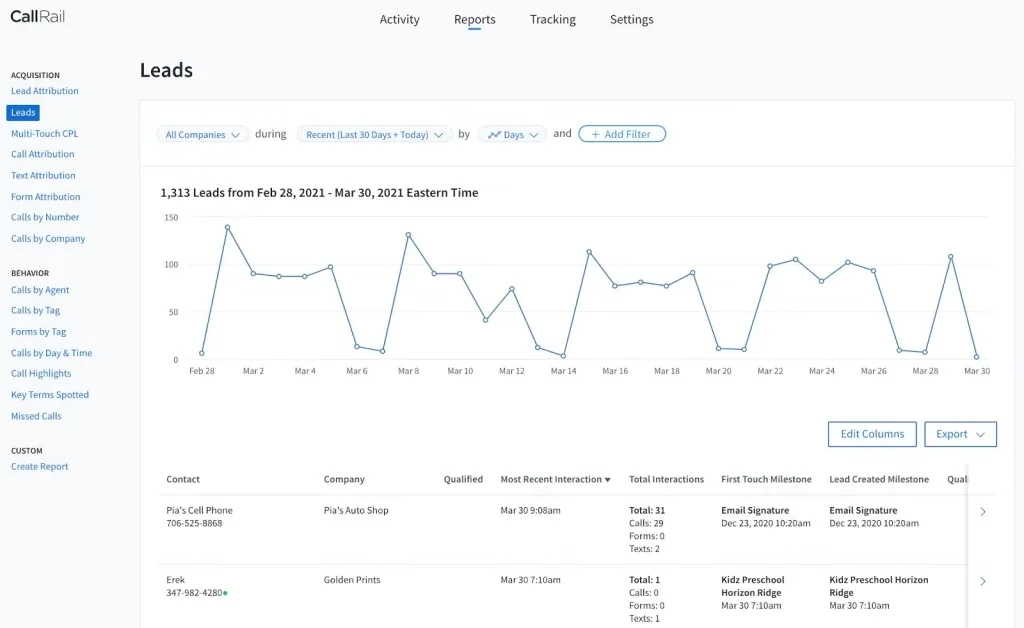
CallRail also provides operational reports rather than focusing exclusively on marketing attribution. For example, its reporting includes Calls by Day and Time and Missed Calls, which can help businesses identify periods when call volume is highest or when staffing may not be sufficient.
CallTrackingMetrics marketing, conversation, and operational reporting
CallTrackingMetrics takes a broader approach to reporting. Its current reporting platform combines marketing attribution with real-time activity monitoring, conversation analytics, sales performance, and contact-center-style reporting. CTM describes reporting for inbound lead volume, advertising ROI, conversation sentiment, sales-pipeline efficiency, and growth opportunities.
Its campaign reports can drill down into advertising performance at the keyword level, helping marketers identify which sources generate calls, conversions, lead quality, and ROI.
CTM’s real-time performance dashboards can be used to monitor calls, texts, forms, and chats as they happen and to understand the workload and availability of individual team members. For organizations managing larger sales or customer-service teams, this creates a reporting layer that goes beyond campaign attribution.
Another distinction is CTM’s emphasis on live conversation monitoring. Its reporting environment can provide live transcripts and allow authorized users to listen, whisper, barge, or end an active call. This can be relevant to managers who need to monitor or coach sales and support teams while conversations are happening.
CTM also supports custom reports and dashboards. Reports can be filtered around the metrics that matter to a particular team and can be scheduled, shared, or exported. Its training documentation specifically describes custom reports that can be combined into dashboards for ongoing monitoring.
CallRail vs CallTrackingMetrics: Integrations & API
When it comes to call tracking, having access to seamless integrations is one of the keystones to making your marketing stack reach its full potential. Both CallRail and CallTrackingMetrics offer a suite of integrations, but the depth and ease of these connections can vary. They can send data to all major marketing, analytics, and business solutions with no issues.
| Integration | CallRail | CallTrackingMetrics |
|---|---|---|
| Native Integrations | 70+ integrations, including Google Ads, Google Analytics 4, HubSpot, Salesforce, Microsoft Ads, Slack, ServiceTitan, and more. | Integrations include Google Ads, HubSpot, Salesforce, Google Sheets, Facebook Conversions, Plecto, monday.com, and other CRM, marketing, and reporting tools. |
| Open API | REST API with support for integrations, custom data, and webhooks. | API and webhook capabilities for connecting call, text, and other activity data with external systems. |
| Webhooks | Real-time webhooks for calls, SMS, and form submissions, including call started, completed, modified, and routing events. | Webhook workflows can send CTM activity to external applications and automation platforms. |
| Zapier | Zapier integration supports triggers such as completed calls, SMS, tagged calls, source/session tracking, and other events. | Zapier integration supports call-based triggers and workflows with apps such as Google Ads, HubSpot, Google Sheets, Salesforce, Gmail, and Webhooks. |
| CRM & Marketing Integrations | HubSpot, Salesforce, Google Ads, Microsoft Ads, Google Analytics 4, Meta Ads and other marketing/CRM platforms. | HubSpot, Salesforce, Google Ads, Zoho and other CRM, advertising, analytics, and automation platforms. |
| Setup & Customization | Many standard integrations are designed for self-service setup. API and webhook workflows require more technical configuration. | Standard integrations can be configured in the platform. Complex CRM, API, and multi-account workflows may require developer or implementation support. |
CallRail vs CallTrackingMetrics: Ease of use and setup
Both CallRail and CallTrackingMetrics (CTM) cover call tracking, attribution, routing, reporting, and conversation intelligence, but they approach configuration differently.
CallRail
CallRail is designed to get core call tracking running with a relatively straightforward setup process. Its onboarding flow guides users through creating tracking numbers, configuring tracking sources, and setting up website visitor tracking. CallRail also provides a Lead Center for managing calls, texts, and other lead interactions in one place.
| Setup | Guided setup for tracking numbers, tracking sources, and Dynamic Number Insertion (DNI). |
|---|---|
| Interface | Centralized activity and lead-management tools make it easier to review calls, texts, forms, and attribution data. |
| For teams | Companies, users, permissions, and Lead Center agents can be configured within the account. |
| Advanced configuration | Call flows, routing, automation, APIs, and webhooks provide additional flexibility when needed. |
| Mobile access | Lead Center is available through mobile apps, allowing teams to manage calls and texts away from their desks. |
Best fit from an ease-of-use perspective: Teams that want to get standard call tracking and attribution running without configuring a highly customized communications workflow.
CallTrackingMetrics
CallTrackingMetrics provides a broader set of controls for teams that need more complex call handling, automation, and contact-center workflows. Its platform includes routing options, queues, skills-based routing, triggers, role-based settings, softphone functionality, API access, and webhooks.
| Setup | Guided onboarding and training are available, with the amount varying by plan. |
|---|---|
| Call workflows | Configure IVR menus, call queues, geographic routing, Smart Router, and skill- or weight-based routing. |
| Team management | Role-based settings, users, teams, and sub-accounts support more complex organizational structures. |
| Advanced configuration | Triggers, custom fields, APIs, webhooks, integrations, and custom reporting allow highly tailored workflows. |
| Softphone | Built-in softphone functionality handles calls and texts within CTM and connects them with its reporting and intelligence features. |
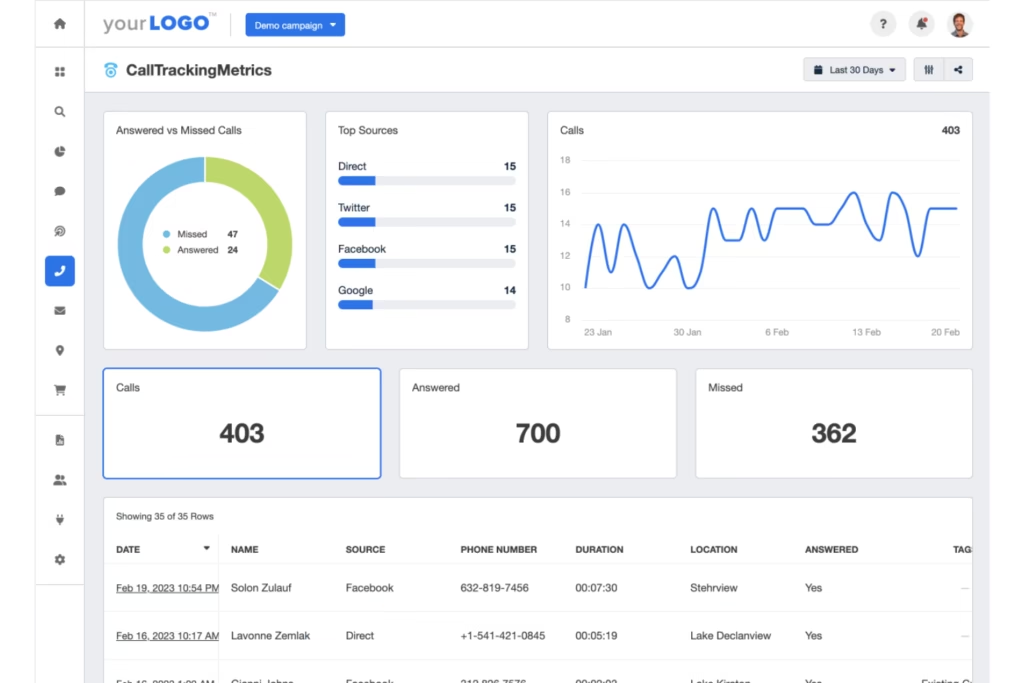
For agencies, reporting is not only about analyzing call volume. It is also about turning call-tracking data into client-ready reports without manually rebuilding the same dashboards for every account.
CallTrackingMetrics (CTM) provides agency-oriented features including sub-accounts, agency roll-up reporting, white-label options, flexible billing, and client-facing reporting capabilities. Its Marketing Pro plan is specifically positioned for agencies and includes sub-accounts, agency reporting, and white-label options. If white-label reporting is a must, compare these options with Nimbata’s white-label.
CallRail vs CallTrackingMetrics: which platform fits which use case?
There isn’t one answer for every business. Let’s check each business case and their needs.
A small local business
A small business may prioritize:
- simple call tracking
- Google Ads attribution
- call recording
- basic conversation analysis
- straightforward reporting
- predictable implementation
CallRail’s Lead Tracking plan starts at $50/month and includes five numbers and 250 local minutes, making it a relatively straightforward starting point for businesses with modest tracking requirements.
CTM can also support this type of use case, but its broader communications capabilities may become more relevant as routing and sales requirements become more complex.
A marketing agency
An agency may prioritize:
- multiple client accounts
- reporting
- Google Ads and GA4
- CRM integrations
- permissions
- white-labeling
- scalable workflows
CTM explicitly offers agency-oriented functionality including sub-accounts and white-label capabilities.
CallRail should be evaluated based on the agency plan, account structure and specific integrations required.
A sales organization
You may care more about:
- routing
- agent workflows
- softphone functionality
- call scoring
- coaching
- outbound calling
- CRM synchronization
CTM’s current product positioning includes these types of sales and communications capabilities.
A multi-location business
You may need:
- separate numbers per location
- location-level reporting
- centralized management
- routing rules
- CRM integration
- campaign attribution
Both platforms can be evaluated for these workflows, but the specific number, reporting and account-management requirements should be checked against the plans available to you.
FAQ about CallRail vs CallTrackingMetrics
CallRail has a lower advertised starting subscription price: its current Lead Tracking plan starts at $50/month, while CTM’s Marketing Lite plan starts at $79/month.
However, the total cost depends on numbers, minutes, features and additional services. A lower starting subscription price does not necessarily mean a lower total cost for every usage pattern.
CallRail’s current plans start at $50/month for Lead Tracking, $95/month for Lead Tracking Complete, $150/month for Lead Conversion and $195/month for Lead Conversion Complete. Usage charges apply in addition to the subscription.
CTM currently lists Marketing Lite at $79/month, Marketing Pro at $179/month, Sales Engage at $329/month and Enterprise at $1,999/month when billed monthly. Usage and number charges apply separately.
Yes. CTM’s current global pricing lists $0.04 per local forwarding minute and $0.055 per toll-free forwarding minute, with separate rates for other calling methods such as its softphone.
Yes. CallRail includes a specified number of local minutes with its plans and charges additional usage when you exceed the included allowance. Its current pricing page lists $0.05 per additional local minute and $0.08 per toll-free minute.
CallRail is more beginner-friendly thanks to its intuitive UI, guided setup wizard, and clean layout. It’s perfect for teams with limited technical expertise. CallTrackingMetrics is powerful but comes with a steeper learning curve.
Yes, CallTrackingMetrics comes with a built-in softphone available via browser and mobile app, making it a strong choice for teams needing unified communications.
Yes. CallRail provides a Google Ads integration for tracking calls as conversions, and CTM provides Google Ads and Analytics integrations as part of its marketing attribution platform.
Yes. CallRail lists Google Analytics 4 among its integrations, and CTM also highlights Google Analytics integration for sending conversion data and analyzing campaigns.
There isn’t a universal answer.
An agency should compare:
- client/account structure
- white-label reporting
- user permissions
- CRM integrations
- Google Ads and GA4 connectivity
- number management
- billing
- automation
- reporting requirements
CTM explicitly markets agency-oriented functionality including sub-accounts, white-labeling and flexible billing.
CallRail should be evaluated based on the agency’s required plan and workflow.
A small business should first determine whether it needs primarily marketing attribution or a broader communications platform.
For example, a local service business running Google Ads may primarily need tracking numbers, attribution, call recording, transcription and lead-quality analysis.
A sales-heavy business with multiple representatives may additionally need sophisticated routing, agent workflows and a softphone.
The appropriate choice depends on those requirements rather than company size alone.
CTM currently states that it offers plans and numbers in more than 80 countries. CallRail states that its service is available in the United States, Canada, UK and Australia.
If international coverage is important, compare the specific countries you need rather than relying only on a global coverage figure.
At a high level, both platforms provide call tracking, attribution, recording, conversation analysis and integrations.
The practical distinction is that CallRail’s product is strongly centered on marketing attribution and lead engagement, while CTM combines marketing attribution with broader routing, communications, sales and workflow capabilities.