Hey, WordPress community!
Tracking your phone leads doesn’t have to be complicated.
With a call tracking plugin, you will be able to track calls in WordPress in 3 simple steps.
In this guide, we show you how to boost your WordPress website with the Nimbata – WordPress direct integration, to identify marketing sources driving calls and texts and swap numbers when visitors arrive on your WordPress website.
Let’s dive right in!
Preparation: Get a tracking number from a call tracking tool
To start, you’ll need a call tracking tool. For the sake of this tutorial, let’s assume you’ve chosen a call tracking number via Nimbata or another system.
Pro Tip – Don’t have a tracking number? We’ve got you covered
You can get one by signing up with Nimbata for free. Below I show you how to easily grab a phone number with a local prefix which you can instantly use!

Step #1: Install and activate the Nimbata plugin from your WordPress plugins directory
Installing the Nimbata Call Tracking plugin is very simple:
- Click on Plugins -> Add New
- Search for Nimbata
- Click on Install Now
- Click Activate
Step #2: Copy your unique DNI ID from Nimbata
- From your Nimbata account go to: Lead Tracking -> Dynamic Number insertion.
- Copy the green part of the code you see at the top of the screen

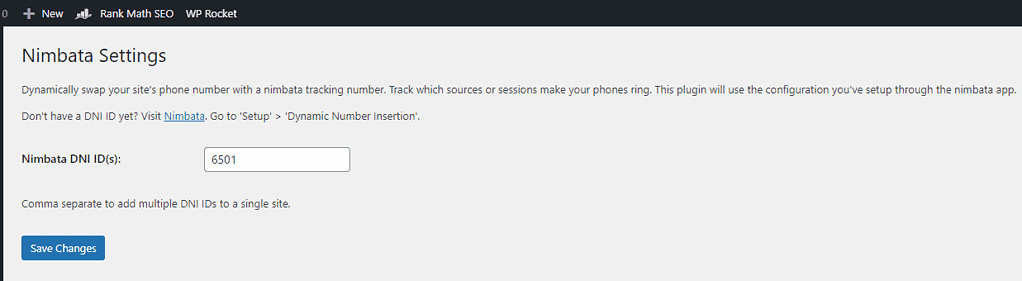
Step #3: Paste your DNI ID in the plugin
- Paste your code into the appropriate section and click Save Changes.
- This section will place the script just above the closing </body> tag, which is the ideal place for our script.
Takeaway
By integrating call tracking on your WordPress website, you unlock a realm of possibilities.
More advanced users may prefer integrating call tracking through Google Tag Manager.
But WordPress comes packed with all these awesome plugins that allow you to set up call tracking in the same way and fewer clicks.
So, why delay?
Harness the potential of Call Tracking for WordPress and begin to track calls in WordPress instantly.
Happy tracking!
FAQ – Track Calls in WordPress
Call tracking for WordPress allows website owners to use the WordPress platform to track and analyze phone calls generated through their website. It helps businesses monitor and measure the effectiveness of their online marketing efforts, particularly in terms of driving phone call leads.
Tracking calls on your WordPress website can offer several important benefits for your business:
Marketing Insights: Call tracking provides valuable data on which of your marketing efforts are driving phone calls. You can determine which advertising channels, campaigns, or keywords are the most effective in generating leads, allowing you to allocate your marketing budget more efficiently.
ROI Measurement: By associating phone calls with specific marketing initiatives, you can calculate the return on investment (ROI) for each campaign. This helps you understand the cost-effectiveness of different advertising channels and adjust your strategies accordingly.
Customer Behavior Analysis: Call tracking allows you to gather data on call duration, caller demographics, and caller location. This information can help you better understand your target audience and tailor your marketing and sales approach to their needs.
Conversion Optimization: You can track calls as conversions, which provides a more complete view of your website’s performance. This data can help you identify areas for improvement in your sales funnel and optimize your website to increase conversions.
Yes! WordPress website owners can take advantage of the Nimbata Call Tracking plugin, without having to manually place code in the footer or use GTM.
This plugin adds the Dynamic Number Insertion (DNI) script for Nimbata’s call tracking software which enables you to discover which sources, marketing activities, keywords, and more are driving phone calls and subsequent conversions.
Our WordPress call tracking plugin can be set up in minutes and allows you to dynamically swap your site’s phone number with one of your private Nimbata tracking numbers. When a visitor calls your tracking number, we’ll correlate the call with the source, session, or campaign details you’ve set up in the Nimbata app.
To get started with Nimbata’s WordPress plugin, you’ll need an active Nimbata account.