INTEGRATIONS / Webhooks

Webhooks

Instantly deliver every lead and call event to your favorite apps.
Ensure your teams are always up to date.

Why Webhooks + Nimbata?

Automatically track calls in Webhooks, push call outcomes, and keep all systems aligned— no manual work.

Call outcomes-Tags- AI insights from Nimbata directly to Webhooks values
Precision data mapping

Instantly push call outcomes, tags, and AI fields into your custom endpoints, keeping your systems aligned without manual handling or extra steps.

Conditional sync logic- Choose when to fire Webhook Integration and send call data to any app
Conditional conversion logic

Control when webhooks fire: trigger on call duration, caller type, or campaign source so only relevant data is sent to each app.
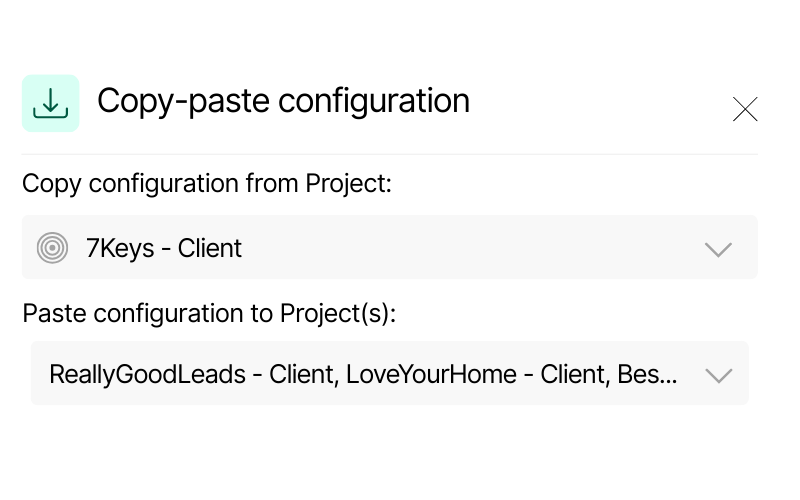
Screenshot of Nimbata’s copy-paste configuration feature. It displays a source project “7Keys – Client” and options to paste configuration into multiple Dynamics projects, including “ReallyGoodLeads – Client” and “LoveYourHome – Client.”
Scalable configuration

Manage webhook endpoints and routing rules centrally, so configurations grow and replicate with your needs without added complexity.

Call Tracking for Webhooks integration capabilities

(that help you react faster to any app)

Automate actions across all your tools by sending updates through webhooks

Automate actions across all your tools

Automatically act on every call event — update CRM records, deliver offline conversions to your ad platforms, notify teams in Slack, or create follow-up tasks in your project tools.

Keep every system in your stack synchronized with live call data.

Push Attribution data such as GCLID, Click ID and Keyword from Nimbata to your apps

All-in-one reporting and attribution

Stream Nimbata call data directly into your analytics platforms, BI dashboards, and spreadsheets to centralize performance tracking.

No exports, no manual updates — just a seamlessly connected stack that delivers reliable, transparent insights.

AI call tracking - enrich your lead's data through webhooks with Nimbata's AI

Go beyond call counts with AI-powered outcomes and scoring

Classify calls, score lead quality, and estimate value — then sync insights to your CRM, ads, and reports to see which calls truly mattered..

Identify which calls are sales-ready leads at a glance.

Get call data in your Webhooks account in no time – seriously!

Webhook meets real-time call intelligence

HOW IT WORKS
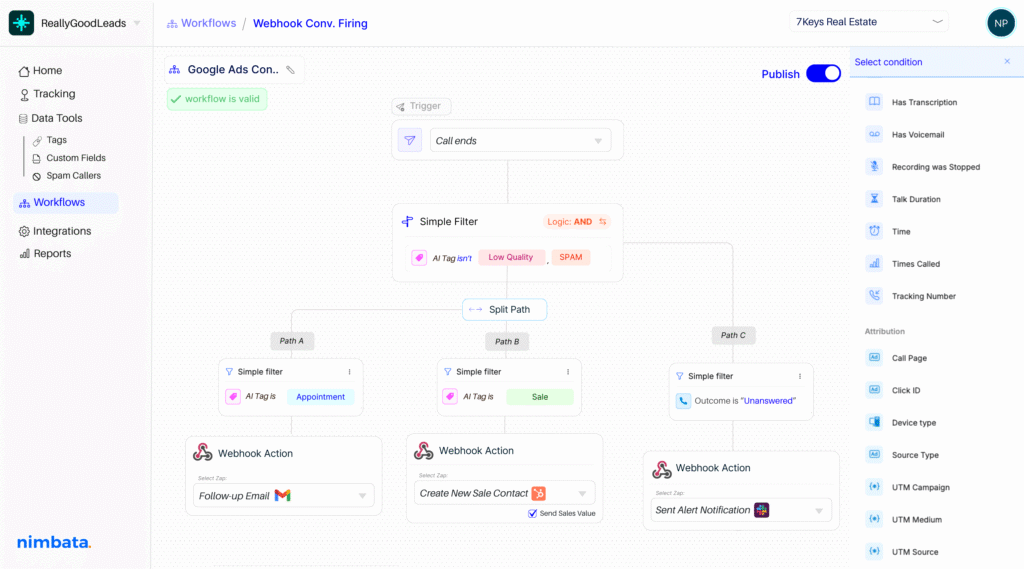
Include CRM automation on your workflow builder-split paths and sync your apps effortlessly

Make Webhooks react to the right calls.

Use webhooks with 30+ real-time conditions — from source, duration, and caller type to AI-detected outcomes — to decide exactly which calls trigger an update and when. No more rigid, one-size-fits-all flows.

Turn every call into real-time actions.

AI scores, tags and notes directly into your custom endpoints the moment a call ends — no delays, no manual steps. Your connected systems receive the full context instantly, so every workflow runs on accurate, live data.

Automate the right Webhook action, every time.

Decide exactly what happens when a call ends — update databases, notify your team, or trigger multi-step workflows. Webhooks give you full control to route insights where they're needed, tailored to how your systems and teams operate.
Nimbata + Webhooks Integration FAQs

What specific data points can Nimbata include in webhook payloads?

You can configure webhooks to transmit a comprehensive set of fields, such as: call duration, caller ID, UTM parameters, tags, AI call outcomes, transcription and recording links, and more. It’s all customizable—just pick what matters most to your workflow.

Can I control which calls trigger which actions downstream?

Absolutely. Nimbata lets you define precise conditions that determine when webhooks fire—things like call duration thresholds, caller behavior, AI tags, or campaign origins—so only meaningful interactions get synced onward.

How do I enable call tracking for Webhook with Nimbata?

Simply connect your Nimbata account to Webhooks, choose your endpoints, set authentications if needed and select the data you want to push. No dev work needed — setup takes just a few minutes.

Why should I use Nimbata for Webhooks call tracking?

Nimbata’s Webhooks let you stream call intelligence in real time to any system you rely on — CRM, reporting tools, ad platforms, or custom apps. Unlike static exports or delayed integrations, webhooks ensure that every call outcome, tag, and AI-enriched field is delivered instantly, keeping your stack in sync.

Can I create multiple webhook configurations for different projects?

Yes. With Nimbata, you can set up multiple webhook endpoints, each tailored to a specific project, campaign, or workflow. This means you can send different call data to different destinations — for example, pushing qualified leads to your CRM, ad conversions to Google Ads, and notifications to Slack.

Can I trigger Webhook workflows with call events?

Absolutely. Nimbata can fire webhooks the moment a call event occurs — such as when a call starts, ends, is missed, or meets specific conditions (e.g., duration, tags, AI-detected outcomes). These events can trigger downstream workflows like creating or updating CRM records, sending notifications, or logging conversions in your ad platforms.

How long does it take to set up the integration?

Setting up a webhook integration in Nimbata is quick and straightforward — no coding required.

Which Nimbata plan supports the Webhook integration?

The Webhook integration is available on the Agency plan. Check our Pricing Plans to see what else is included under the Agency Plan.

Discover more integrations