INTEGRATIONS / Google Sheets

Google Sheets

No more building call reports by hand.
Every call logs automatically to Google Sheets — clean, structured, and ready to act on.

Why Google Sheets + Nimbata?

Turn call data into reporting you can actually use. Nimbata sends every call straight to Google Sheets, so your data is always up to date.

Call outcomes-Tags- AI insights from Nimbata available fields to Google Sheets
Multiple Call Conversions, one setup

Send call outcomes, tags, and AI-generated insights straight into Google Sheets — structured, filterable, and ready for analysis.
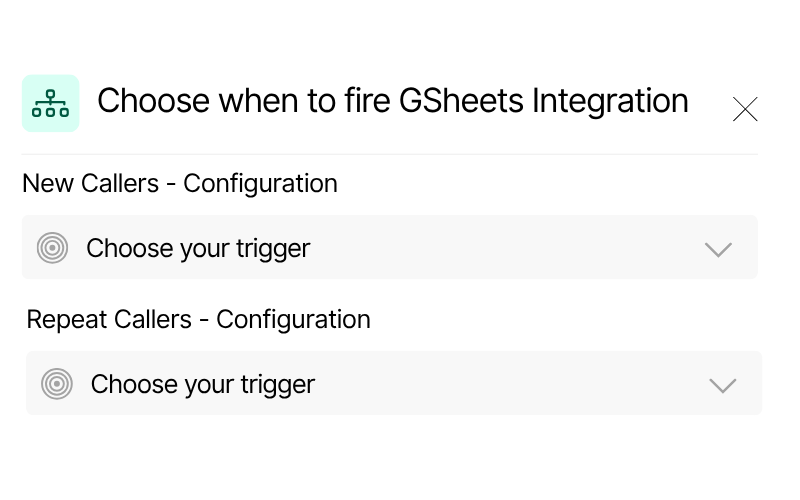
Conditional conversion logic

Trigger Google Sheets integration based on real-time call insights, like tags, duration, or caller type — to feed your reports and dashboards.
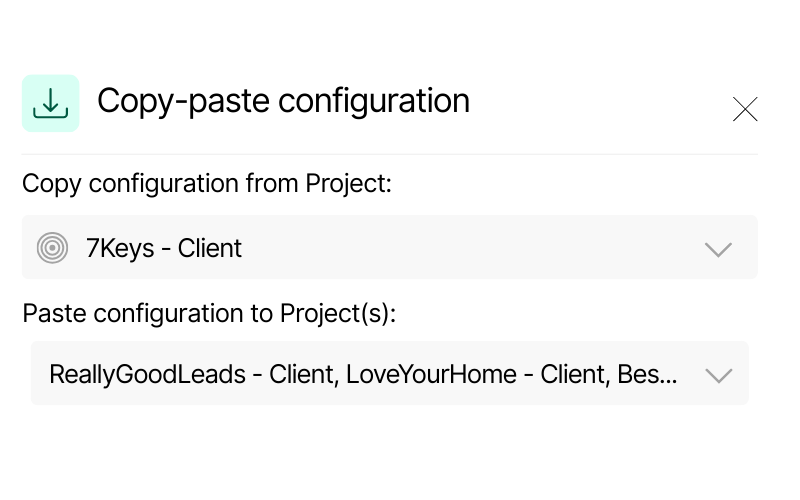
Screenshot of Nimbata’s copy-paste configuration feature. It displays a source project “7Keys – Client” and options to paste configuration into multiple Dynamics projects, including “ReallyGoodLeads – Client” and “LoveYourHome – Client.”
Scalable configuration

Manage one client or a hundred. Copy your setup across all projects in seconds and keep every account consistent.

Call Tracking for Google Sheets integration capabilities

(that send the right insights to the right sheet, every time)

Auto-fille your spreadsheets converting Nimbata's fields to Google Sheets columns

Your sheet updates itself – instantly.

Automatically enrich rows and update your Google Sheets with every call — converting available or custom fields into structured data like call details, marketing sources, and AI-powered insights.


Keep your spreadsheets clean, complete, and always up to date with the insights that matter.

Push Attribution data such as GCLID, Click ID and Keyword from Nimbata fields to structured columns

Push the right data on your reports

Transform available or custom fields into structured columns in real time. Each Google Sheet can be triggered by a unique configuration, capturing exactly the data you need.

All automatically captured in Google Sheets. Zero manual effort. 100% clarity.

AI call tracking - enrich your lead's data in your spreadsheets with Nimbata's AI

Bring AI insights straight into your Sheets

Nimbata’s AI break down every conversation — assigning intent, lead scores, and estimating value based on what was said.

Quickly spot high-potential leads in your reports without manual review.

Call data, meet Google Sheets — synced in seconds.

Google Sheets meet real-time call intelligence

HOW IT WORKS
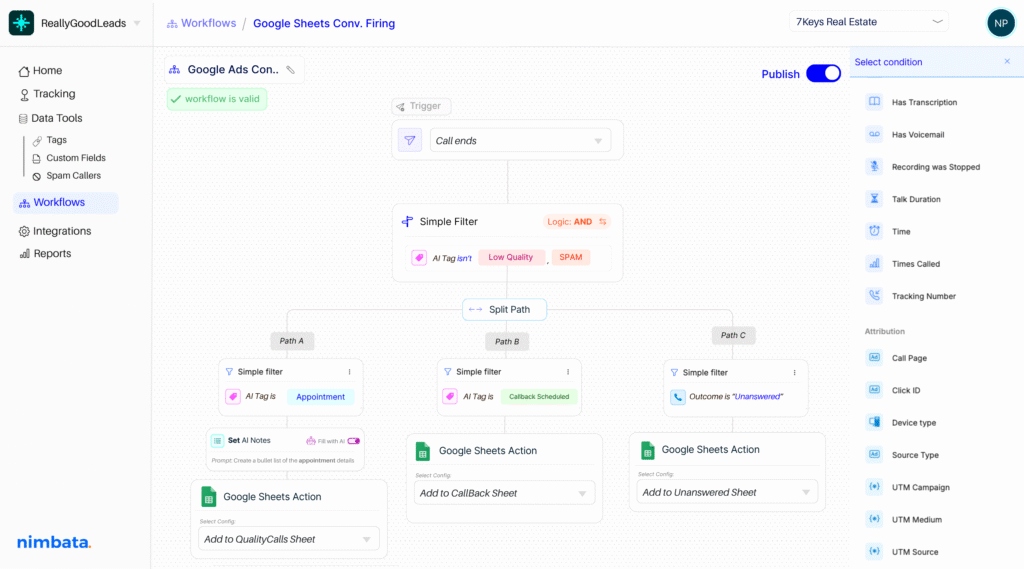
Include CRM automation on your workflow builder-split paths and sync your apps effortlessly

Make Google Sheets respond to the right data inputs.

Build workflows using 30+ real-time conditions — from source, duration, and caller type to AI-detected outcomes – to decide which rows deserve an update, and when. No more generic logic– ensure that only relevant information gets added.

Every important call data delivered straight to your reports.

Let Nimbata's AI enrich your Google Sheets with summaries, lead scores, intent detection, and auto-applied tags — all structured and ready for analysis. Build sharper dashboards and data-driven reports.

Trigger the right action in Google Sheets, automatically.

Sync Nimbata with Google Sheets to log and update call data across multiple files and tabs — all based on your custom workflows. Create flexible configurations to keep every report, dashboard, or team sheet perfectly aligned.

Nimbata + Google Sheets Integration FAQs

What call data can I send to Google Sheets?

You can send over 50 data points per call — including caller ID, call duration, date/time, call outcome, source/medium, UTM parameters, tags, and AI-generated insights like lead score, intent, and estimated value. You can also include custom properties based on your campaign or workflow needs.

Can I use my existing Sheets or do I need to set up a new one every time?

You can push data to your existing Google Sheets — no need to duplicate or create new files for every campaign. Just configure once and let Nimbata handle the rest.

How do I enable call tracking for Google Sheets with Nimbata?

Connect your Google account in Nimbata, choose or create a Sheet, and select the fields you want to sync — including call data, marketing source, and AI insights. Set your automation rules, save the workflow, and your data will update automatically after every call.

Why should I sync Nimbata with Google Sheets?

Syncing with Google Sheets lets you log call data in real time, directly into structured, shareable spreadsheets. It’s perfect for building custom reports, aligning teams, and making fast, informed decisions without the manual work.

Can I control which calls get logged in Google Sheets?

Absolutely. Use Nimbata’s automation rules to filter which calls are logged based on criteria like call duration, source, tags, or AI-classified outcomes — only track the calls that matter to you.

What if I want to log data from different sources in one sheet?

That’s exactly what Nimbata is built for. You can combine calls from different sources, numbers, or campaigns into one centralized Google Sheet to create your own marketing data lake.

Can I create custom workflows for multiple Sheets or teams?

Yes. You can configure multiple workflows to push different call data into separate sheets or tabs — perfect for teams managing multiple clients, brands, or locations.

Does it update in real time?

Data is sent shortly after each call ends — so your Sheets stay fresh and your reports stay relevant, without long delays or missed updates.

How long does it take to set up the integration?

Just a few minutes. Connect your Google account, select your Sheet, map your fields, and you’re good to go — no technical skills or manual setup required.

Which Nimbata plan supports the Google Sheets integration?

The Google Sheets integration is available on the Agency plan. Check our Pricing Plans to see what else is included under Agency Plan.

Discover more integrations