INTEGRATIONS / Zapier

Zapier

Sync your call data across every tool in your stack.
Automate workflows, eliminate manual work, and connect to 6,000+ apps.

Why Zapier + Nimbata?

Never update your tools manually after a call again. Nimbata triggers Zapier the moment a call ends — pushing data exactly where it needs to go.

Flexible automation- Send call outcomes, tags, AI insights from Nimbata to Zapier
Flexible workflow automation

Send call outcomes, tags, and AI-enriched fields from Nimbata exactly where they’re needed in your connected apps.

Conditional sync logic- Choose when to fire Zapier Integration with custom triggers
Sync when it matters.

Choose exactly when to trigger each workflow: filter calls by duration, caller type, tags, AI classification, or campaign source to ensure only the right data flows to each app.
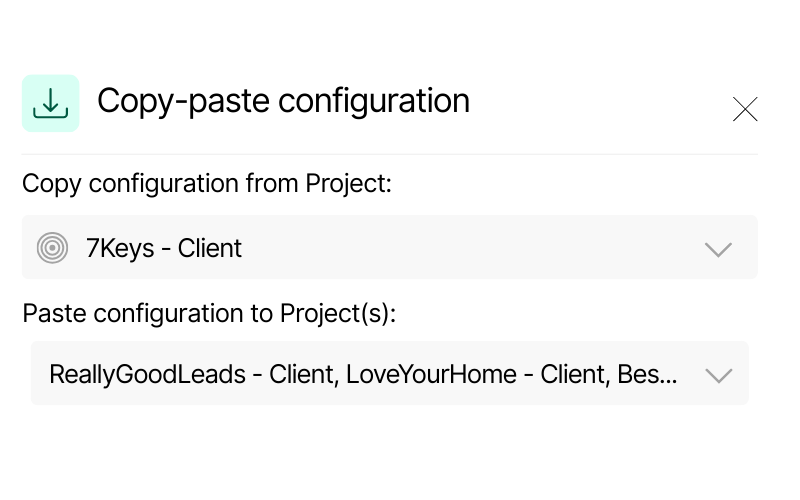
Screenshot of Nimbata’s copy-paste configuration feature. It displays a source project “7Keys – Client” and options to paste configuration into multiple Dynamics projects, including “ReallyGoodLeads – Client” and “LoveYourHome – Client.”
Scalable configuration

Set up projects across apps — apply sync rules once, replicate anywhere, and manage without any duplicate effort.

Call Tracking for Zapier integration capabilities

(that help you automate seamlessly across all your apps)

Perform actions across platform automatically-Trigger any Zapier configuration seamlessly

Perform actions across platform automatically

Seamlessly send call-triggered actions—create or update CRM records, push offline conversions to ad platforms, send real-time alerts to Slack and even assign follow-up tasks in project management tools.

Keep every platform in your stack accurate and always in sync with the latest call activity.

Push Attribution data such as GCLID, Click ID and Keyword from Nimbata to any connected app

Unified reporting & attribution

Push Nimbata call data into analytics, BI dashboards, and spreadsheets for a unified view of performance. Attribute every lead to its source for precise reporting and optimization.

No manual updates. Just a fully connected stack and crystal-clear attribution.

AI call tracking - enrich your lead's data in Zapier with Nimbata's AI

Go beyond volumes with AI-driven call outcomes & scoring

Leverage AI to automatically classify calls, assign lead quality scores, and estimate revenue value — then sync this enriched data back to CRMs, ad platforms, and reports.

See not just how many calls you drove, but which ones truly mattered. shorter

Trigger the right Zaps in one place – straight from your calls!

Zapier meets real-time call intelligence

HOW IT WORKS
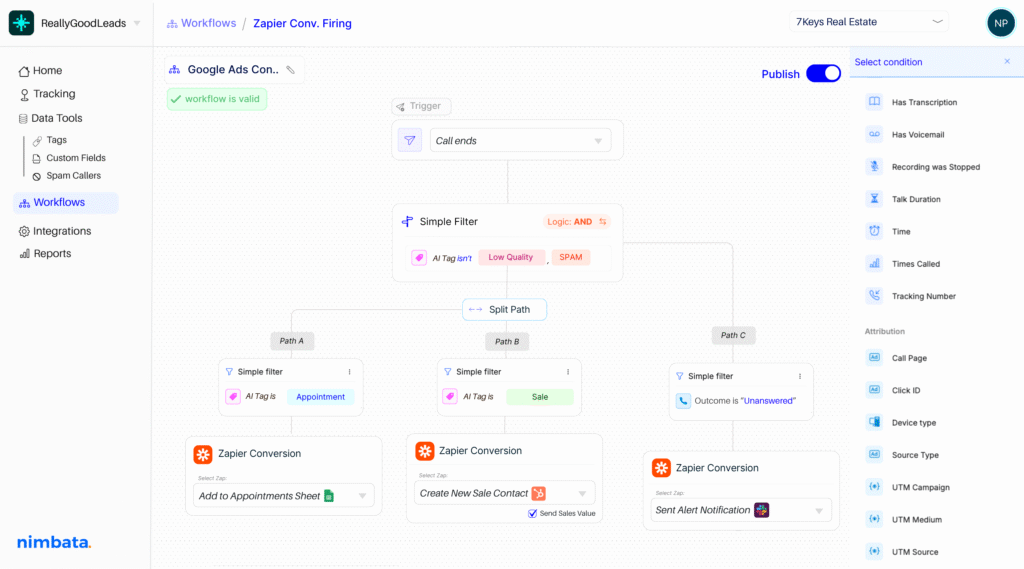
Include CRM automation on your workflow builder-split paths and sync your apps effortlessly

Make Zapier react to the right calls.

Use Nimbata's real-time triggers — like call ends, SMS received, or form submitted — to activate the exact Zap you've built. Apply 30+ conditions, from source, duration, and caller type to AI-detected outcomes, to decide which calls fire which zaps, and when.

Turn every call into AI-powered actions.

Nimbata's AI scores leads, detects intent, and tags calls in real time — then sends those insights through Zapier to the apps where your team works. Your connected tools get the full context instantly, so every workflow runs on accurate data.

Automate the right Zapier action, every time.

Decide exactly what Nimbata should trigger after a call — from creating new records in your CRM to updating spreadsheets, sending Slack alerts, or kicking off multi-step workflows. Fully customizable to match how your apps and teams work together.

Nimbata + Zapier Integration FAQs

What’s the benefit of connecting Zapier with Nimbata?

You turn every call into instant actions—auto-create/update CRM records, log Tasks, send Slack alerts, add rows to Sheets, kick off emails, and more—no manual entry, no delays.

Which apps can I connect through Zapier?

Thousands. Popular picks: Salesforce, HubSpot, Pipedrive, Zoho CRM, Google Sheets, Airtable, Slack, Microsoft Teams, Gmail, Mailchimp, Zendesk, Intercom, Notion, and “Webhooks by Zapier” for anything API-friendly.

Can I choose different Zaps for different workflows?

Yes. Create as many Zaps as you need—per number, campaign, country, or call outcome. Use Filters and Paths in Zapier to route calls to different apps/steps based on context.

Is it difficult to set up?

No it’s really quick. You just connect Nimbata to Zapier, choose when each zap should fire, and you’re set! Now, every time you receive a call that meets your trigger criteria, it’s instantly sent to any app you’ve chosen in your zap.

Can I control which calls sync?

Absolutely. Add Zapier Filters like “duration > 15s,” “outcome = Qualified,” “campaign = US,” “business hours only,” or “call type = missed” to keep data clean.

What Nimbata data can I send to other apps?

Common fields include caller ID/phone, call timestamp, duration, call outcome/disposition, agent, campaign, tags/notes, and (if enabled) a call recording URL. You decide what to map.

Is my data secure?

Zapier and Nimbata communicate over HTTPS. Only the fields you map are shared. Follow least-privilege principles, restrict app access to what you need, and revoke tokens anytime.

Can I trigger Zaps on workflows with call events?

Yes. Nimbata call events can trigger Zaps (e.g., New Call, Call Completed, Missed Call). Add Filters/Paths to route by outcome, duration, tags, or campaign.

How long does it take to set up the integration?

Most users connect Zapier and start syncing data in 5–15 minutes (≈5 with a template; 20–30 for advanced flows).

Which Nimbata plan supports the Zapier integration?

The Zapier integration is available on the Marketing, Agency and Pro plans. Check our Pricing Plans to see what else is included under Marketing, Agency and Pro Plans.

Discover more integrations