If you ask me personally, server-side tracking is a monster of a thing – created not because anyone wanted it, but because the tech giants couldn’t get along. Privacy fights between Apple, Google, and the browser vendors have stripped data out of marketing systems for years, and server-side is what’s left after the dust settles. It isn’t optional anymore. It’s just the price of measuring anything reliably.
Here’s what it actually fixes, in simple terms.
Instead of relying on the browser to ship your data, the data travels from a secure server directly to GA4. No browser middleman. No ad-blocker interception. No ITP cookie expiry breaking attribution four days after the click.
Browser privacy updates have been quietly dropping your visitors’ data. iOS settings strip identifiers before they ever reach Google Ads. Most marketers don’t notice – because the data that does make it through looks fine, and the data that goes missing never reports itself as missing.
The estimates I trust most put the loss at 20–40% of your conversion data, depending on your audience, device mix, and how privacy-conscious your traffic is.
That’s the entire premise of client-side tracking.
Your website fires the event.
The browser passes it along.
Anything between your visitor and Google can intercept it.
This piece explains how server side call tracking works, what you’re losing if you’re not using it, why almost no call tracking platform actually supports it, and how Nimbata makes it work end to end.
What Is Server Side Call Tracking?
Server side call tracking is a method of capturing, attributing, and forwarding phone call conversion data through a server you control – typically a Google Tag Manager Server (sGTM) container – rather than through tags executed in the visitor’s browser.
In a traditional setup, when someone clicks a Google or Meta ad, lands on your website, and dials your number, a chain of JavaScript tags in their browser is responsible for tying that call back to the original click. Every step in that chain is exposed: to ad-blockers, to browser privacy features, to network interruptions, to script-set cookie expirations.
Server side call tracking takes the browser out of the equation. When a call is captured by your call tracking platform, the platform sends the attribution data directly to your sGTM container in a server-to-server request. Your container then forwards a clean, fully-attributed conversion event to GA4.
The visitor’s device never has to relay the conversion.
Which is the whole point.
What You Lose Without Server Side Call Tracking
If your call tracking is still browser-based, the question isn’t whether you’re losing conversions – it’s how many.
Four specific losses are worth understanding in detail.
Ad-blocker traffic disappears from your reporting. More than 900 million devices now run ad-blockers globally, and those extensions routinely block analytics tags alongside ad scripts. Every call from a visitor with uBlock Origin, AdBlock Plus, or any of the major mobile blockers is invisible to your browser-based tracking. The call still happens. Your reporting just doesn’t know about it.
Delayed conversions get orphaned. Safari’s Intelligent Tracking Prevention caps script-set first-party cookies at 24 hours, and 7 days for other cookies. If a prospect clicks an ad on Monday and calls on Friday, the cookie tying that call back to the original campaign is gone. The call gets logged as direct, organic, or referrer-unknown – and your highest-intent leads end up credited to the wrong source.
Smart Bidding optimises against bad signals. Google Ads Smart Bidding learns from your conversion data. Feed it incomplete call data and it confidently bids toward the wrong campaigns, the wrong keywords, the wrong audiences. The system isn’t broken; it’s just doing math on a distorted picture of reality.
Cost-per-lead becomes a guess. When a meaningful share of your call conversions are silently missing, every downstream metric – CPL, ROAS, channel mix – is approximate at best. Defending budget, reallocating spend, or proving incremental value to leadership all rest on numbers that don’t reconcile.
The cumulative effect is that performance marketing teams are making seven- and eight-figure decisions on data that doesn’t represent what actually happened.
Why Most Call Tracking Platforms Can’t Do This
Server side call tracking sounds like table stakes. It isn’t.
Most call tracking platforms were architected before sGTM existed and before privacy-first browsers reshaped what worked in the browser. Their attribution layer is fundamentally a JavaScript snippet that lives on your website, captures session context, and uses browser cookies to stitch calls to clicks. Bolting on a server-side workflow means rebuilding the session-stitching layer, the IP-resolution layer, the first-party ID enrichment layer, and the transport layer – and the major players have largely chosen not to.
Nimbata is one of the very few call tracking platforms – and on a strict definition of native, fully-supported server side call tracking, arguably the only one – that ships an end-to-end sGTM integration out of the box. The integration isn’t a third-party connector or a custom build engagement. It’s a configuration option inside the product.
That matters because the difference between “you can probably make this work with some custom development” and “this is one toggle and three fields” is the difference between a project that ships and a project that stalls.
How Nimbata Delivers Server Side Call Tracking
The mechanics are straightforward, even if the underlying engineering is not.
When a call comes in, Nimbata’s infrastructure captures the full attribution context for that visitor: the session ID, the marketing source, the campaign and keyword, the Google Click ID (gclid), and any other identifiers that were present at the moment of the original click. Rather than passing this data back through the visitor’s browser, Nimbata sends it as a server-to-server request directly to your sGTM container.
The container does three things that matter:
- First-party ID enrichment – each call event is augmented with a first-party client ID, which is what allows the call to be stitched to the correct user session in GA4, even when third-party cookies are blocked and ITP has cleared the browser-side identifiers.
- Real IP resolution – the visitor’s actual IP is extracted from the X-Forwarded-For header (after stripping ports, brackets, and proxy hops) so GA4 receives accurate geo data instead of an obfuscated proxy address.
- User-agent forwarding – device and browser context is preserved so segmentation in GA4 still works.
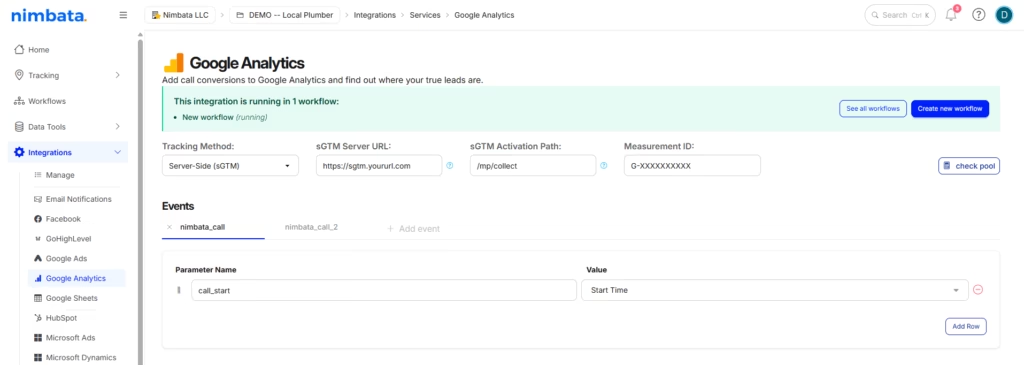
The result is a fully-attributed conversion event landing in GA4, Google Ads, and any downstream platform – independent of whether the visitor blocked your tags, cleared their cookies, or called you four days after the original click.
Setup is a one-time exercise inside Nimbata and GTM that takes roughly 30 minutes if your sGTM container is already provisioned. The full step-by-step lives in our setup guide.
What Changes When You Get This Right
The shift from browser-based to server side call tracking is one of the few infrastructure changes that produces immediate, visible improvements in reporting accuracy.
Campaigns that looked underperforming start showing their true contribution. Cost-per-lead figures become defensible numbers you can put in front of a CFO. Smart Bidding has the signal quality it needs to actually optimize. Delayed conversions stop falling out of attribution. And the conversation with leadership shifts from “we think this channel is working” to “here’s what it produced, with the math to back it.”
For any business where calls are part of the revenue path – agencies, home services, healthcare, legal, financial services, automotive, education – that shift is the difference between marketing analytics that’s approximately right and analytics you can actually run a business on.
Getting Started
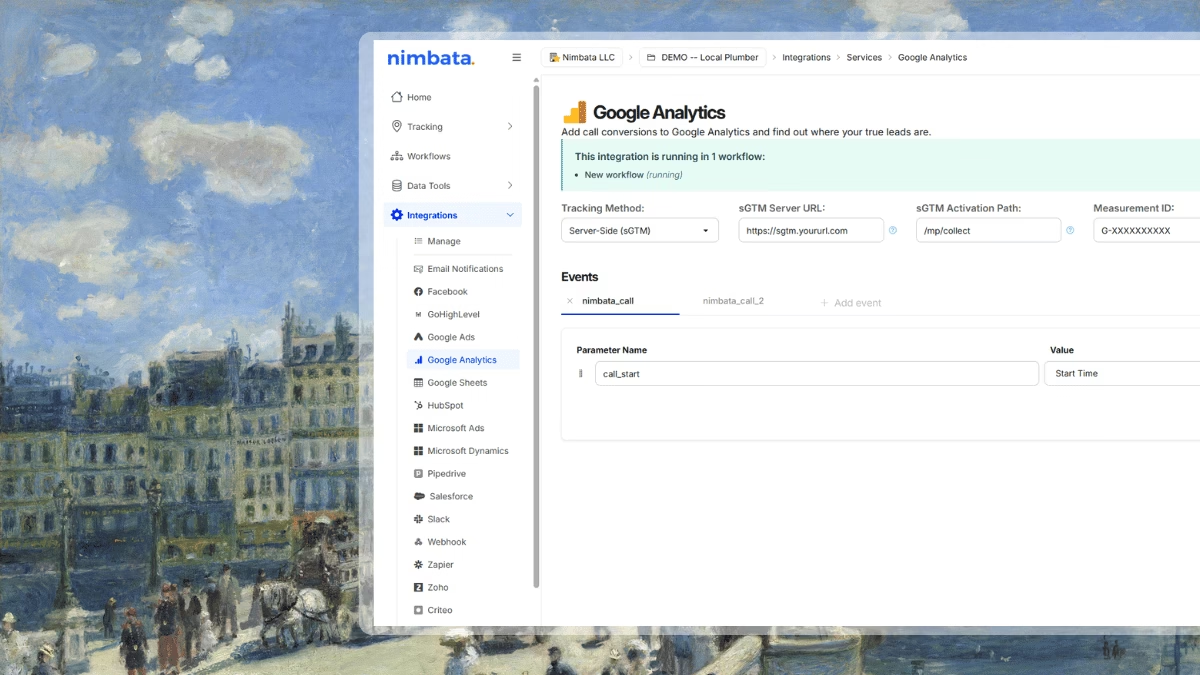
If you’re already on Nimbata, server side call tracking is available today in your account under Integrations → Google Analytics → Server-side (sGTM). Our setup guide walks through the full configuration in seven steps.
👉 How to set up server-side tracking with Nimbata (sGTM)
If you’re evaluating call tracking platforms and server side call tracking matters to you – which it should – see how Nimbata works, or talk to our team.
Not using Nimbata yet? See how call tracking works →